Frontfanassembly
Attention:Donotopenyourcomputerorattemptanyrepairbeforereadingandunderstandingthe“Read
thisfirst:Importantsafetyinformation”onpagev.
Note:Thefrontfanassemblyisonlyavailableonsomemodels.
Toreplacethefrontfanassembly,dothefollowing:
1.Prepareyourcomputer.See“Preparingyourcomputerandremovingthecomputercover”onpage61.
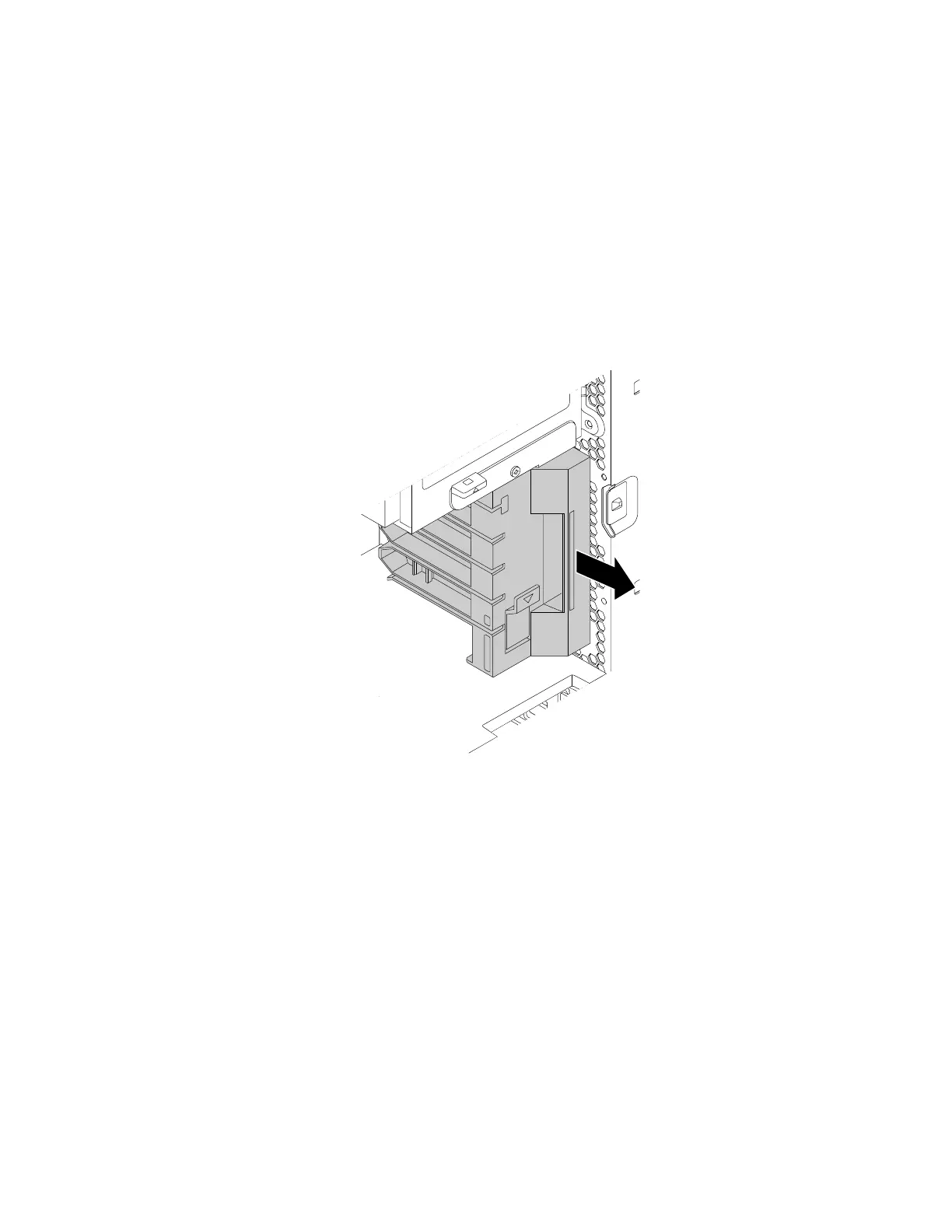
2.Pullthefrontfanassemblybythehandletoslideitoutofthecomputerchassis.
Note:Whenyouslideoutthefrontfanassembly,avoidpullingthefrontfanassemblycable.
Figure48.Removingthefrontfanassembly
3.Disconnectthefrontfanassemblycablefromthefrontfanconnectoronthesystemboard.
4.Connectthecableofthenewfrontfanassemblytothefrontfanconnectoronthesystemboard.See
“Partsonthesystemboard”onpage7.
Chapter7.Installingorreplacinghardware83


 To Next Page
 Loading...