3
PRG: 1. 2Pt Re
JKL
PRG
4) Program Key
1. 2-Pt Reference Line
Measuring Distance and Offset Values along a Specified Line
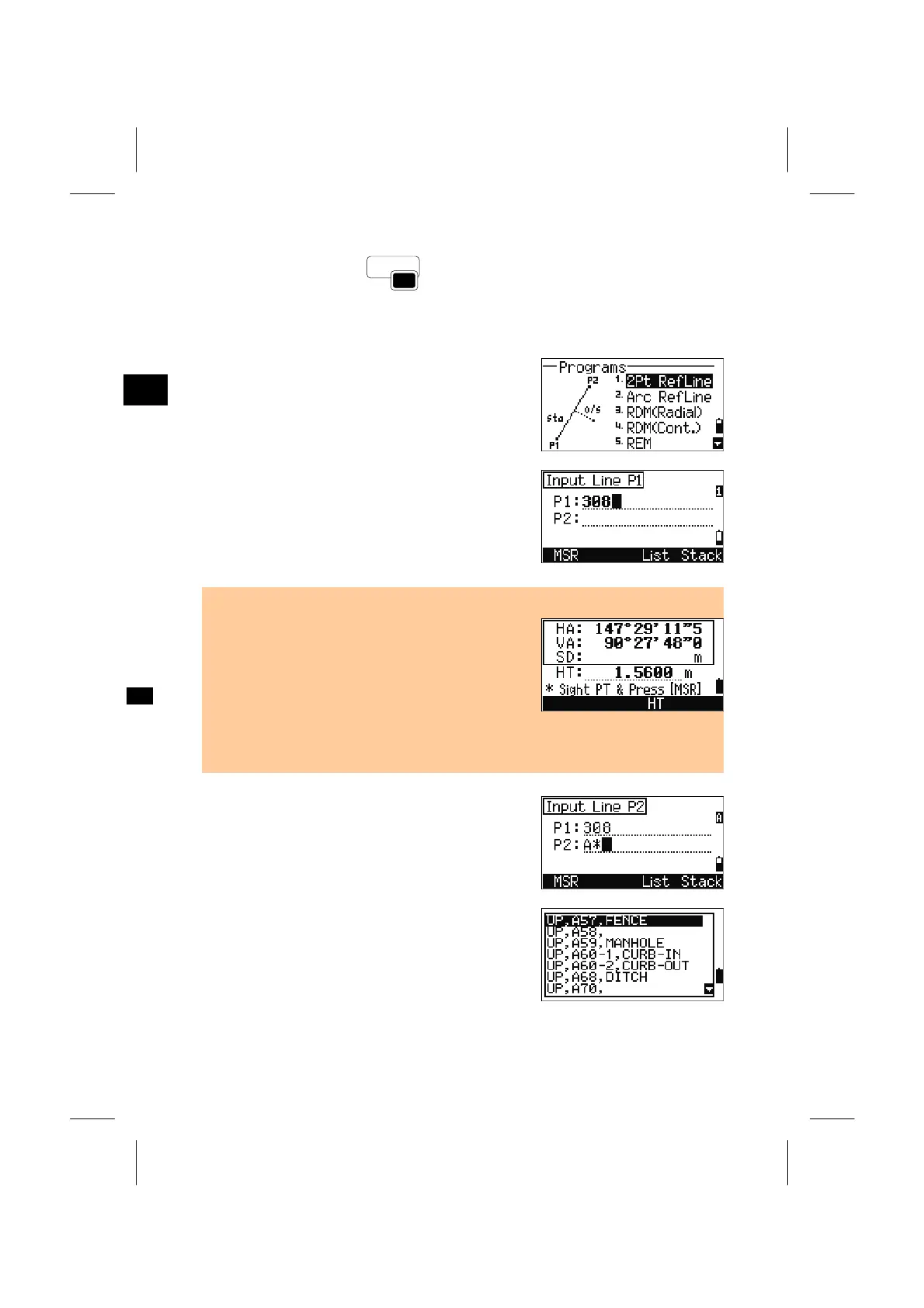
Press the [1] key on the Programs menu.
Input the first point for the reference line.
Inputting the point by measurement is also available.
Press the [MSR] softkey to get to the observation
screens.
Direct Measurement screen
• By pressing the [MSR] softkey, a direct
measurement screen is shown.
Sight the target and press [MSR1] or [MSR2]. After
taking a measurement, it automatically proceeds to
the “Record PT” screen.
• If [ESC] is pressed on the “Record PT” screen, the
measured point will be used but not recorded in the
job.
Input the second point for the reference line.
When the asterisk(*) is used in the PT field, a list of
points found is shown. Select a point and press the
[ENT] key.
3-55



 To Next Page
 Loading...







