Applications 4
Pulse Laser Station NPL-302 Series Instruction Manual 79
Two-point resection along a known line 40.1
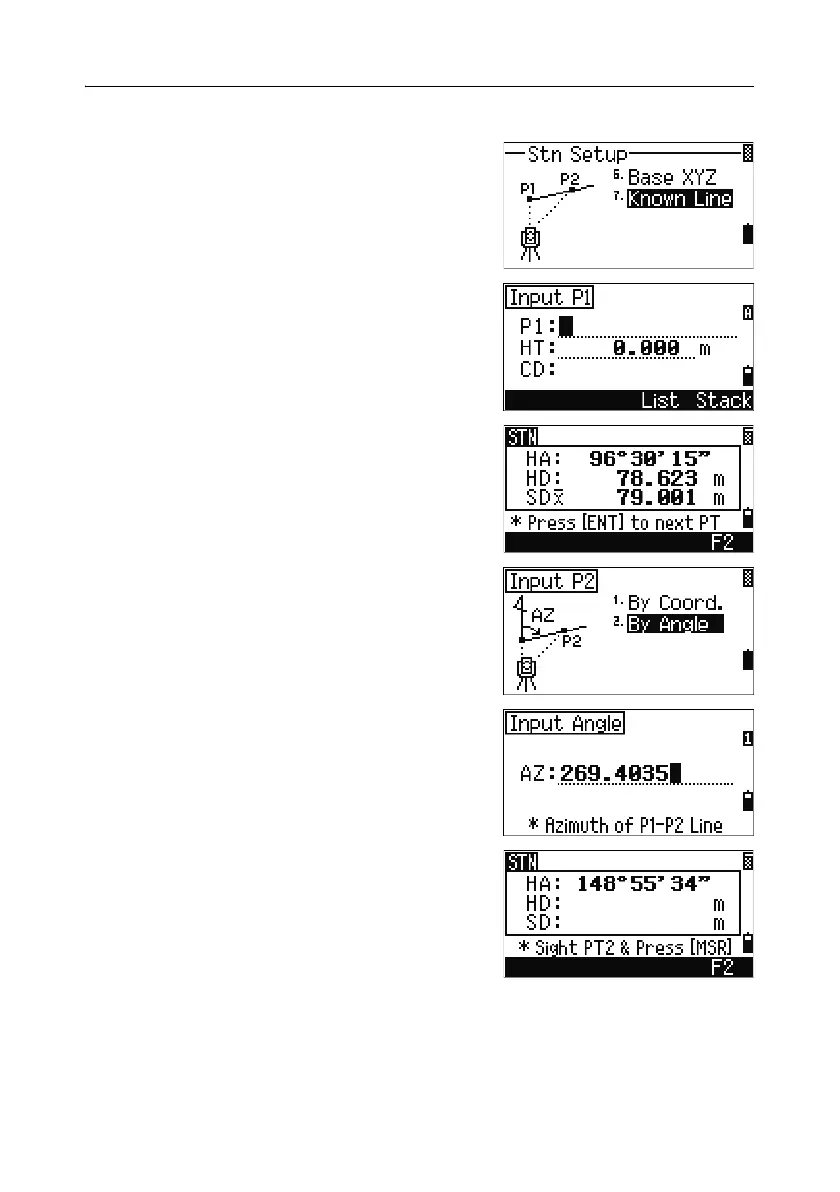
1. To enter the Known Line function, press [7] or
select
Known Line in the Stn Setup menu.
2. Enter a known point as P1.
If you enter a new point name, a coordinate
input screen appears.
Sight P1 and press
[MSR1] or [MSR2] to take a
measurement. Press
[ENT].
3. Choose how you want to define a known line:
– To define the line by entering P2
coordinates, press
[1] or select By Coord.
– To define the line by entering the azimuth,
press
[2] or select By Angle.
4. If you select By Angle, the azimuth input
screen appears. Enter the angle value and press
[ENT].
A measurement screen appears.
5. Sight P2 and press [MSR1] or [MSR2] to take a
measurement. Press
[ENT].


 To Next Page
 Loading...







