948
Basic I/O Unit Instructions Section 3-23
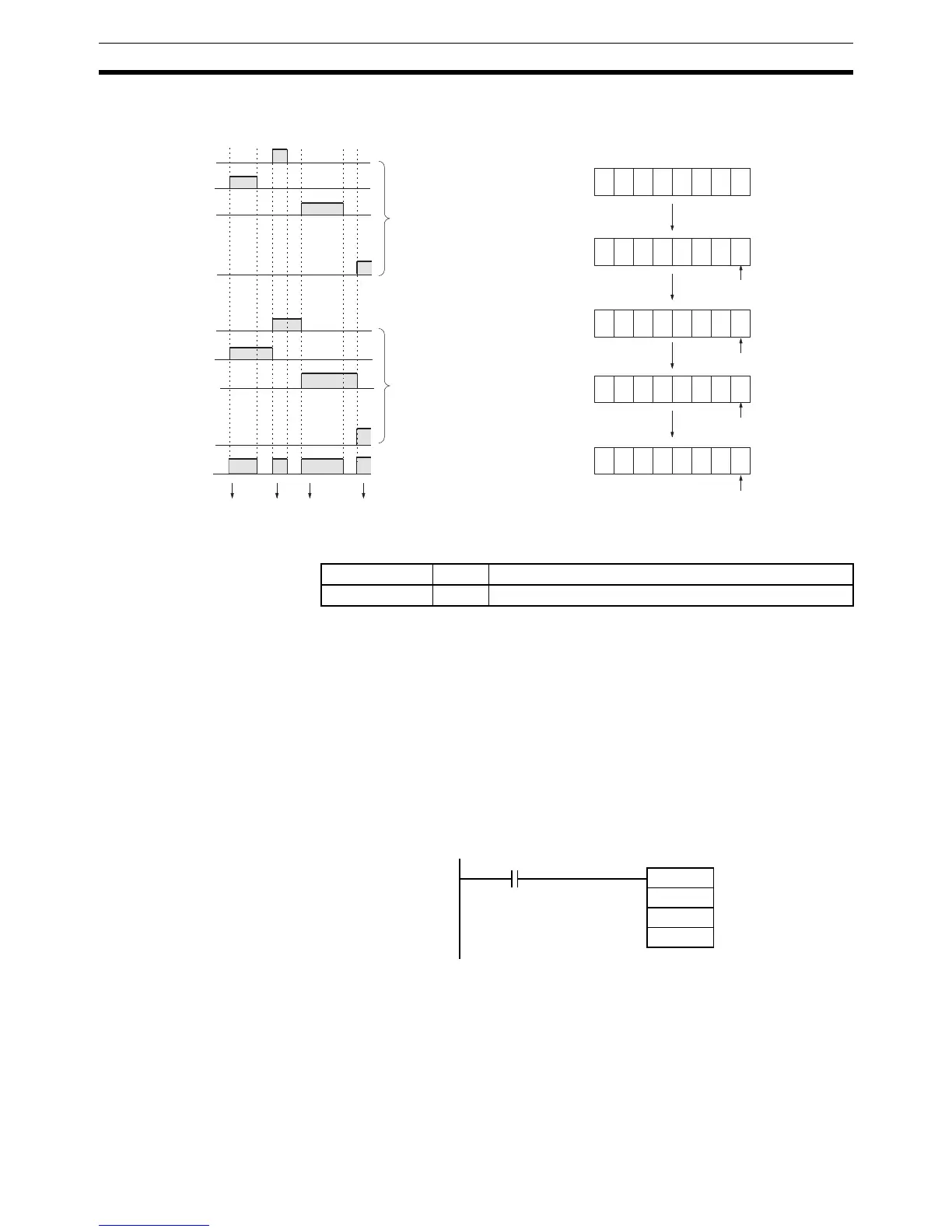
Timing Chart
Flags
Precautions TKY(211) will not operate correctly if I/O refreshing is not performed Input Unit
connected to the ten-key keypad after TKY(211) is executed. Consequently,
set the input time constant for the Input Units used for the data line input word
to a value that is shorter than the cycle time, or do not connect the ten-key
keypad to the following Units.
• Basic I/O Units or High-density I/O Units mounted in a SYSMAC BUS
Remote I/O Slave Rack
• Communications Slaves (DeviceNet or CompoBus/S Slaves)
Example In this example, TKY(211) reads key inputs from a ten-key keypad and stores
the inputs in CIO 200 and CIO 201. The ten-key keypad is connected to
CIO 0100 (allocated to a CS1W-ID211 16-point DC Input Unit).
3-23-7 HEXADECIMAL KEY INPUT – HKY(212)
Purpose Reads numeric data from a hexadecimal keypad connected to an Input Unit
and Output Unit and stores up to 8 digits of hexadecimal data in the specified
words.
This instruction is supported only by CS/CJ-series CPU Unit Ver. 2.0 or later.
0 0 0 0 0 0 0 0
0
0 0 0 0 0 0 1
0
0 0 0 0 0 1 0
0
0 0 0 0 1 0 2
0
0 0 0 1 0 2 9
D
1
+1 D
1
(1)
(2)
(3)
(4)
(1) (2) (3) (4)
00
01
02
09
00
01
02
09
10
to
I
to
D
2
Input from 10-key
ON if a key is pressed.
"1" key input
"0" key input
"2" key input
"9" key input
Turn ON flags corre-
sponding to 10-key
inputs (The flags re-
main ON until the
next input.)
Before
execution
Name Label Operation
Error Flag ER OFF
I
D
1
D2
TKY(211)
0100
0200
D00000
P_On
Always ON Flag






 To Next Page