2.Click CustomL
evel.
3.Under
DownloadunsignedActiveXcontrols,click Prompt
(recommended)or
Enable.
4.Click
OKandthenclick OKagain.
Accessingusingawebbrowser
1.Openyourwebbrowserfromaweb-enableddeviceconnectedtothe
samenetworkastheIPcamera.
2.Enteryourcamera
’sIPaddressinthebrowser’saddressbarinthe
followingformat:http://192.168.1.100:80andpress Return.
3.Entertheusernameandpasswordforthecameraandclick
Login.
Themainscreenforthecamerawebinterfaceisdisplayed.Fromhereyou
canconfigureandviewthecamerafeed.
Note:Ifyoudonotseethecamerafeed,mak esureyourcomputerhasthe
latestversionofAdobeFlashPlayer(Chrome,FirefoxInternetExplorerand
Safari)orActiveX(InternetExploreronly)installed.Afterinstallingrestart
yourbrowserandreconnecttothecamera.
InternetExplorer-ActiveXandFlashPlayer
TheActiveXplug-inmayprovidesmoothervideoperformancethanFlash
Player
.
1.IfyourcomputerhasFlashPlayerinstalled:
i.Openthewebinterface.
ii.Clickthemessageabovethevideowindow.
iii.Clickinsidethevideoareaandselect
InstallthisAdd-onforallusers
onthiscomputer.
iv.Followtheonscreenprompts.
2.IfyourcomputerdoesnothaveFlashPlayerinstalledyouwillbe
promptedtoselectifyouwouldliketouseActiveXorFlashPlayer:
•ClicktoplaylivevideowithActiveXcontroltoreducelatency
(R
ecommended)—UsestheActiveXplug-intoconnecttothecamera.
Toinstalltheplug-in,clickonthevideoarea,andselect
Installthis
add-onforallusersonthiscomputer.
•ClicktodownloadthelatestversionofFlashPlayertoplaylivevideo
—OpensalinktodownloadFlashPlayerfromAdobe
’swebsite.After
completingtheinstallation,restartyourbrowserandopentheweb
interface.
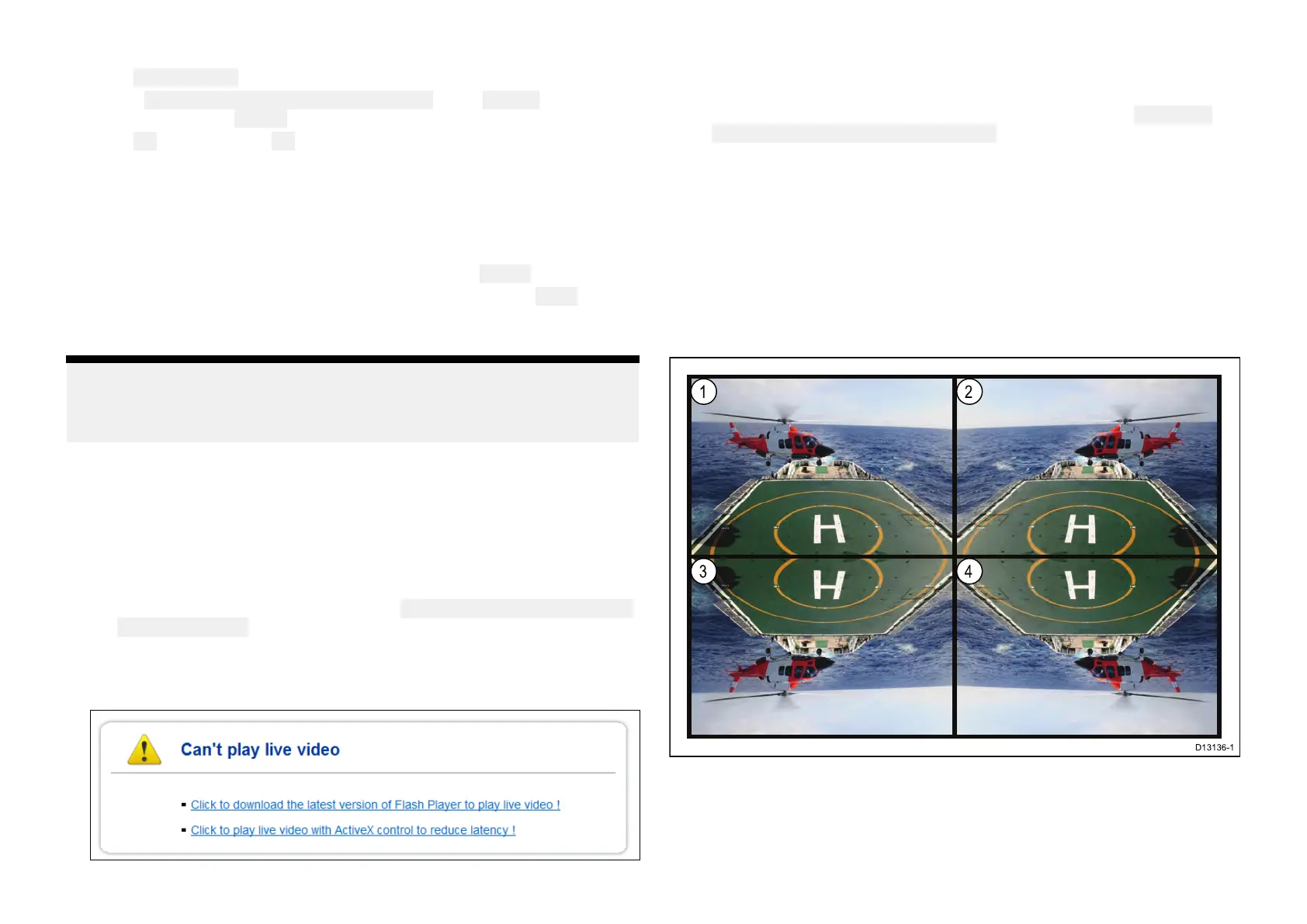
9.3Reversevideoandvideoflip
Thevideofeedcanbereversed(mirrorimage),flippedupsidedownor
reversedandflippeddependingonyourinstallation.
1.Normalview—Forforwardfacingcameras.
2.Mirror/reverseview—Forcamerasfacingaft.
3.Imageflipview—Forforwardfacingcameras,wherethecameraimage
appearsupsidedown.
52


 To Next Page
 Loading...