1R
ollcorrectiondisabled
2
R ollcorrectionenabled
10
.8AR200Calibration(Linearization)
ToenableaccurateplacementofAugmentedReality(AR)flagsonthe
camera’svideofeed,theAR200’sAHRSsensorsneedtocompensatefor
localmagneticfields,aswellastheEarth’smagneticfields.
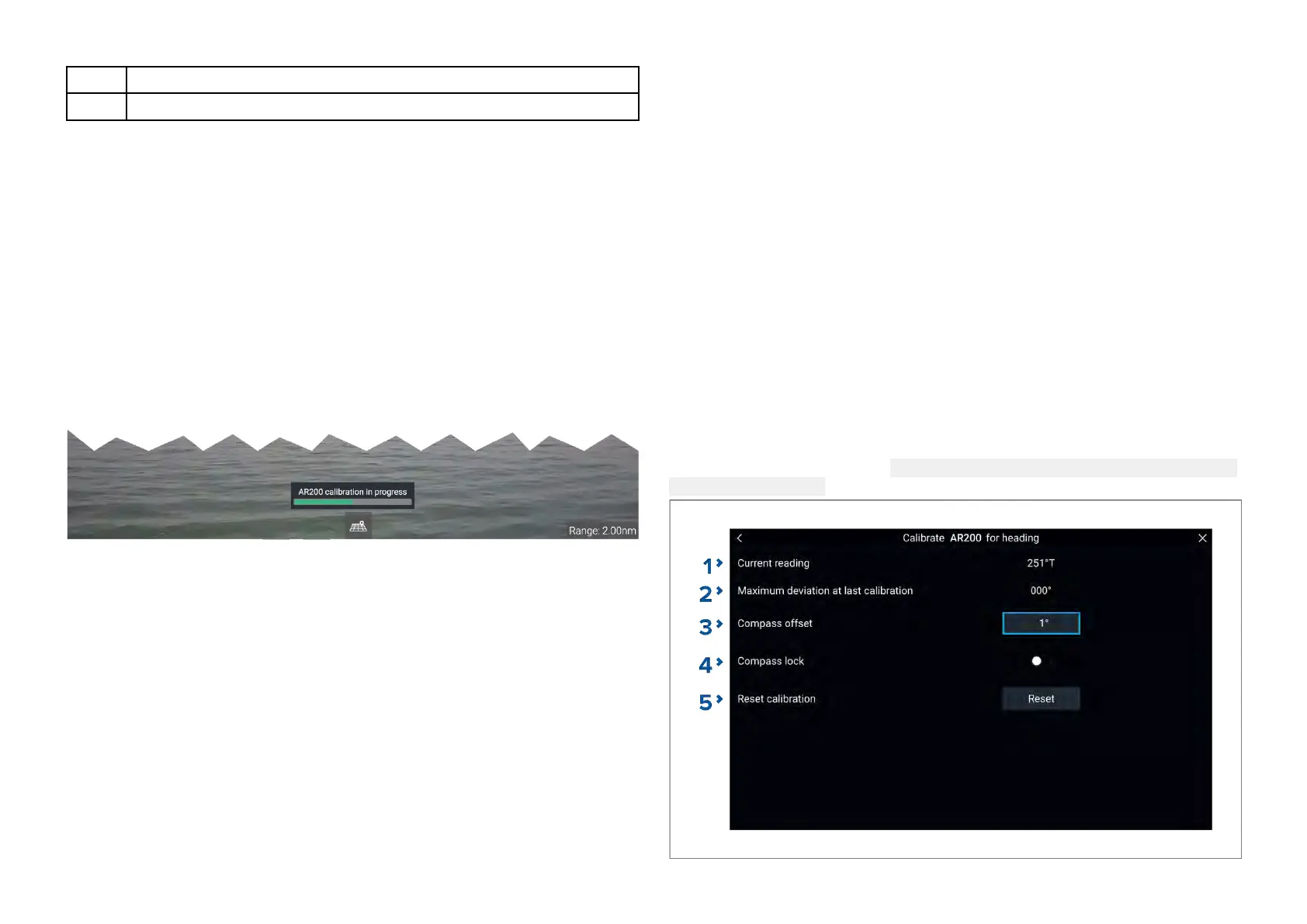
Calibrationisachievedusinganautomaticlinearizationprocess.The
linearizationprocessstartsautomaticallyafteryourvesselhasturned
approximately100°,whentravellingataspeedofbetween3to15knots.
Thelinearizationprocessrequiresnouserinput,howeveratleasta270°
turnisrequiredbeforelinearizationcanbecompleted.Thedurationofthe
linearizationprocesscanbedecreasedbycompletingafull360°turn,when
travellingataspeedofbetween3to15knots.Thelinearizationprocesscan
alsoberestartedatanytime.
IntheVideoapptheLinearizationprogressbarisdisplayedwhen
linearizationisinprogress.Thebarisfilledtoindicatecompleteness,andwill
turnR ediftheprocessispausedorotherwiseinterrupted.
Thetimetakentocompletethelinearizationprocesswillvaryaccordingto
thecharacteristicsofthevessel,theAR200’sinstallationlocation,andthe
levelsofmagneticinterferencepresentatthetimelinearizationisperformed.
Magneticinterferencecanbecausedbyobjectsonboardyourvessel,such
as:
•Speakers
•Electronicequipment
•Electricalcabling
•Metalbulkheadorhull
Magneticinterferencecanalsobecausedbyexternalobjectsinclose
proximatelytoyourvessel,suchas:
•Metalhulledvessels
•Underwaterelectricalcables
•Marinepontoons
Magneticdeviation
Magneticdeviationistheerrorinducedinacompasscausedbyinterference
fromlocalmagneticfields.
Theautomaticlinearizationprocessresultsinadeviationvaluebeingsetfor
yourAR200.IfAugmentedRealityflagsintheVideoapparenotalignedwith
theironscreenobjects,orthecompassisoutofalignment,youshouldcheck
theAR200’scurrentcalibrationsettings.Forinstructionsonhowtodothis,
referto:AR200calibrationsettings
AR200calibrationsettings
ThecalibrationsettingspageprovidesaccesstotheAR200’scompass
calibrationoptions.
TheAR200calibrationpagecanbeaccessedusingyourDatamasterMFD;
fromtheHomescreenselect:
Settings>Network>Datasources>Heading
>AR200>Calibrate.
A ugmentedReality
65


 To Next Page
 Loading...