User Manual 6 Electrical Connection
45
6.6 Communication Connection
6.6.1 Communication Overview
The inverter operation information can be transferred via its integrated RS485
interface to a PC with monitoring software (such as SolarInfo Insight), or to data
logging device (such as SolarInfo Logger).
RS485 is the standard communication choice for inverter.
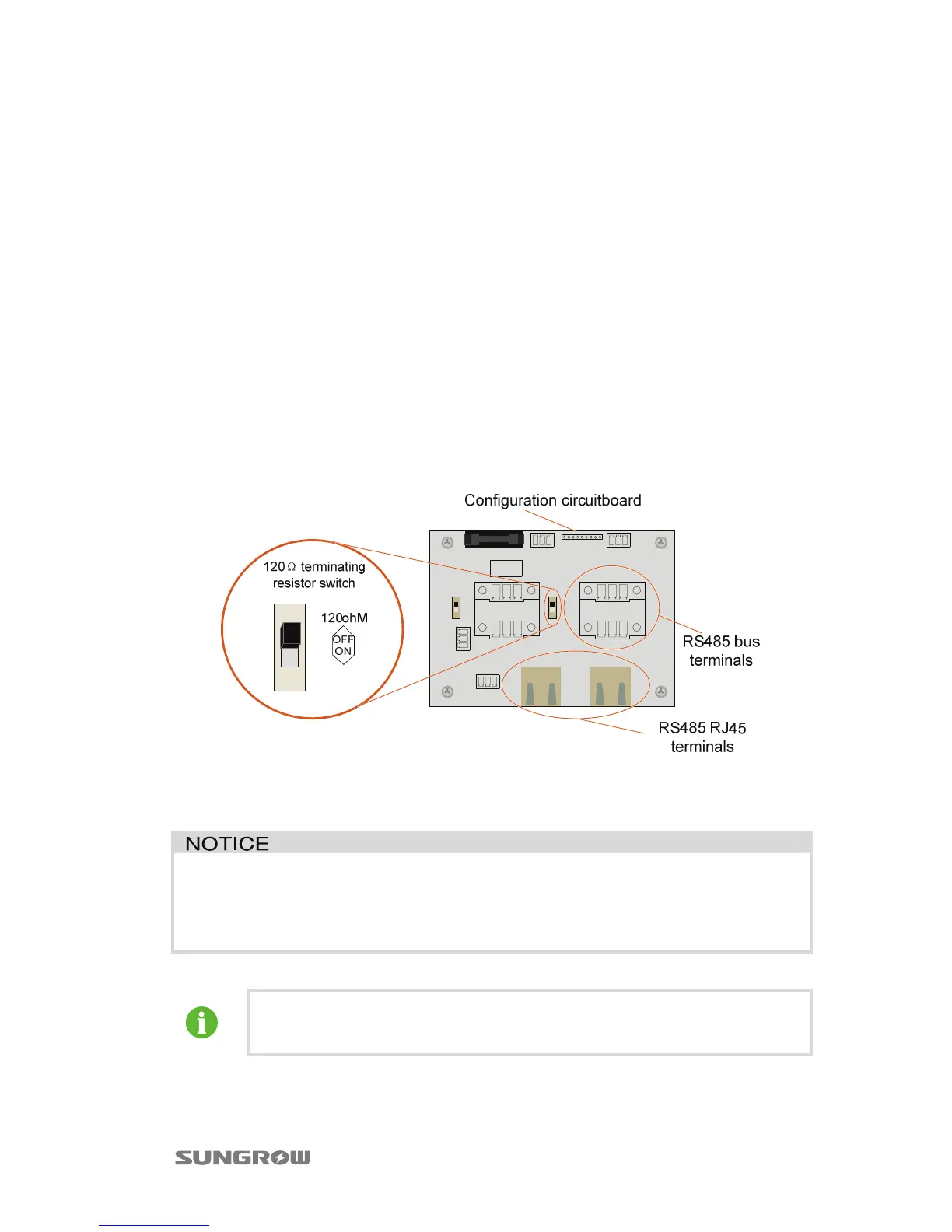
There are communication terminals (RS485) at the bottom of the inverter. And there
apply two optional connection terminals on the configuration circuit board: RS485
A/B terminal blocks and RJ45 plug in terminals.
In the case of a need of terminating resistor, switch on the 120Ω terminating resistor
switch, a terminating resistor will be connected between the communication cables
of the inverter.
Fig. 6-7 Communication related devices on the Configuration Circuit Board
Before communication connection, prepare communication cable and RJ45 plug.
RS485 cable’s requirements to ensure quality of communication:
y RS485 shielded twisted pair cables
y Shielded network cable
A converter such as RS485-232 converter or SolarInfo Logger, which
converts 485 to 232 signal, is needed between inverter and PC.


 To Next Page
 Loading...