6 Electrical Connection User Manual
48
6.6.3 RS485 Communication Connection
RS485A/B Bus Connection
Step 1 Remove the threaded plastic plug from the AC cable knockout and replace
with a conduit hub sized to fit the required wiring and raceway.
Step 2 Lead RS485 shielded twisted pair cables through conduit opening to the
configuration circuit board.
Step 3 Trip off the insulating layer of the communication cables. Connect the cables
to the RS485 bus terminal blocks.
Step 4 According to the position of the inverter (refer to the prior section), repeat
step 1…2 to connect the other RS485 cables.
Step 5 Pull cables outwards to confirm whether they are fastened firmly.
Step 6 According to the position of the inverter (refer to the prior section) switch ON
or OFF the terminating resistor.
Step 7 If there is no other connection procedure, recover and fix the front cover of
the combiner unit.
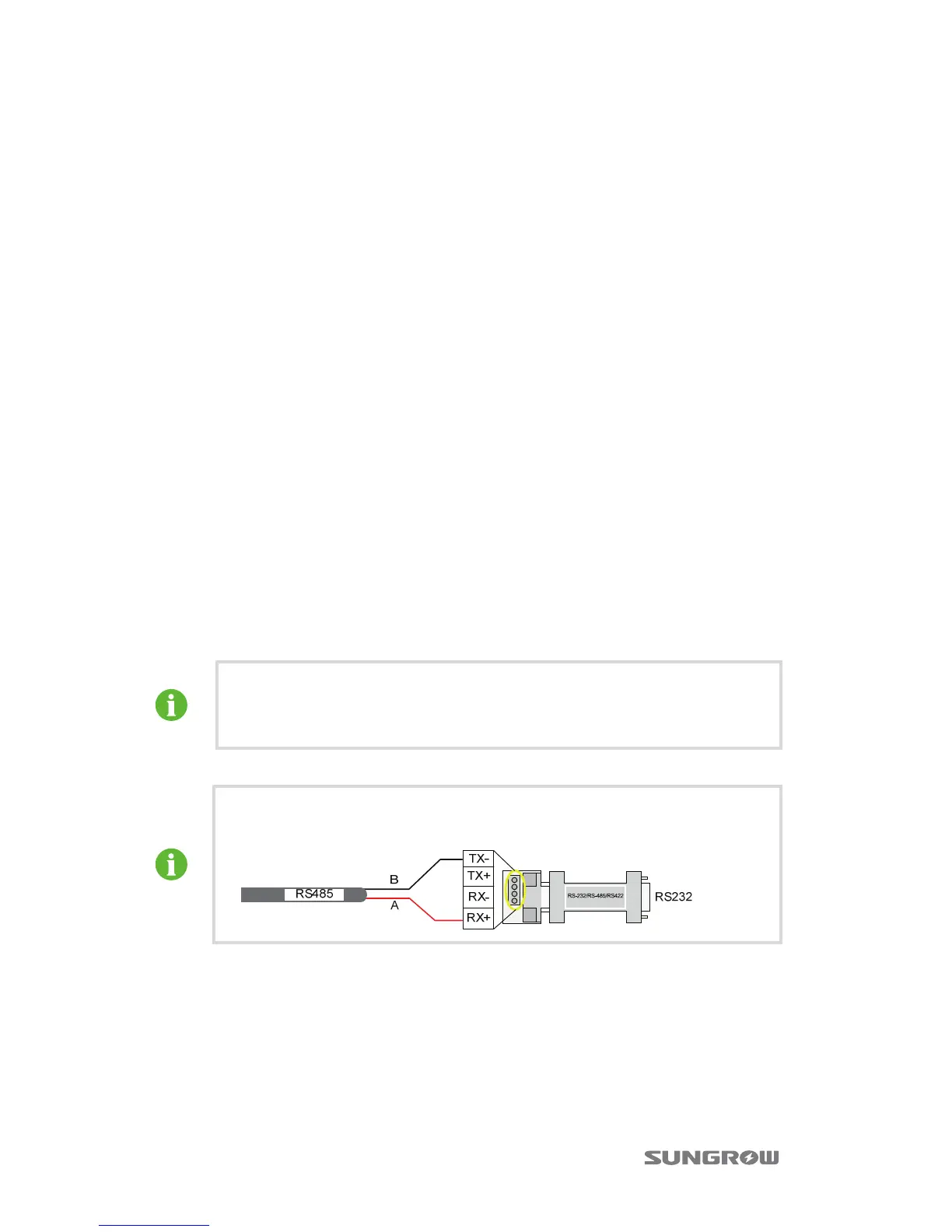
Step 8 Now perform RS485 communication connection as the diagram shown
above. Connect the other end of cable to other devices. Communication
terminal definition is referred to device manual.
Step 9 Verify the communication connection and configure the communication
parameters.
If there is more than one inverter to communicate with a PC or a data
logger, it is crucial to configure the communication parameters of each
inverter. See “10.12 Communication Parameters Setting”.
SolarInfo logger and RS485-232 converter are optional parts and can be
ordered from Sungrow.


 To Next Page
 Loading...