Page 53FT-
991
Using IF SHIFT and WIDTH Together
The IF SHIFT and Variable IF WIDTH features
together form a very eective interference-ght-
ing ltering system.
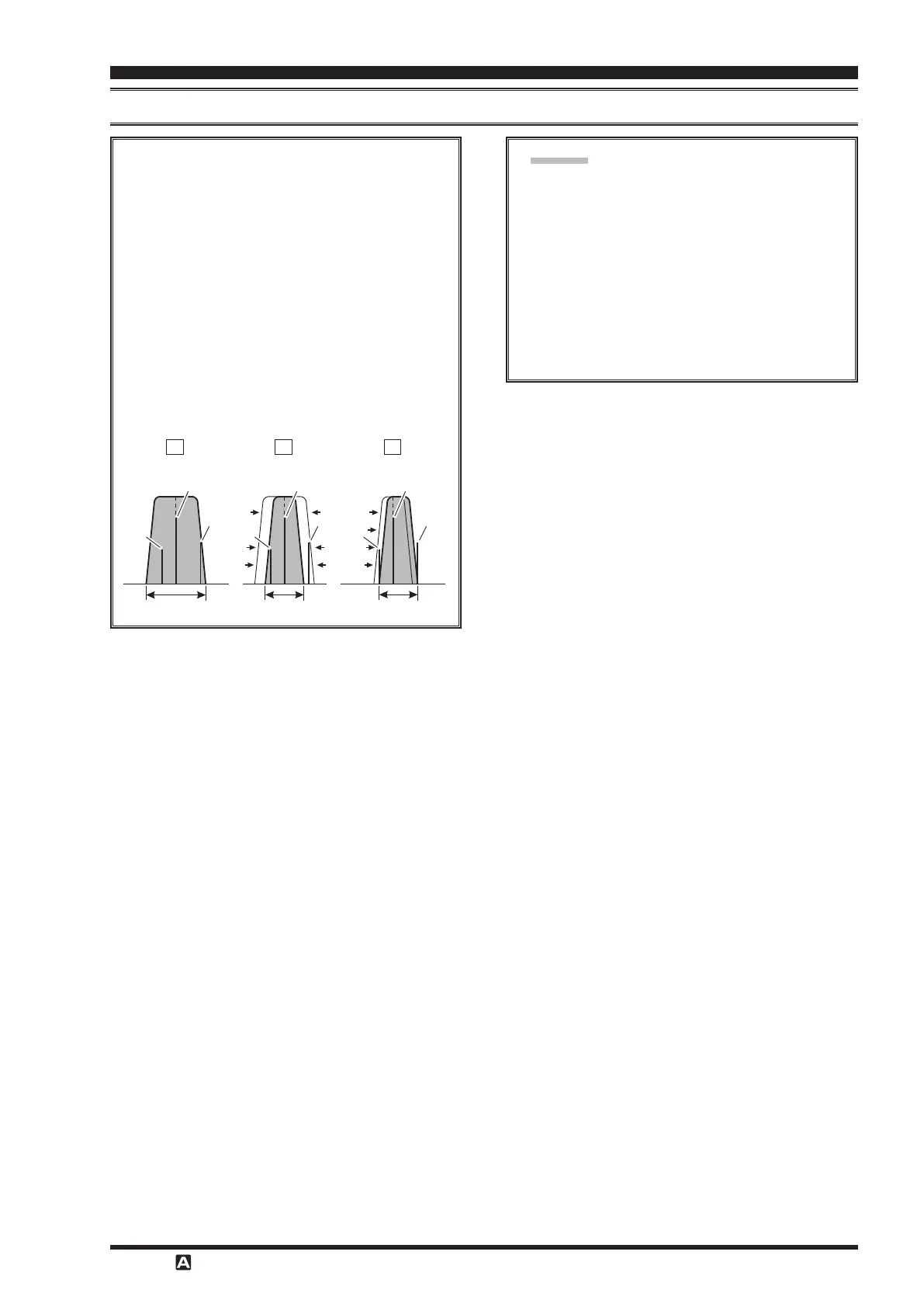
For example, in Figure “
A
”, you can see how in-
terference has appeared both on the high and low
sides of the desired signal. Touch
[
]
on
the LCD, the interference from one side can be
eliminated
(
Figure “
B
”
)
. Next, rotate the
knob to re-position the passband
(
Figure “
”
)
,
the interference on the opposite side can be re-
moved, without re-introducing the interference
previously eliminated in Figure “
B
”.
The WIDTH and SHIFT features are the pri-
mary tools to use for best interference reduction.
After narrowing the bandwidth
(
WIDTH
)
and/
or adjusting the center of the passband
(
SHIFT
)
,
the Contour control may then yield additional
signal-enhancement benets on the net residual
bandwidth. Even more, the IF NOTCH Filter
(
described later
)
may also be used, in conjunc-
tion with these lter systems, to signicant ad-
vantage.
Desired Signal Desired Signal Desired Signal
QRM
QRM
QRM
QRM
QRM
QRM
IF BANDWIDTH IF BANDWIDTH IF BANDWIDTH


 To Next Page
 Loading...