Page 56 FT-
991
(
)
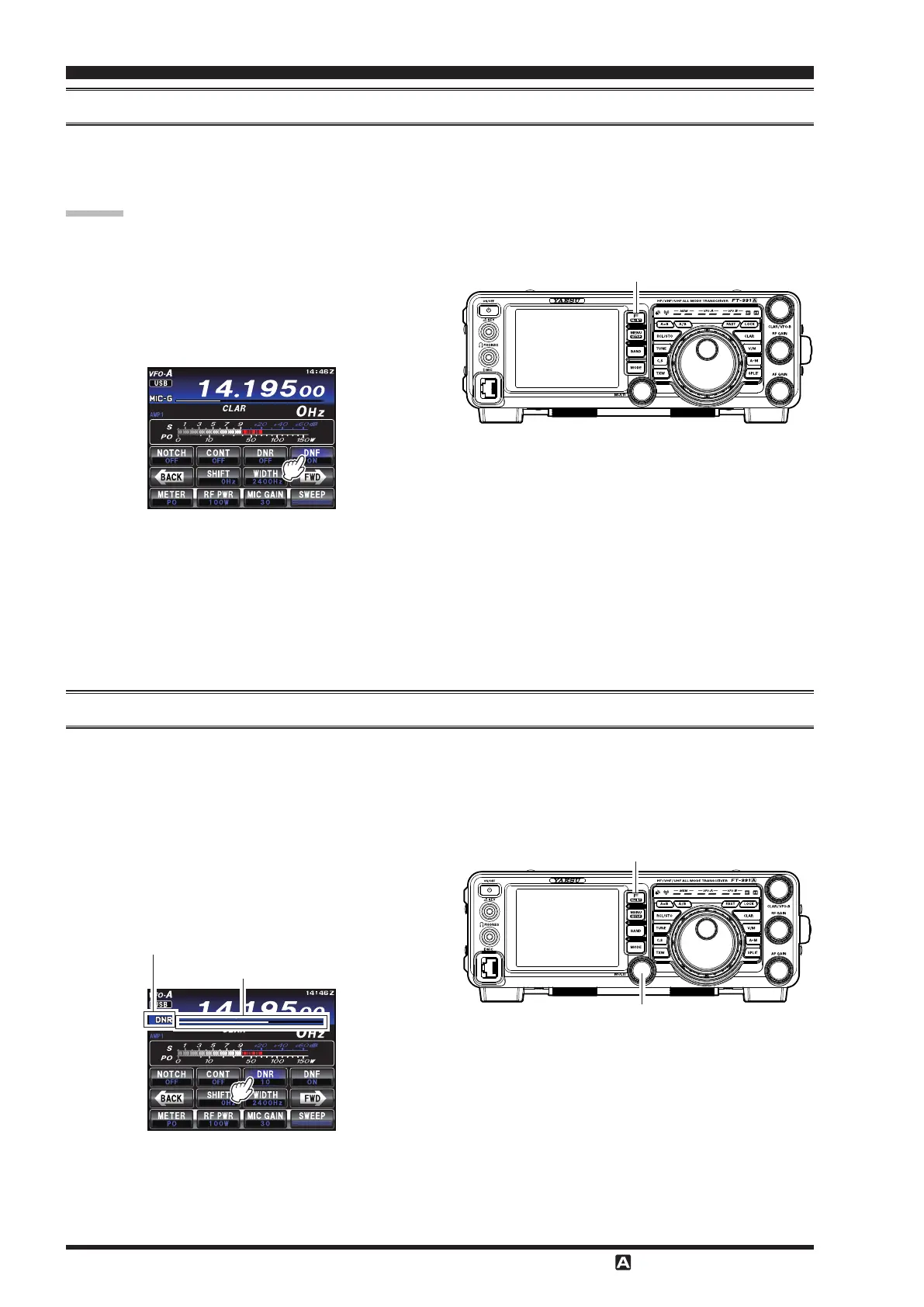
The Digital NOTCH Filter
(
DNF
)
is an eective beat-canceling lter that can null out a number of interfering beat notes
inside the receiver passband. Because this is an Auto-Notch feature, there is no adjustment knob associated with this l-
ter.
If a very strong interfering carrier is encountered, we recommend using the IF NOTCH lter rst, as it is the most eec-
tive notching tool in the receiver section.
1. Press the
F
button to show the functions
listed on the TFT display, then touch
[
]
on the
TFT display. The Digital NOTCH Filter will be set
to “
ON
”.
F
(
M-LIST
)
Button
(
)
The Digital Noise Reduction
(
DNR
)
system is designed to reduce the level of ambient noise found on the HF and 50
MHz bands. The
(
DNR
)
system is especially eective during SSB operation. While DNR is functioning, rotate the
knob to adjust the DNR level. Any of 15 dierent noise-reduction algorithms can be selected; each of these al-
gorithms was created to deal with a dierent noise prole. You will want to experiment with the DNR system to nd the
best setting corresponding to the noise currently being experienced.
1. Press the
F
button to reveal the functions
list on the TFT LCD display.
2. Touch
[
]
on the LCD. The DNR function will
be set to “
ON
”.
MULTI Knob
F
(
M-LIST
)
Button
DNR indicator
DNR level indicator
To disable the Digital NOTCH Filter, just repeat the
above procedure, touching
[
]
on the LCD to choose
“
OFF
”. The “
” will turn off, confirming that the
Digital NOTCH Filter is not active.
3. Rotate the
knob to choose one of 15 algo-
rithms that best reduces the noise level.
4. To cancel the DNR lter, touch
[
]
on the LCD,
“
OFF
” will appear in the display, conrming that the
DNR system is no longer in operation.


 To Next Page
 Loading...