Page 74 FT-
991
(
)
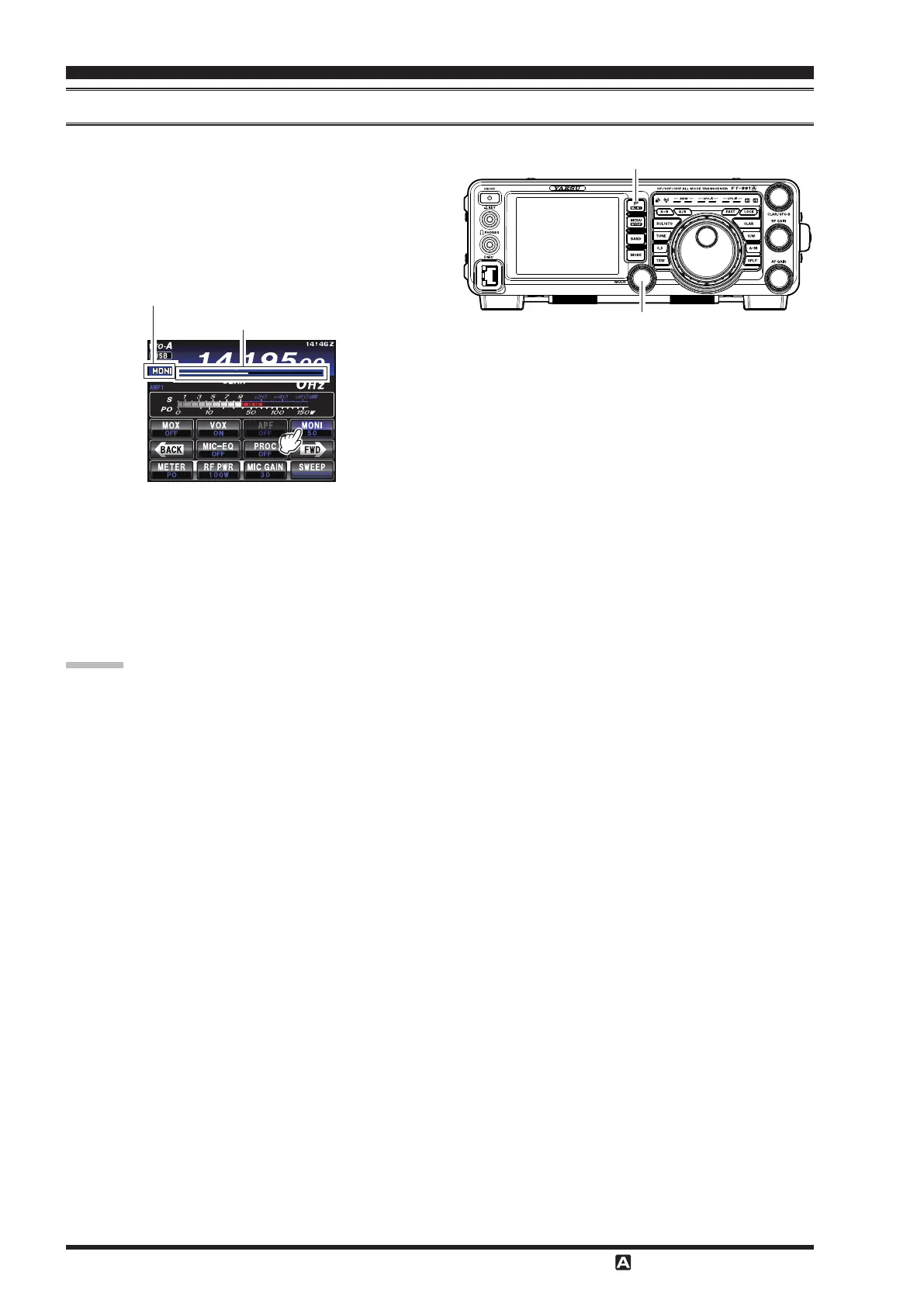
You may listen to the quality of your transmitted signal using the Monitor feature.
1. Touch
[
]
displayed by pressing the
F
button to reveal the functions list on the TFT LCD
display.
2. Touch
[
]
on the LCD, the Moniter function
will be set to “
ON
”. The
knob serves as the
MONITOR adjustment knob.
MULTI Knob
F
(
M-LIST
)
Button
MONI
(
Monitor
)
indicator
MONI
(
Monitor
)
level indicator
3. During transmission, rotate the
knob to ad-
just the audio level in the Headphones or speaker.
Clockwise rotation of this knob will increase the vol-
ume level.
4. To switch the Monitor o again, touch
[
]
on
the LCD once more. “
OFF
” will be displayed, con-
rming that the Monitor function is disengaged.
Because the Monitor feature samples the transmit-
ter IF signal, it can be very useful for checking the
adjustment of the Speech Processor or Parametric
Equalizer on SSB, and for checking the general sig-
nal quality on AM.


 To Next Page
 Loading...