Basic Operations — Organizing Your Data
PF-1000
50
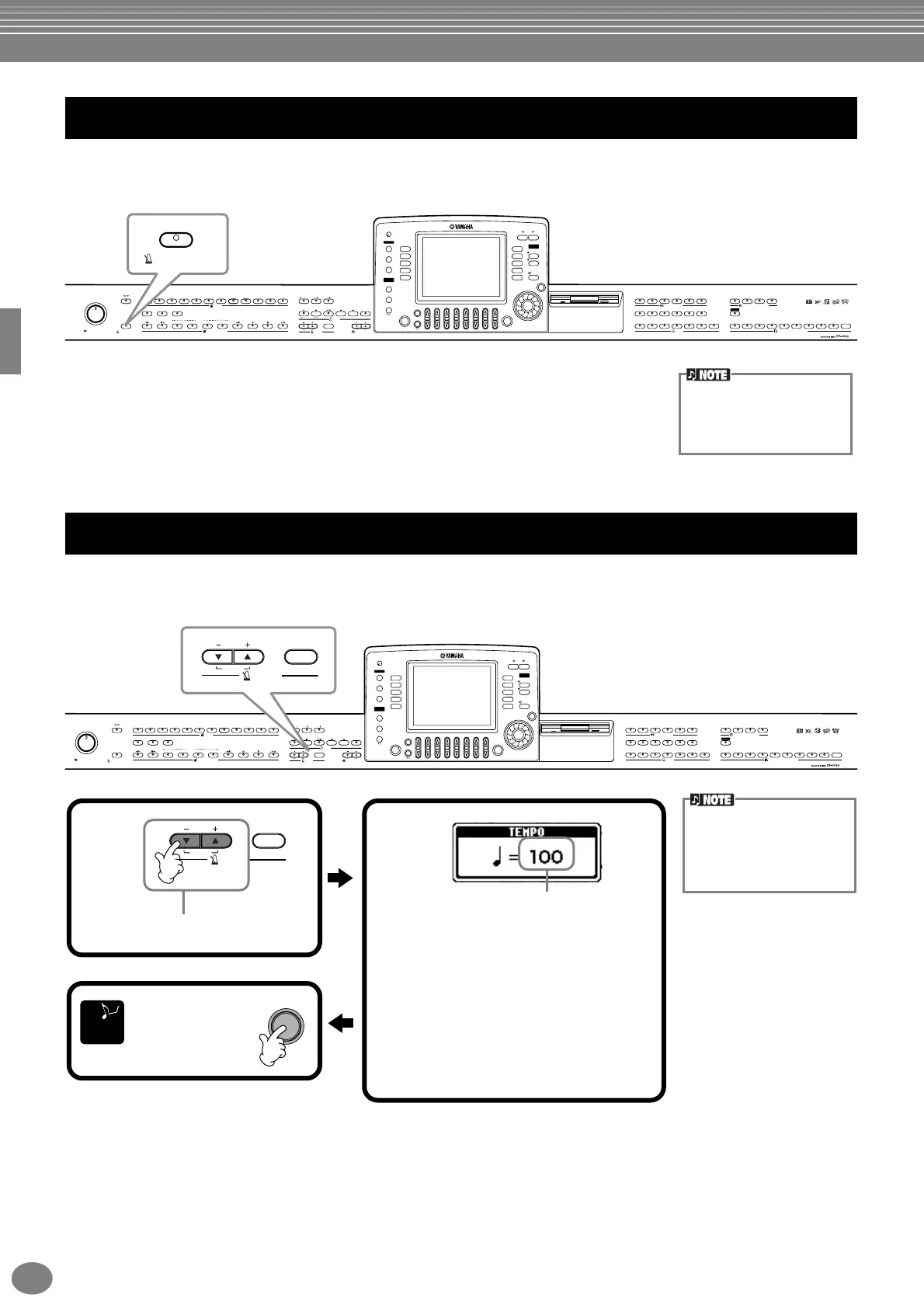
The metronome provides a click sound, giving you an accurate tempo guide when you practice, or letting you hear and
check how a specific tempo sounds.
The metronome starts by pressing the METRONOME [START/STOP]
button. Adjust the tempo by using the TEMPO[–] [+] buttons (see below).
To stop the metronome, press the [START/STOP] button again.
This section shows you to adjust the playback tempo — which not only affects the metronome, but also the playback of
a song or an accompaniment style.
Using the Metronome
MASTER VOLUME
MIN MAX
METRONOME
STYLE CONTROL
START/STOP
FADE IN/OUT POP & ROCK
BREAK INTRO
ENDING/rit.
SYNC.STOP SYNC.START
TOPREC
NEW SONG
SYNC.START
EXTRA TRACKS TRACK2
STYLE L
TRACK1
R
START/STOP
START/STOP
REW
FF
REPEAT
DEMO
HELP
FUNCTION
E
D
C
B
A
J
I
H
G
F
SOUND
CREATOR
DIGITAL
RECORDING
DIRECT
ACCESS
BALANCE
CHANNEL
ON/OFF
PART
PART
MIXING
CONSOLE
LCD
CONTRAST
A
ACMP
AUTO FILL IN
OTS LINK
B
MAIN
C
TAP TEMPO
EXIT
DATA ENTRY
ENTER
ON/OFF
LAYER
BACK
LEFT
NEXT
MUSIC
FINDER
RESET RESET
POP BALLADS
DANCE
SWING & JAZZ
R & B CO UNTRY
LATIN WALTZ BALLROOM PIANIST
USER 4321
4321FREEZEUSERXGSYNTH.
CHOIR & PAD
BRASS WOODWIND STRINGS
LEFT HOLDMONOECHO
HARMONY/
REVERB
PIANO & ORGAN &
DSP VARIATION
BASSGUITAR
PERCUSSION
HARPSI. E.PIANO
ACCORDION
8 MEMORY765
MARCH &
WORLD
TEMPO
TRANSPOSE
STYLE
SONG
MENU
DIGITAL
STUDIO
2 31 5 6 7 84
VOICE
PART
PIANO
VOICE REGISTRATION MEMORY
VOICE EFFECT ONE TOUC H SETTING
D
METRONOME
START/STOP
The sound, volume level,
and the beat (time signature)
of the metronome can all be
changed (page 137).
Adjusting the Tempo
MASTER VOLUME
MIN MAX
METRONOME
STYLE CONTROL
START/STOP
FADE IN/OUT POP & ROCK
BREAK INTRO
ENDING/rit.
SYNC.STOP SYNC.START
TOPREC
NEW SONG
SYNC.START
EXTRA TRACKS TRACK2
STYLE L
TRACK1
R
START/STOP
START/STOP
REW
FF
REPEAT
DEMO
HELP
FUNCTION
E
D
C
B
A
J
I
H
G
F
SOUND
CREATOR
DIGITAL
RECORDING
DIRECT
ACCESS
BALANCE
CHANNEL
ON/OFF
PART
PART
MIXING
CONSOLE
LCD
CONTRAST
A
ACMP
AUTO FILL IN
OTS LINK
B
MAIN
C
TAP TEMPO
EXIT
DATA ENTRY
ENTER
ON/OFF
LAYER
BACK
LEFT
NEXT
MUSIC
FINDER
RESET RESET
POP BALLADS
DANCE
SWING & JAZZ
R & B COUNTRY
LATIN WALTZ BALLROOM PIANIST
USER 4321
4321FREEZEUSERXGSYNTH.
CHOIR & PAD
BRASS WOODWIND STRINGS
LEFT HOLDMONOECHO
HARMONY/
REVERB
PIANO & ORGAN &
DSP VARIATION
BASSGUITAR
PERCUSSION
HARPSI. E.PIANO
ACCORDION
8 MEMORY765
MARCH &
WORLD
TEMPO
TRANSPOSE
STYLE
SONG
MENU
DIGITAL
STUDIO
2 31 5 6 7 84
VOICE
PART
PIANO
VOICE REGISTRATION MEMORY
VOICE EFFECT ONE TOUCH SETTING
D
TAP TEMPO
RESET
TEMPO
Songs and accompaniment
styles have been given
default (initial) tempo
settings, designed to best
suit the song/style.
TAP TEMPO
RESET
TEMPO
EXIT
Press either the TEMPO [–]
button or the [+] button.
Adjust the tempo by using either the TEMPO [
–]
[
+] buttons or the [DATA ENTRY] dial.
The number in the display indicates how many
quarter-note beats there are in one minute. The
range is between 5 and 500. The higher the value,
the faster the tempo.
When you change the tempo, both tempos of the
current song and style will be changed to the same
tempo. To restore their respective default (initial)
tempo settings, press both the TEMPO [
–] [+]
buttons simultaneously. Also refer to the “Tempo
Indications — MAIN display” (page 51) for more
about tempo.
1 2
Press this to
close the
TEMPO display.
END


 To Next Page
 Loading...