Styles
61
PF-1000
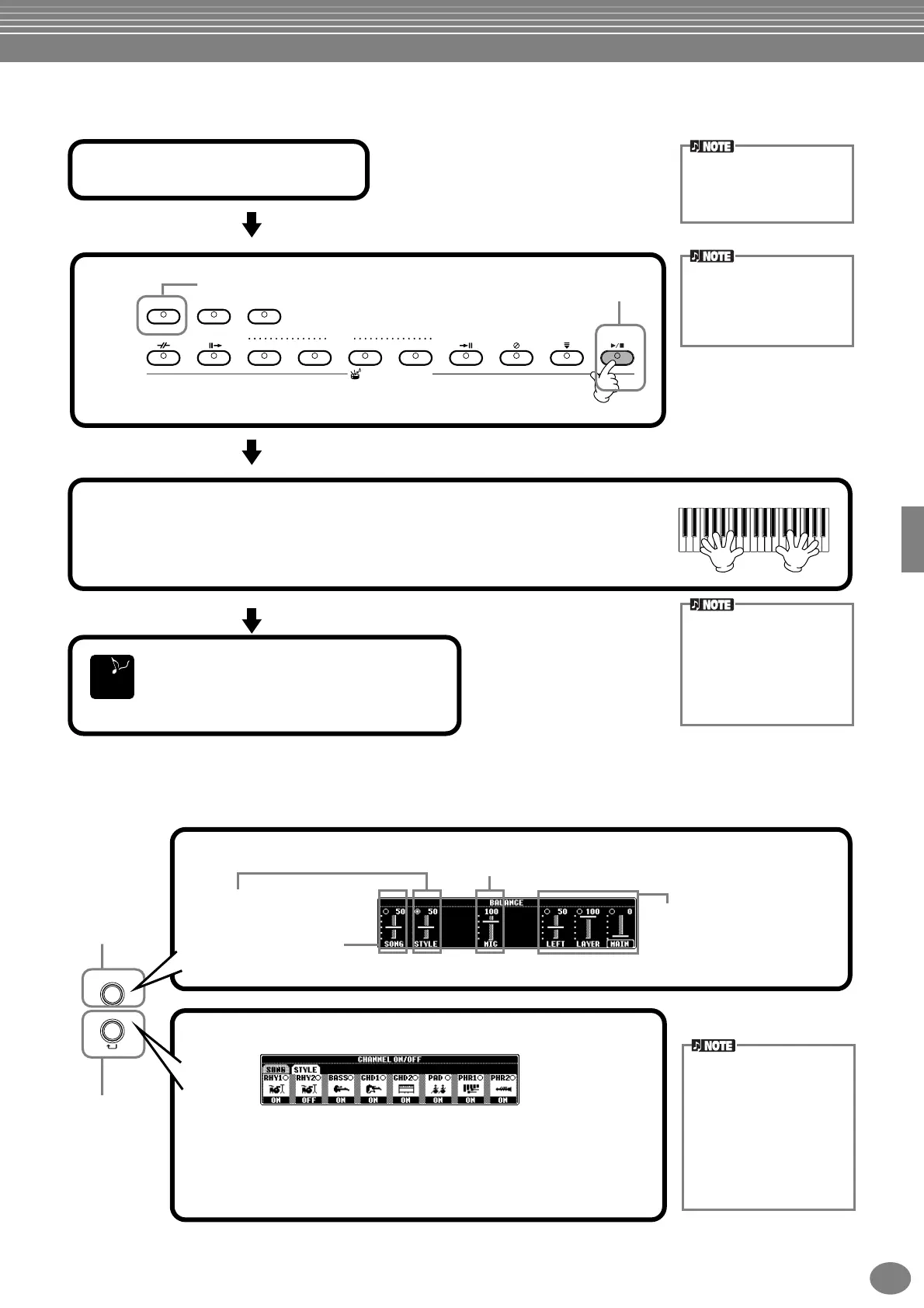
Playing a Style’s Rhythm Channels only
Adjusting the Volume Balance/Channel Muting
STYLE CONTROL
BREAK INTRO
ENDING/rit.
SYNC.STOP SYNC.START
START/STOP
A
ACMP
AUTO FILL IN
OTS LINK
B
MAIN
C
D
Rhythm starts.
1
Select a style (page 59).
The Rhythm channels are
part of the styles. Each style
has different rhythm pat-
terns.
Set to off.
3
Play along with the rhythm playback.
The Tempo can be adjusted using the TEMPO [–][+] or [TAP TEMPO] buttons.
If you tap the [TAP TEMPO] button, the tempo will adjust to the same speed that
you tapped.
2
When selecting the style
group “PIANIST,” the
rhythm doesn’t sound.
When you want to use any
of the styles, always make
sure that ACMP is turned
on.
Press the STYLE CONTROL [START/STOP]
button again to stop the rhythm playback.
END
You can also start the
rhythm simply by playing a
key on the keyboard, if Sync
Start is enabled (turn on the
[SYNC.START] button).
BALANCE
CHANNEL
ON/OFF
PAR T
BALANCE display
Adjust the output level of the Part.
Parts played from the
keyboard (MAIN/LAYER/
LEFT)
STYLE part (Auto
Accompaniment section)
SONG part
MIC part
CHANNEL ON/OFF display
Call up the STYLE display by pressing the [CHANNEL ON/OFF]
button, then turn the instrument you want to cancel off. To listen to
only one instrument by itself, hold down the appropriate button for
the channel to set the channel to SOLO. To cancel SOLO, simply
press the appropriate channel button again.
Channel
Refers to the MIDI channel
in the song data (page 147).
The channels are assigned
as shown below.
Song
1 - 16
Accompaniment Style
9 - 16
Call up the
BALANCE
display.
Call up the
Channel ON/
OFF display.


 To Next Page
 Loading...