Recording Your Performances and Creating Songs— Song Creator
95
PF-1000
■ Measure/Beat/Clock
■ Velocity
The table below shows the available settings and the corresponding velocity values.
■ Gate Time
The following settings are available:
Normal ....................... 80%
Tenuto ........................ 99%
Staccato...................... 40%
Staccatissimo.............. 20%
Manual .......................
The gate time (note length) can be specified as a percentage by using the [DATA ENTRY] dial.
Kbd. Vel fff ff f mf mp p pp ppp
Actual
playing
strength
127 111 95 79 63 47 31 15
E
D
C
B
A
J
I
H
G
F
2 31 5 6 7 84
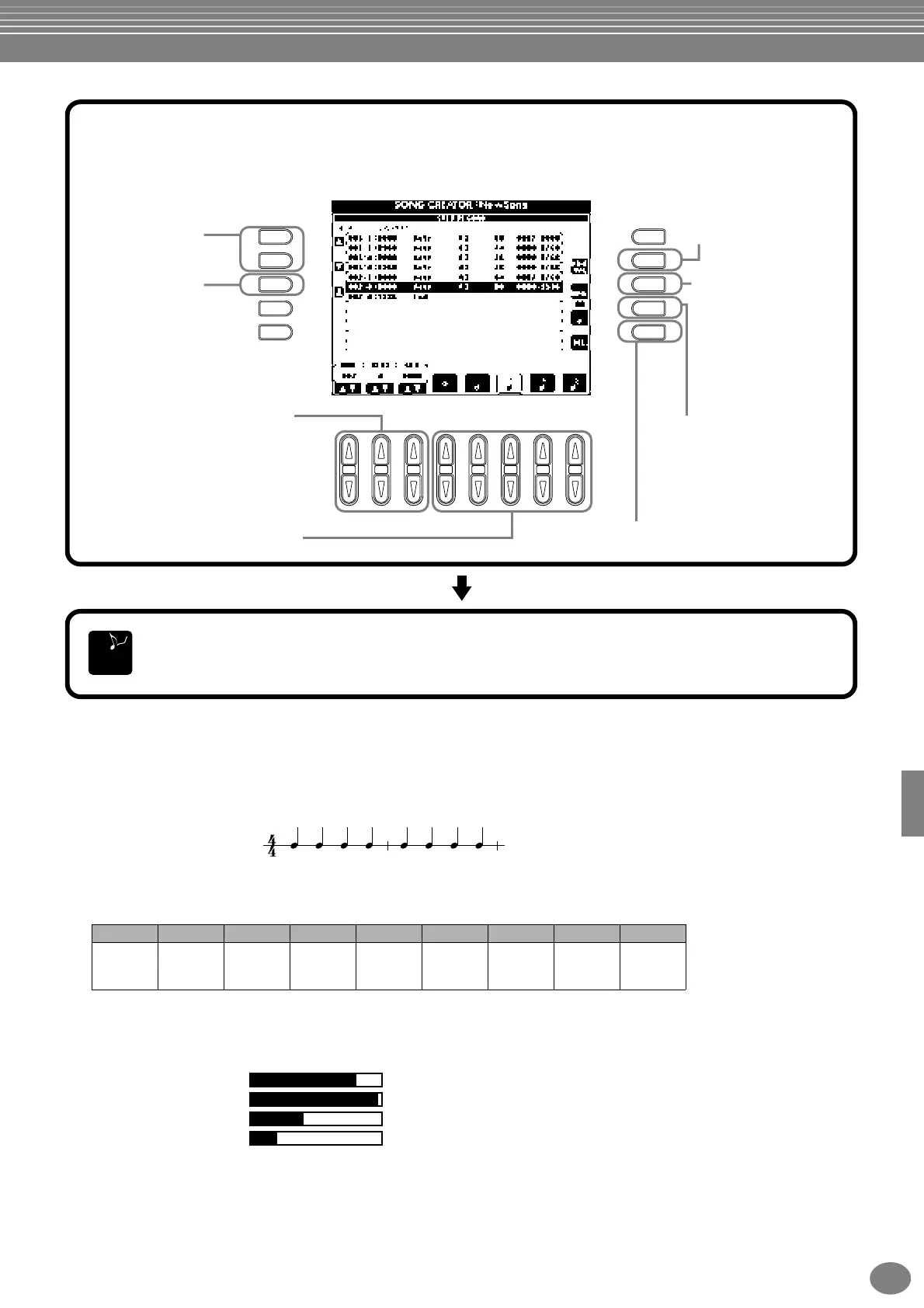
Moves the cursor
position up and down.
Returns the cursor to
the beginning of the
song (the first note of
the first measure).
Determines the velocity
(loudness) of the note to be
entered (only when recording
the melody). For information
on velocity settings, see
below.
Determines the length of
the note (as a percentage)
from the position at which it
is to be entered. (This is
available only when
recording the melody.) For
information on gate time
settings, see below.
Each press of this button toggles
among the three basic note
selectors at the bottom of the
display: normal, dotted, and triplet.
(This is available only when
recording the melody.)
Deletes the event at the cursor.
Use these to move the selected event,
in units of measures (BAR), beat, and
clocks. For information on measure/
beat/clock settings, see below.
Specifies the type of note to be input next.
(Sixteenth notes are available only when
recording the melody.) This also determines
the position to which the pointer will
advance after a note has been entered.
6
First, select the desired voice. To enter the note, first specify the length and loudness in this display,
then enter the pitch by actually playing the note on the keyboard.
To close the STEP RECORD display, press the [EXIT] button. Make sure to store the recorded
data by pressing the [I] (SAVE) button (page 44).
END
Measure
Beat
Clock
1
1
000-
1919
2
000-
1919
3
000-
1919
4
000-
1919
2
1
000-
1919
2
000-
1919
3
000-
1919
4
000-
1919


 To Next Page
 Loading...