Chapter 6: Sequence Application 126
Buttons common to multiple windows
• Create an ordered pair table (Editor/Graph/RUN) ......................................................................................#
• Create a sequence table with column(s) that determine if a sequence
is an arithmetic sequence, geometric sequence, progression of
difference, or Fibonacci sequence (Editor/Graph/RUN) ..........................) (arithmetic), _ (geometric),
+ (progression of difference), ` (Fibonacci)
• Display the Sequence Table Input dialog box (Editor/Table/Graph/RUN) ..................................................8
• Draw a cobweb diagram on a graph (Editor/Table) ....................................................................................w
• Display the Sequence RUN window (Editor/Table/Graph) .........................................................................`
• Display the Sequence Editor window (Table/Graph/RUN) .........................................................................&
6-1 Recursive and Explicit Form of a Sequence
ClassPad supports use of three types of sequence expressions: a
n
+1
=, a
n
+2
= and a
n
E.
Generating a Number Table
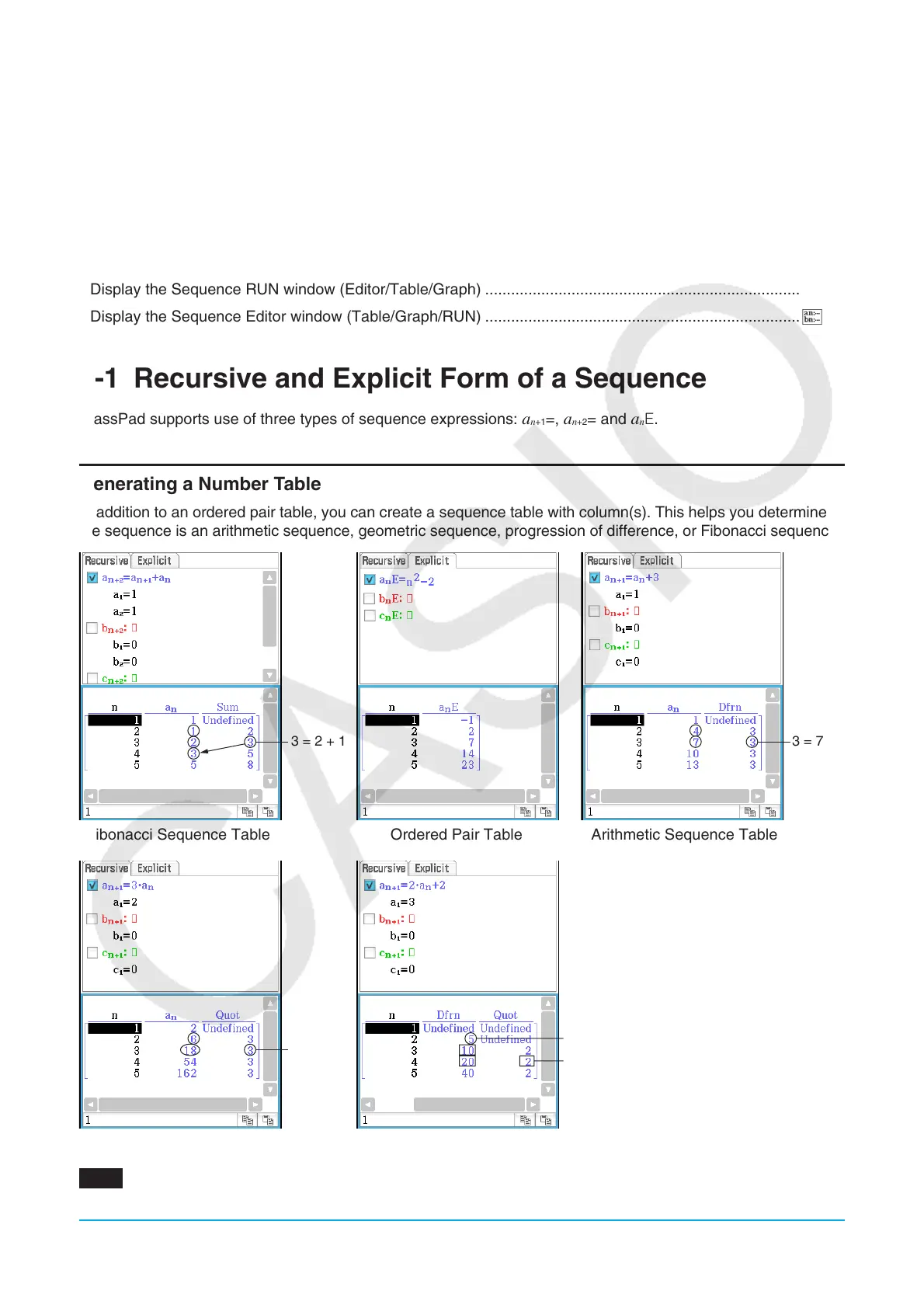
In addition to an ordered pair table, you can create a sequence table with column(s). This helps you determine if
the sequence is an arithmetic sequence, geometric sequence, progression of difference, or Fibonacci sequence.
3 = 2 + 1
3 = 7 − 4
Fibonacci Sequence Table Ordered Pair Table Arithmetic Sequence Table
3 = 18 ÷ 6
5 = 8 − 3
2 = 20 ÷ 10
Geometric Sequence Table Progression of Difference Table
0601 To create a number table (Fibonacci sequence table) to check the Fibonacci sequence expressed by
the recursion formula a
n
+2
= a
n
+1
+ a
n
, a
1
= 1, a
2
= 1


 To Next Page
 Loading...











