Chapter 8: Geometry Application 155
Inserting Text Strings into the Screen
You can insert text strings into the screen while working on the Geometry application window. To do so, tap
[Text] on the [Draw] menu. On the dialog box that appears, input the text you want, and then tap [OK].
Attaching an Angle Measurement to a Figure
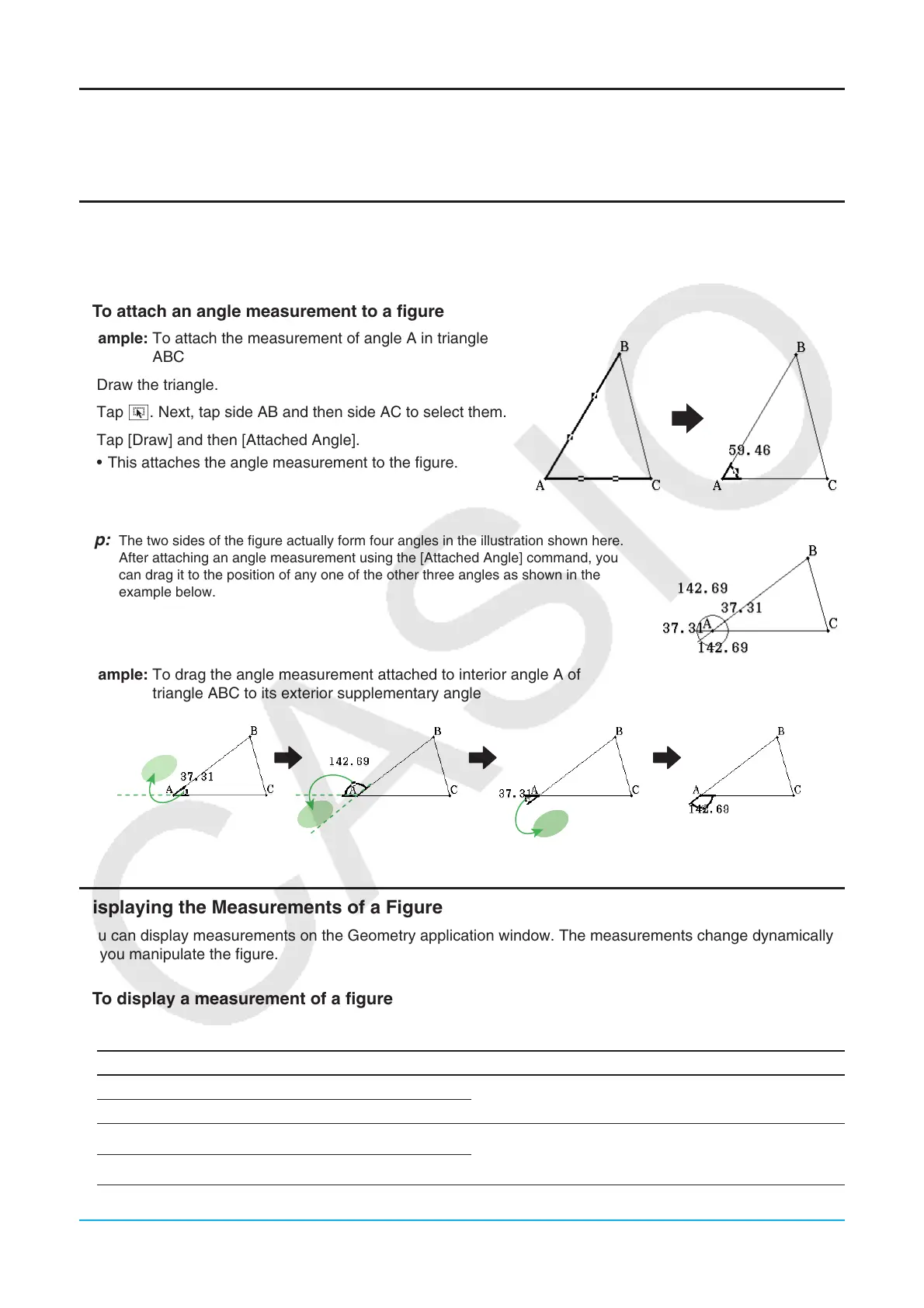
The measurement of an angle formed by two sides of a figure can be attached to the figure as shown here. To
do so, tap [Attached Angle] on the [Draw] menu.
u To attach an angle measurement to a figure
Example: To attach the measurement of angle A in triangle
ABC
1. Draw the triangle.
2. Tap G. Next, tap side AB and then side AC to select them.
3. Tap [Draw] and then [Attached Angle].
• This attaches the angle measurement to the figure.
Tip: The two sides of the figure actually form four angles in the illustration shown here.
After attaching an angle measurement using the [Attached Angle] command, you
can drag it to the position of any one of the other three angles as shown in the
example below.
Example: To drag the angle measurement attached to interior angle A of
triangle ABC to its exterior supplementary angle
Displaying the Measurements of a Figure
You can display measurements on the Geometry application window. The measurements change dynamically
as you manipulate the figure.
u To display a measurement of a figure
1. What you should select (point, line, figure, etc.) depends on the type of measurement you want to display.
To display this type of measurement: Select this:
Angle between two lines Two lines (Any two of the following: line segment,
infinite line, ray, or vector, one side of a polygon)
Supplementary angle of extended lines
Area of selected figure
• All the sides or all the apexes of a polygon
• The circumference of a circle, ellipse, or arc
• Three points
Circumference or perimeter of selected figure



 To Next Page
 Loading...










