xStack
®
DES-3500 Series Layer 2 Stackable Fast Ethernet Managed Switch User Manual
167
BackendState
The Backend State will display one of the following: Request, Response, Success, Fail,
Timeout, Idle, Initialize, and N/A.
OpenDir
Operational Controlled Directions are both and in.
PortStatus
The status of the controlled port can be Authorized, Unauthorized, or N/A.
Reauthenticate Port(s) for MAC Based 802.1x
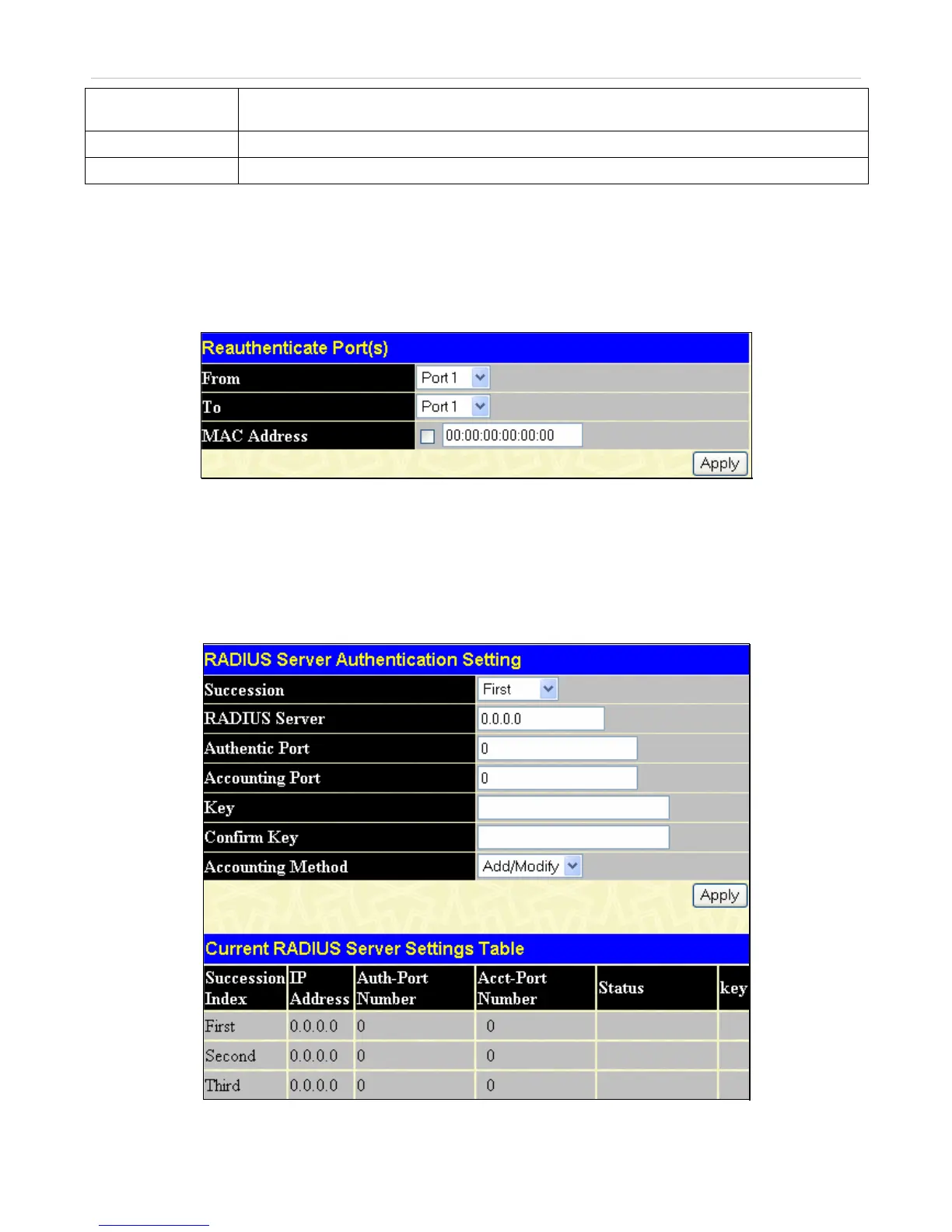
This window allows you to reauthenticate a port or group of ports by using the pull down menus From and To to select the ports ,
enter a MAC Address and click Apply.
Click Security Management > Port Access Entity > PAE System Control > Reauthenticate Port(s) to open the
Reauthenticate Port(s) window:
Figure 7- 18. Reauthenticate Port (MAC Based 802.1x) window
RADIUS Server
The RADIUS feature of the Switch allows you to facilitate centralized user administration as well as providing protection against
a sniffing, active hacker. The Web Manager offers three windows.
Click Security Management > Port Access Entity > RADIUS Server > Authentic RADIUS Server to open the RADIUS
Server Authentication Setting window shown below:
Figure 7- 19. RADIUS Server Authentication Setting window



 To Next Page
 Loading...