230 /Flow Charts
Names
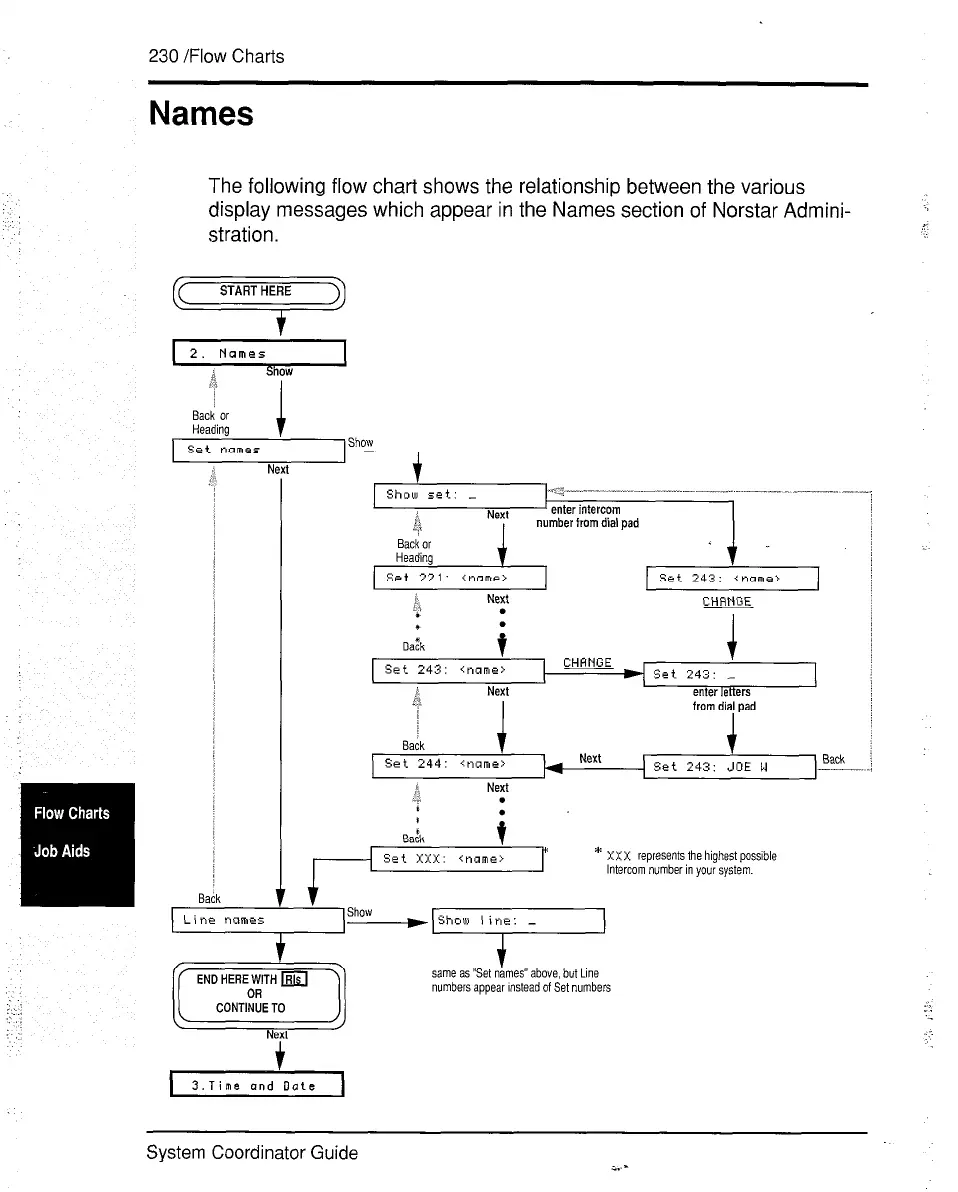
The following flow chart shows the relationship between the various
display messages which appear in the Names section of Norstar Admini-
stration.
=?
I set names
, Show
-
sack
-
Show set: _
~.-~--“----” ..---- --.. -.-_ .
~. -
ii
NM
enter intercom
i?
, number from dial pad
Srt 243: <name,
Next
CHRNGE
i
set 243: ~name>
Set 243: -
h
Next
enter letters
I
from dial pad
/
I
Back
t
set 244: ~name>
*
Next
6.d
.
*
.
Back
1
Ed
i
I
set xxx: ~name>
* XXX represents the highest possible
Intercom number in your system.
CONTINUETO
Next
i
3.Time ond Date
same as “Set names” above, but Line
numbers appear Instead of Set numbers
System Coordinator Guide


 To Next Page
 Loading...

