36
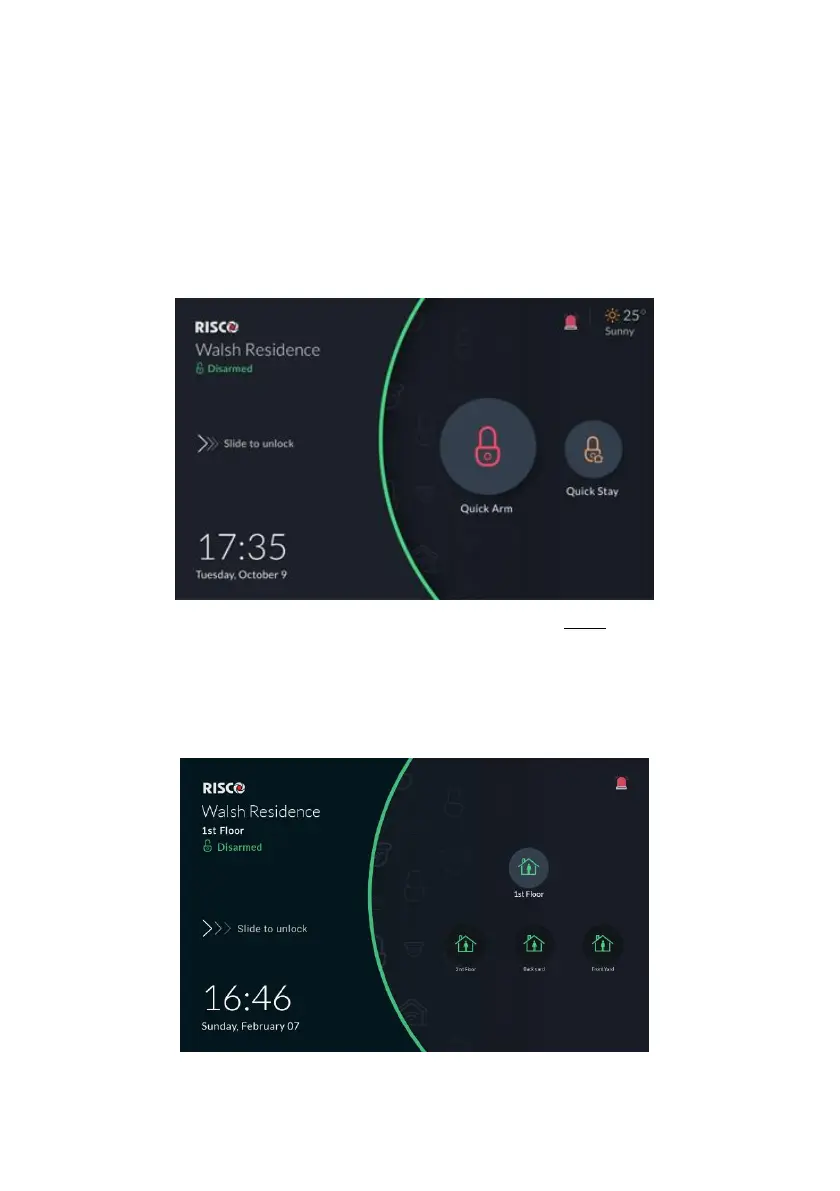
Lock Screen with Quick Arm and/or Quick Stay
The RisControl is always assigned to only one partition and can also be masked to
other partitions, via the Installer Programing of the Security System.
The partition that is assigned to the RisControl can be set (via the Installer
Programming Menu) to allow Quick Arm and/or Quick Stay. The Lock Screen
displays Quick Arm and/or Quick Stay icons that indicate when they are enabled,
allowing anyone to directly arm the system from the Lock Screen without having
to enter a PIN Code.
The partition that the RisControl is assigned to is defined with Quick Arm and/or
Quick Stay.
Figure 32: Lock Screens with Quick Arm and/or Quick Stay
Note: If “Multiview” is defined in the system, the Multiview screen containing all
partitions that are assigned to RisControl will be displayed as shown below.
Figure 33: Multiview Screen
RisControl’s Assigned Partition Status - Assigned Partition status is always



 To Next Page
 Loading...



