EasyManua.ls Logo

Samsung SC-D366 - Rear & Bottom View

Samsung SC-D366
106 pages
Print Icon
To Next Page IconTo Next Page
To Previous Page IconTo Previous Page
Loading...
ENGLISH
1212
Getting to Know Your Camcorder
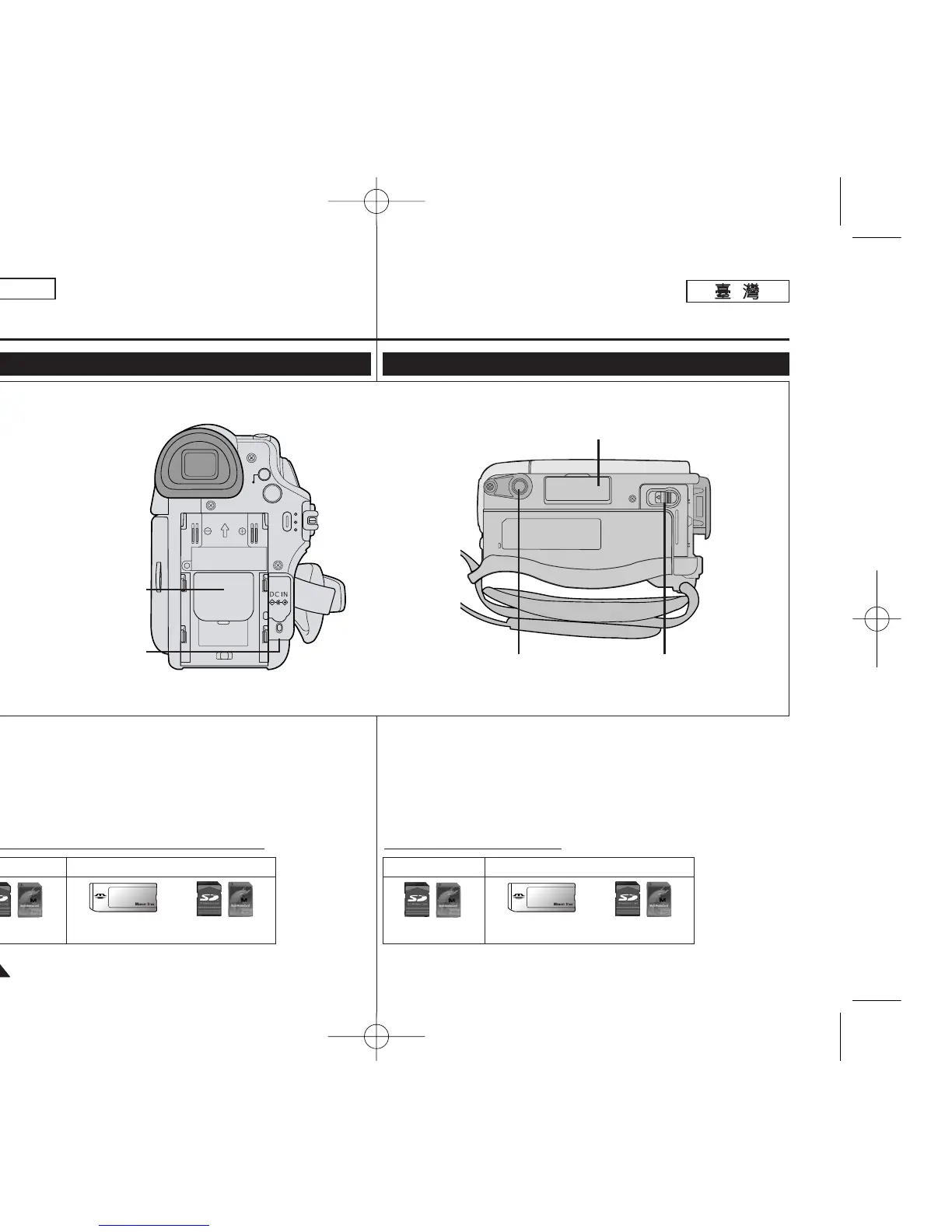
Rear & Bottom View
1. Lithium Battery Cover
2. Charging Indicator
3. Memory Card Slot (SC-D363/D364/D365/D366 only)
4. Tripod Receptacle
5. Battery Release
MENU
CHG
QUICK
MENU
4. Tripod Receptacle
3. Memory Card Slot
(SC-D363/D364/D365/D366 only)
BATTERY
RELEASE
1. Lithium Battery Cover
5. Battery Release
2. Charging Indicator
Memory Card Slot (Usable Memory Card)
SC-D363/D364
SC-D365/D366
Memory Stick
Memory Stick PRO
SD/MMC
SD/MMC
1.
2.
3.
SC-D363/D364/ D365/D366
4.
5.
SC-D363/D364
SC-D365/D366
Memory Stick
Memory Stick PRO
SD/MMC
SD/MMC
00970F SCD363 TAI~022 1/12/06 3:16 PM 페이지12 001 QMS 1660E

Table of Contents

Other manuals for Samsung SC-D366

Related product manuals