Digital Still Camera Mode
(SC-D363/D364/D365/D366 only)
Taking a Photo Image (JPEG) on the Memory Card
✤ You may take photo images while in <M.Cam> mode and store the
images on the Memory Card. ➥page 19
✤ You can take photo images using the remote control.
(SC-D364/D366 only)
✤ Audio will not be recorded with a photo image on to the Memory
Card.
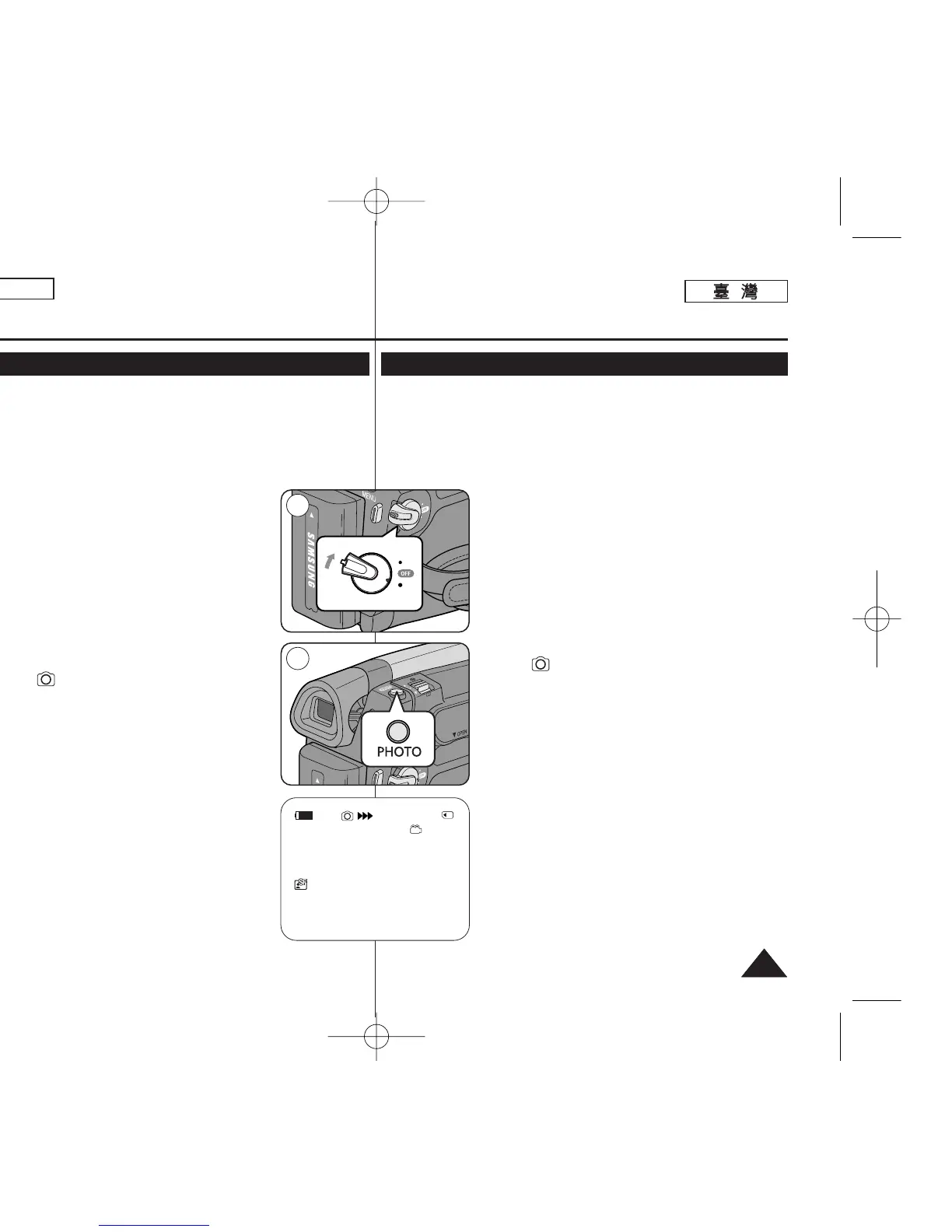
1. Set the [Power] switch to [CAMERA].
2. Set the [Mode] switch to [MEMORY].
3. After framing your object to record, fully press the
[PHOTO] button to take the picture.
■
The picture is taken and saved into the Memory
Card within a few seconds.
■
Taking another picture within this interval is not
possible.
■
The <
√√√√√√
> indicator appears during the
time it takes to save the image.
[ Notes ]
■
Photo images are saved in the Memory Card in an
800x600 format.
■
The number of photo images that can be stored
depends on the quality of the image.
7373
ENGLISH
1
3
1min
46
數數位位靜靜止止相相機機模模式式
((僅僅限限
SC-D363/D364/ D365/D366
))
拍拍攝攝記記憶憶賓賓上上的的相相片片影影像像
(JPEG)
✤ 舅可以在 <M.Cam> 模式下拍攝相片影像,橙將影像儲存在記憶賓中0
➥第 19 頁
✤ 舅可以使用遙控器拍攝相片影像(僅限 SC-D364/D366)0
✤ 聲訊將不會隨著相片影像錄製到記憶賓中0
1. 將 [Power]
((電電源源))
開關設定爲 [CAMERA]0
2. 將 [Mode]
((模模式式))
開關設定爲 [MEMORY]
((記記憶憶賓賓))
0
3. 係住要錄製的物體後,完全按下 [PHOTO]
((相相片片))
按
瞿以拍攝相片0
■
相片將在數秒內拍攝,然後儲存在記憶賓內0
■
舅不可能在儲存相片期間拍攝癩一張相片0
■
<
√√√√√√
> 指示器會在拍攝時出現以便儲存影
像0
[
附附註註
]
■
相片影像可以 800x600 格式儲存在記憶體內0
■
可儲存相片影像的張數取決於影像的品質0
00970F SCD363 TAI~094 1/12/06 3:43 PM 페이지73 001 QMS 1660E


 To Next Page
 Loading...










