7979
ENGLISH
Digital Still Camera Mode
(SC-D363/D364/D365/D366 only)
Recording a Moving Images (MPEG) on the Memory Card
✤ You may record moving images while in <M.Cam> mode and store the images
on a Memory Card. ➥page 19
✤ You can record moving images with audio on a Memory
Card.
✤ The screen format of the moving image to be recorded is
720x480.
Saving Moving Images onto a Memory Card
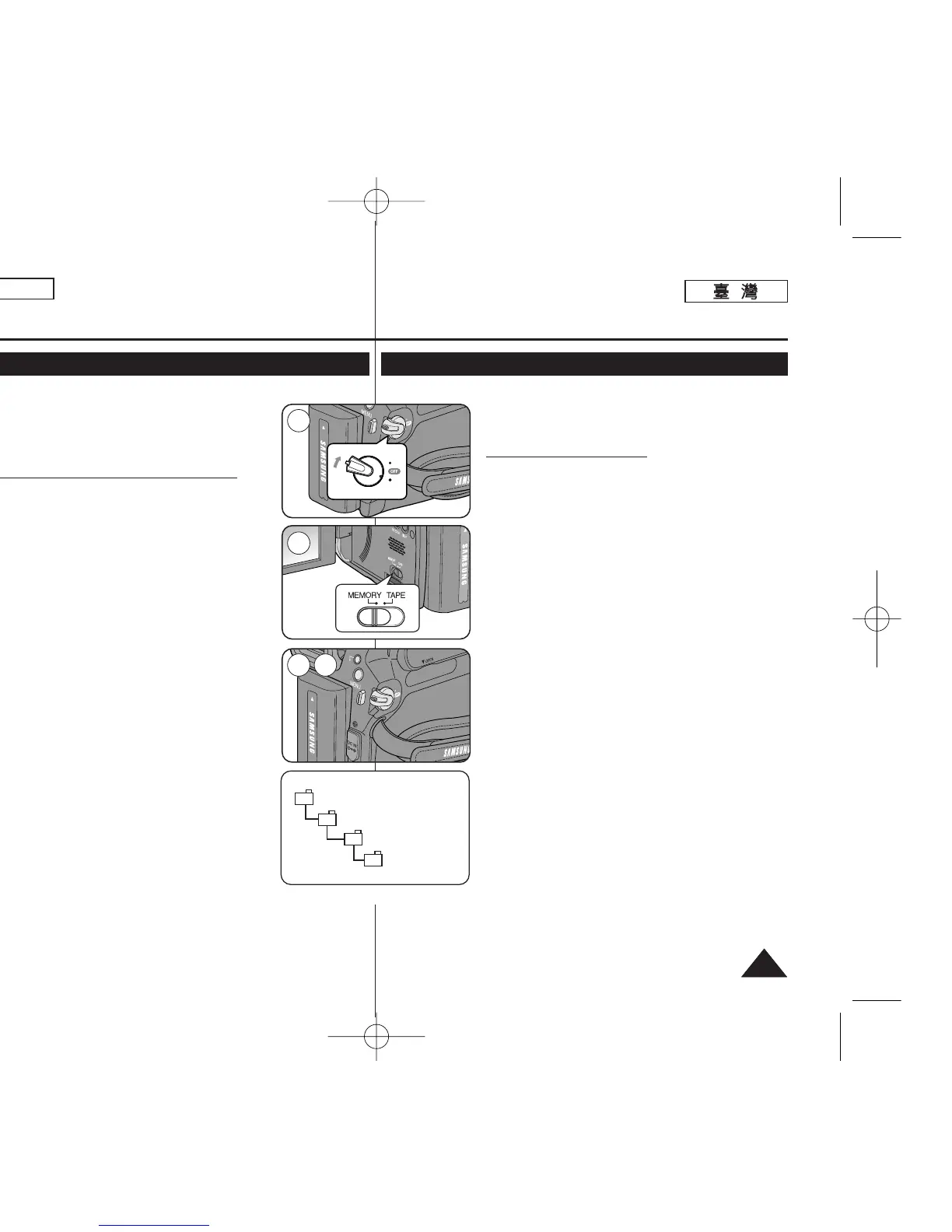
1. Set the [Power] switch to [CAMERA].
2. Set the [Mode] switch to [MEMORY].
3. Press the [Start/Stop] button, the moving images are
recorded on the Memory Card in MPEG4.
■
You can record a photo image on Memory Card by
pressing the [PHOTO] button instead of the [Start/Stop]
button.
4. Press the [Start/Stop] button to stop the recording.
[ Notes ]
■ Support memory cards ranging up to 4GB and a movie can
be recorded up to 2GB of file size.
■ MPEG files can be stored in the memory card up to 1,000
files.
■ [MENU] button and [OK] button are not available while
recording a moving image. To use [MENU] button and
[OK] button, stop recording. Recording a moving image
is not available when a MENU or QUICK MENU is
displayed on the screen. To start recording, press the
[MENU] button to make the memu disappear.
■ Before using the Recording a moving image function, check
whether the Memory Card is inserted into the Camcorder.
■ Moving images that you recorded are saved in *.avi (avi 1.0)
file format on the Memory Card.
■ The files that you recorded are saved in a following folder to
the right. (see illustration right)
■ The moving images on a Memory Card are a smaller size
and lower definition than images on tape.
■ The sound is recorded in mono.
■ The following functions are not allowed in <M.Cam> Mode.
DIS (Digital Image Stabilizer), Digital Zoom, Fade, Program
AE, Visual Effect, Slow Shutter.
■ While recording on a Memory Card, don’t insert or eject the
tape as it may record noise.
■ While recording on a Memory Card, don’t eject the Memory Card or it may break
the data on the Memory Card or Memory Card itself.
■ Turning the power off while accessing the Memory Card may damage the data
stored on the Memory Card.
數數位位靜靜止止相相機機模模式式
((僅僅限限
SC-D363/D364/ D365/D366
))
錄錄製製記記憶憶賓賓上上的的動動態態影影像像
(MPEG)
✤ 舅可以在 <M.Cam> 模式下錄製動態影像,橙將影像儲存
在記憶賓中0 ➥第 19 頁
✤ 舅可以將動態影像和聲訊錄製到記憶賓上0
✤ 將錄製的動態影像的螢幕格式爲 720x4800
將將動動態態影影像像儲儲存存到到記記憶憶賓賓上上
1. 將 [Power]
((電電源源))
開關設定爲 [CAMERA]
((相相機機))
0
2. 將 [Mode]
((模模式式))
開關設定爲 [MEMORY]
((記記憶憶賓賓))
0
3. 按下 [Start/Stop]
((開開始始
/
停停止止))
按瞿,動態影像將以 MPEG4
圭案格式錄製到記憶賓上0
■ 舅可以透過按下 [PHOTO]
((相相片片))
按瞿,而非
[Start/Stop]
((開開始始
/
停停止止))
按瞿,將相片影像錄製到記憶
賓上0
4. 按下 [Start/Stop]
((開開始始
/
停停止止))
按瞿以停止錄製0
[
附附註註
]
■ 本攝錄放影機支援高達 4GB 的記憶賓,橙且可以錄製高達
2GB 圭案大小的影片0
■ MPEG 圭案可在記憶賓中儲存多達 1,000 個圭案0
■ [MENU]
((選選單單))按按瞿瞿和和
[OK]
((確確定定))按按瞿瞿在在錄錄製製動動態態影影像像期期
間間不不可可用用00 若若要要使使用用
[MENU]
((選選單單))按按瞿瞿和和
[OK]
((確確定定))按按瞿瞿,,請請停停止止錄錄製製00 錄錄製製動動態態影影像像功功能能在在
MENU
((選選
單單))或或
QUICK MENU
((快快速速選選單單))顯顯示示在在螢螢幕幕上上時時不不可可用用00
若要開始錄製,按 [MENU]
((選選單單))
按瞿以使選單消失0
■ 使用錄製動態影像功能之前,請檢査記憶賓是否已揷入攝
錄放影機0
■ 舅所錄製的動態影像則會以 *.avi (avi 1.0) 圭案格式儲存在
記憶賓上0
■ 舅所錄製的圭案將儲存在圖中所示右邊的資料夾中0(參看
右圖)
■ 記憶賓上的動態影像比錄影帶上的影像具有更小的尺寸和
更低的淸劉度0
■ 聲音將以單聲道模式錄製0
■ 以下功能無法在 <M.Cam> 模式中操作0
DIS(數位防手震功能)/ Digital Zoom(數位縮放)/ Fade(淡
化)/ Program AE(程序自動曝光)/ Visual Effect(視訊效
果)/ Slow Shutter(較慢的快門)0
■ 在錄製到記憶賓時,請勿揷入或退出錄影帶,因爲這可能
會發出筮音0
■ 在錄製到記憶賓時,請勿退出記憶賓,否則可能損毁記憶
賓內的資料或該賓0
■ 在存取記憶賓時關閉電源,可能損毁儲存在記
憶賓內的資料0
00970F SCD363 TAI~094 1/12/06 3:44 PM 페이지79 001 QMS 1660E



 To Next Page
 Loading...









