使使用用望望遠遠微微距距
ENGLISH
3939
Basic Recording
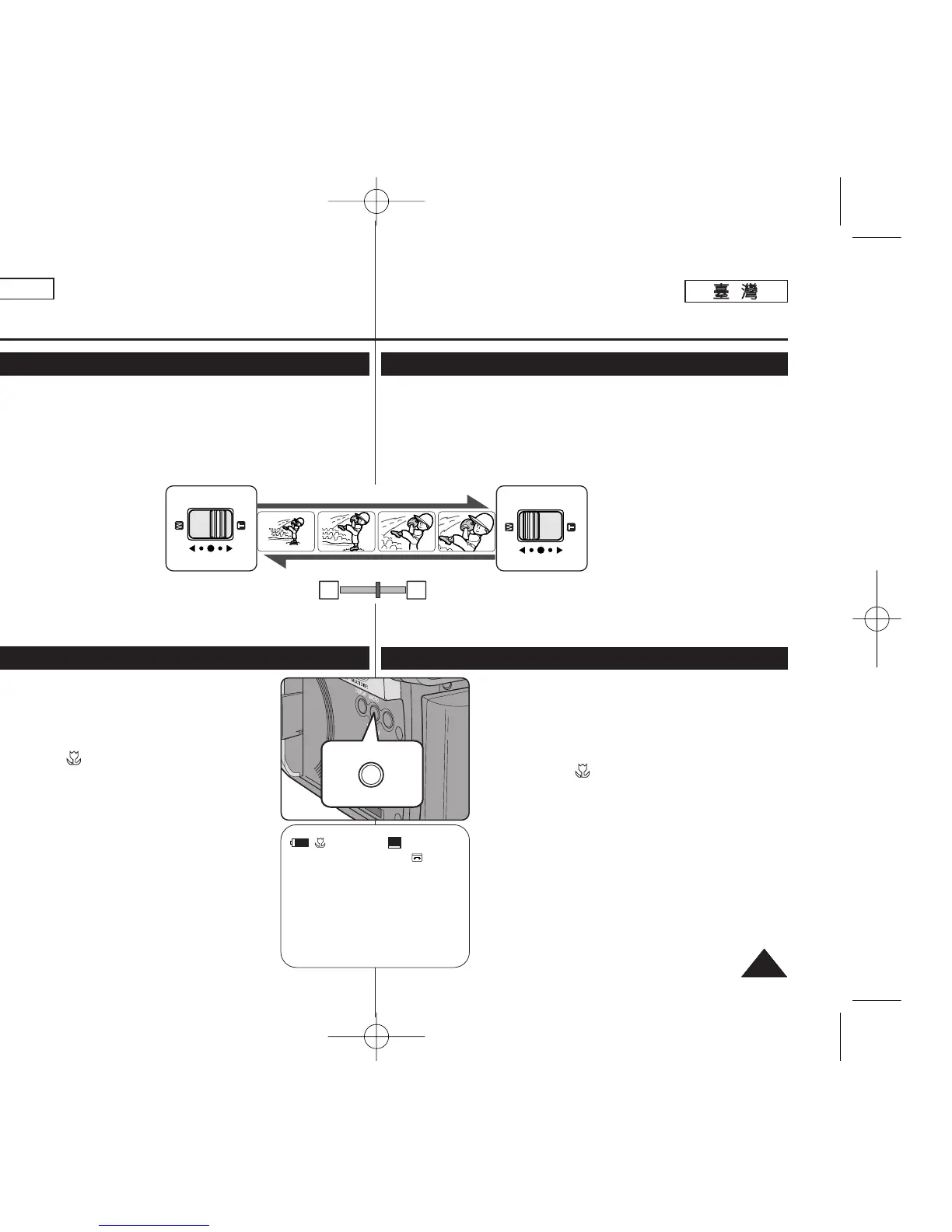
Zooming In and Out
Using the Tele Macro
✤ The Zoom function works in both <Camera> and <M.Cam> modes.
➥page 19
✤ Zooming is a recording technique that lets you change the size of the
subject in a scene.
✤ You can zoom using variable zoom speeds.
✤ Use these features for different shots. Please note that over-use of the
Zoom feature can lead to unprofessional looking results and a reduction of
battery usage time.
1. Move the [Zoom] lever slightly for
a gradual zoom, move it further for
a high-speed zoom.
■
Your zooming is monitored on
the OSD.
2. [T] (Telephoto) side: Subject
appears closer.
3.
[W] (Wide angle) side: Subject appears farther away.
■
You can record a subject that is about 10mm (about 0.5 inch) away
from the lens surface in the Wide position.
✤ Tele Macro function works in both <Camera> and
<M.Cam> mode. ➥page 19
✤ Effective focal distance in Tele Macro mode is 50 Cm
(19.7 inches) ~ 100 Cm (39.4 inches).
1. Press the [MACRO/PB ZOOM] button.
■
Tele Macro ( ) icon is displayed.
2. If you want to cancel the Tele Macro function, press the
[MACRO/PB ZOOM] button again.
[ Notes ]
■
When recording in Tele Macro mode, the focus speed
may be slow.
■
When you operate the Zoom function in the Tele Macro
mode, the recording subject may be out of focus.
■
Use a tripod to prevent hand shake in the Tele Macro
mode.
■
Avoid shadows when recording in the Tele Macro mode.
■
As the distance to the subject decreases, focusing area
narrows.
■
When you can not get proper focus, use the [Zoom]
lever.
TELE
WIDE
SP
25min
0:39:40
STBY
œ
W T
基基本本錄錄製製
放放大大和和縮縮小小
✤ 縮放功能可在 <Camera> 和 <M.Cam> 模式下操作0 ➥第 19 頁
✤
縮放是讓舅變更場景中主體大小的錄製技巧0
✤
舅可以使用不同的縮放速度來進行縮放0
✤
橙爲不同的拍攝使用這些功能0 請留意過度使用縮放功能可能導致不觀
專業的視覺效果,橙縮短電池使用時間0
1. 稍微移動 [Zoom]
((縮縮放放))
桿以漸
次縮放,增大移動幅度則可進
行高速縮放0
■
舅的縮放可在 OSD 上監控0
2. [T]
((望望遠遠))
側: 主體顯得較近0
3. [W]
((廣廣角角))
側: 主體顯得較遠0
■
舅可在廣角位置錄製大約距透鏡表面 10 公釐(大約 0.5
英勝)的主體0
✤ 望遠微距功能可在 <Camera> 和 <M.Cam> 模式下操
作0 ➥第 19 頁
✤ 望遠微
距模式下的有效焦距是 50 公分(19.7 英勝)~
100 公分(39.4 英勝)0
1. 按下 [MACRO/PB ZOOM]
((微微距距
/
播播放放縮縮放放))
按瞿0
■
望遠微距 ( ) 圖示將會顯示0
2. 若舅要取消望遠微距功能,請再次按[MACRO/
PB ZOOM]
((微微距距
/
播播放放縮縮放放))
按瞿0
[
附附註註
]
■
當在望遠微距模式中進行錄製時,對焦速度可能緩慢0
■
當舅在望遠微距模式下操作縮放功能時,錄製主體可
能失焦0
■
在望遠微距模式中使用三苛架以避免手震動0
■
在望遠微距模式中進行錄製時避免陰影0
■
當與主體的距離縮短時,對焦區域也變窄0
■
當舅無法取得正確對焦時,請使用 [Zoom]
((縮縮放放))
桿0
00970F SCD363 TAI~043 1/12/06 3:25 PM 페이지39 001 QMS 1660E


 To Next Page
 Loading...










