98
Cooling system
Thermostat, replacement
(20A-04)
1
Drain the cooing system so that the coolant level is
below the position of the thermostat and disconnect
the upper hose from the coolant outlet connection.
2
Remove the mounting screws and remove the cool-
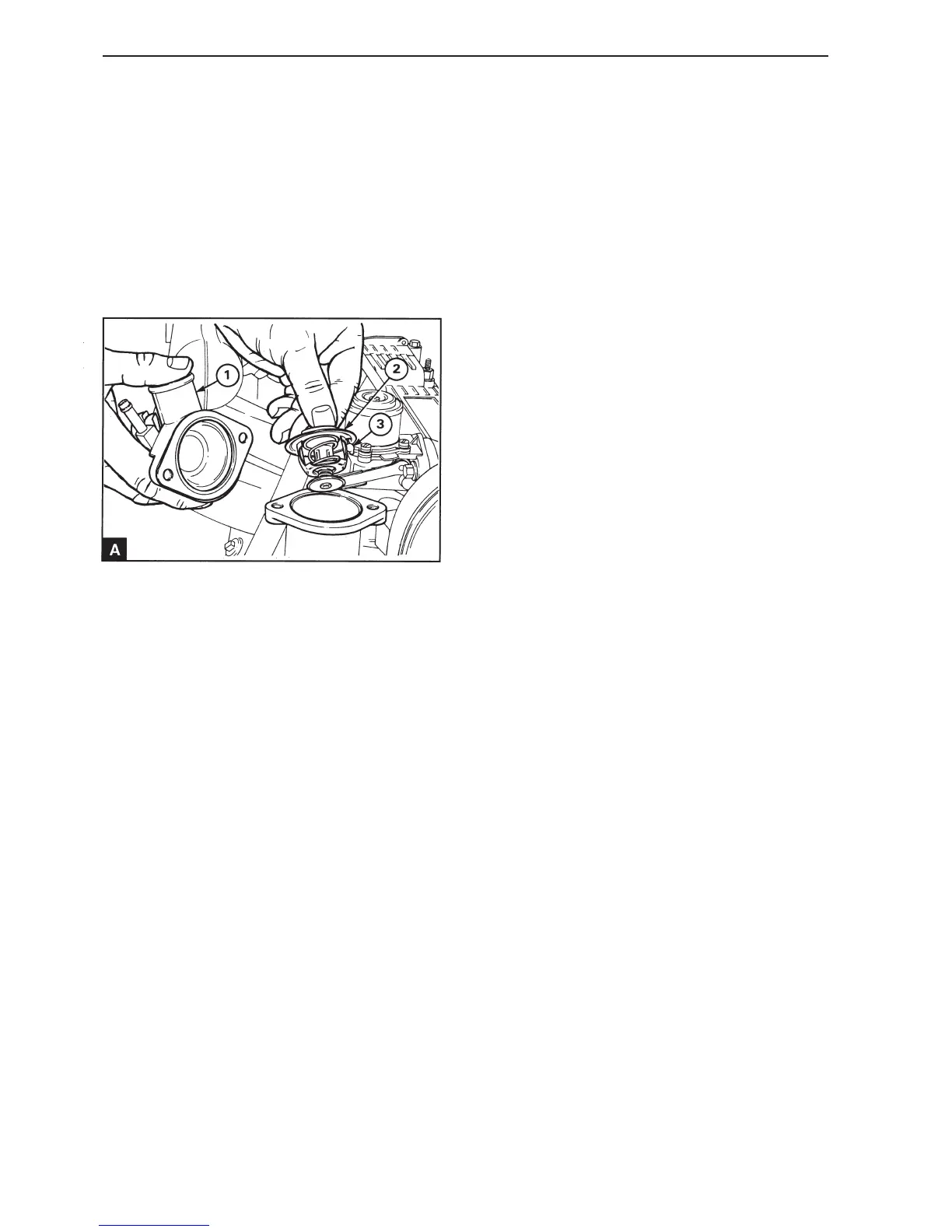
ant outlet connection (A1).
3
Remove the thermostat (A2).
4
Check that the sealing surfaces of the housing and
the outlet are clean and the tilt pin (A3) in the ther-
mostat can move freely.
5
Install the new thermostat in position in the housing.
6
Install the coolant outlet connection for the with a
new gasket and tighten the mounting screws.
7
Connect the upper hose and fill the coolant system
with the correct coolant, see the relevant manual.
Thermostat, checking
1
Suspend the thermostat in a suitable container filled
with water.
2
Warm the water slowly. Use a thermometer to
measure at what water temperature the thermostat
starts to open and at what temperature it is fully
open. For the correct temperatures see Workshop
Manual “Technical data”.
3
If the thermostat does not operate correctly, it must
be replaced. Do not try to change the setting.
.


 To Next Page
 Loading...