EasyManua.ls Logo

Emerson Bettis 500 - Valve Control Setup

Emerson Bettis 500
102 pages
Print Icon
To Next Page IconTo Next Page
To Previous Page IconTo Previous Page
Loading...
February 2018
Installation and Operation Manual
E2K-405-0218 Rev. 2
48
Section 5: Customizing Actuator Settings
Customizing Actuator Settings
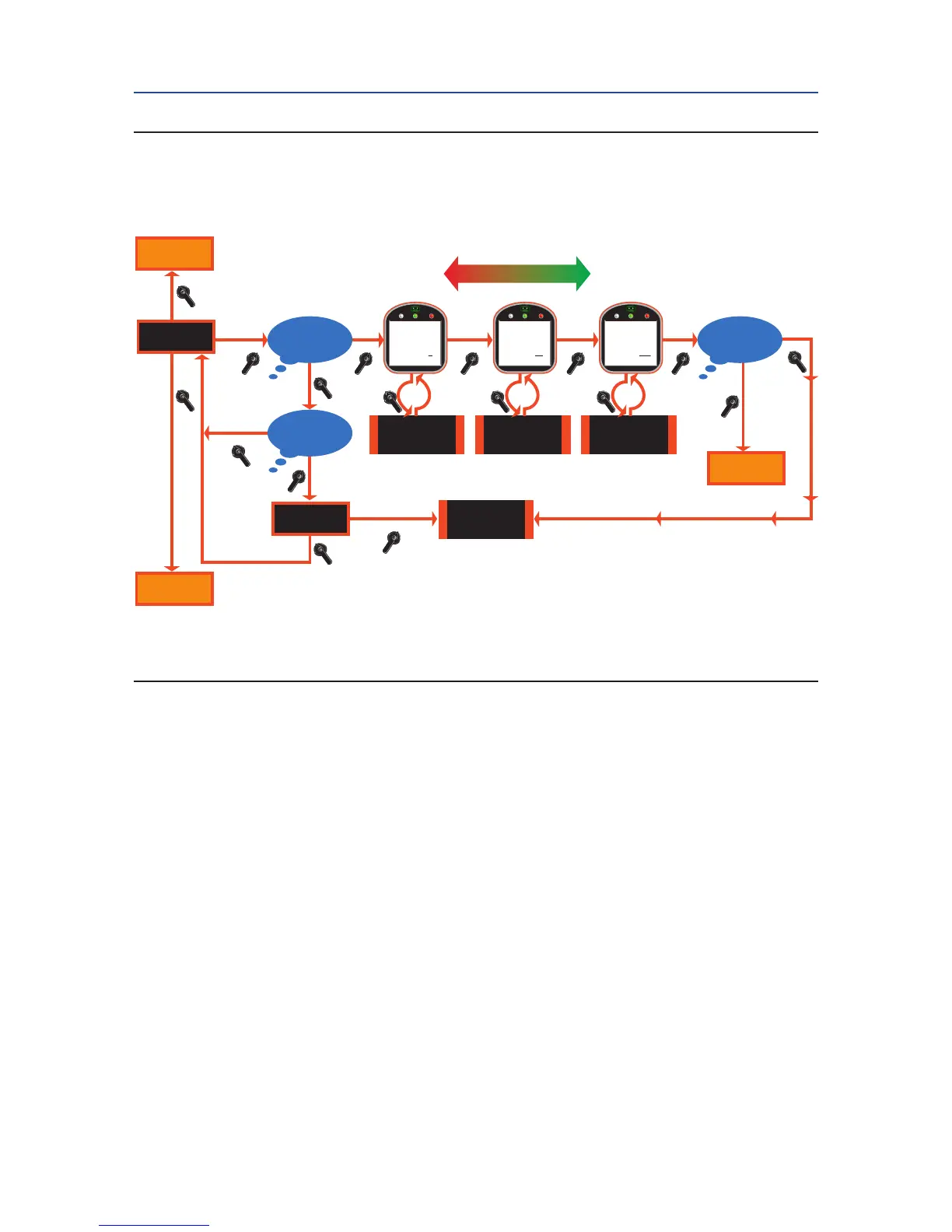
Figure 5-5 Passcode Entry
5.5.2 Valve Control Setup
1. At the “VALVE CONTROL SETUP?” prompt answer “YES.
2. Use the selector knob (NEXT/BACK) to scan the settings until the desired
setting is reached. Place the control knob in the NO position to increment
through each setting’s associated choices. Answer “YES” to accept the
desired choice. See Figure 5-6.
See Section 4.5, Remote/Auto Control Operation, for a description of each
control mode.
NO

Figure 5-5 Passcode Entry
Go to
Figure 5-3
Go to Next Display
See Figure 5-4
Go to Next Display
See Figure 5-4
YES
YES
YES
Accept
Passcode
Character 1:0
Increment Character
0-9, A-Z
Passcode Reset To
‘000’
YES
Increment Character
0-9, A-Z
NO
NO
NO
NO
NO
NO
BACK NEXT
BACK
CHANGE
SETTINGS?
RESET
PASSCODE?
Is Passcode
‘000’?
Is Passcode
‘RPC’?
YES
YES
YES
Is Passcode
Correct?
Accept
Passcode
Character 2:00
NO
YES
Increment Character
0-9, A-Z
Accept
Passcode
Character 3:000

Table of Contents

Related product manuals