11. MAINTENANCE & TROUBLESHOOTING
11-7
2. Select [Change] at [Setup].
3. Select [Self Test] at the bottom of the screen.
4. Press the Enter key. The results of the self test are displayed a short time later.
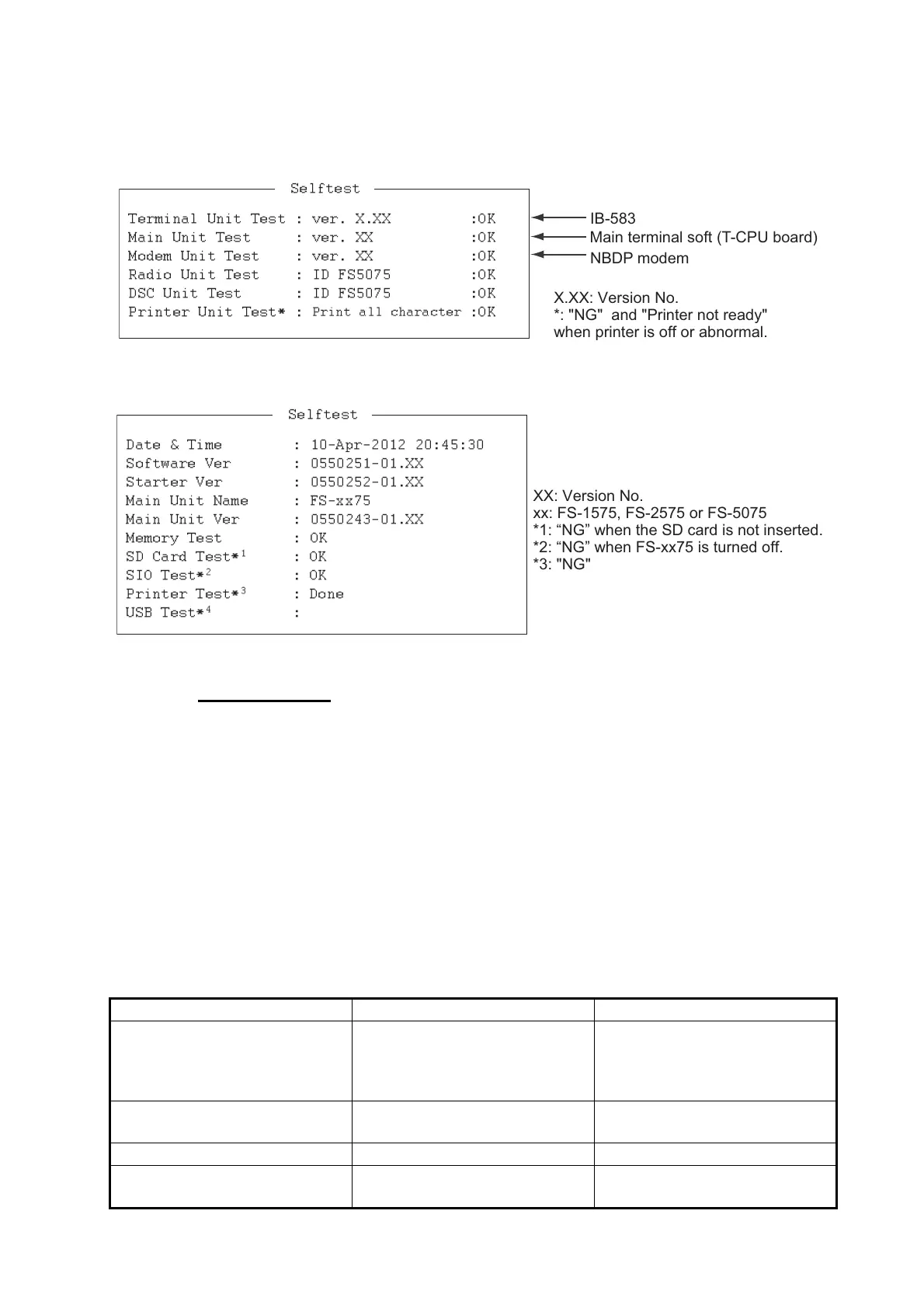
Selftest results for IB-583
Selftest results for IB-585
Self test results
The test results are shown as [OK] or [NG] (No Good). For any [NG], check the con-
nection of the equipments then try the self test again. If it appears again, call for ser-
vice. When the test is completed, the message "Selftest Completed. Press any key to
escape." appears.
11.7.5 Power fuse
If you can not turn on the power for IB-585, check the power fuse. If the fuse has
blown, replace the fuse (Type: FGBO-A 125V 3A PBF). If the fuse blows again after
replacement, request service.
11.7.6 Notification messages for IB-585
Notification message Meaning Remedy
Caution: This Editor cannot edit
over 16Kbytes
Can not edit the files over 16
kilo bytes.
Can not open the files over 16
kilo bytes. Delete unnecessary
characters so that the file size is
less than 16 kilo bytes.
Station by that name already
exists.
The station under this file name
has been already registered.
Change the station name.
Station memory is full. The station memory is full. Delete unnecessary stations.
Scan group by that name al-
ready exists.
The scan group under this
name has already exist.
Change the scan group name.
Selftest
Terminal Unit Test : ver. X.XX :OK
Main Unit Test : ver. XX :OK
Modem Unit Test : ver. XX :OK
Radio Unit Test : ID FS5075 :OK
DSC Unit Test : ID FS5075 :OK
Printer Unit Test* :
Print all character :OK
X.XX: Version No.
*: "NG" and "Printer not ready"
when printer is off or abnormal.
IB-583
Main terminal soft (T-CPU board)
NBDP modem
Selftest
Date & Time : 10-Apr-2012 20:45:30
Software Ver : 0550251-01.XX
Starter Ver
: 0550252-01.XX
Main Unit Name : FS-xx75
Main Unit Ver : 0550243-01.XX
Memory Test : OK
SD Card Test*
1
: OK
SIO Test*
2
: OK
Printer Test*
3
: Done
USB Test*
4
:
XX: Version No.
xx: FS-1575, FS-2575 or FS-5075
*1: “NG” when the SD card is not inserted.
*2: “NG” when FS-xx75 is turned off.
*3: "NG" and "Printer not ready" when
printer is off or abnormal.
*4: The message “Press 3 keys” appears.
Press any three keys.


 To Next Page
 Loading...



