31OPERATING THE TRACTOR
PTO RPM / TRAVEL SPEED MONITOR
BChanging Display Mode
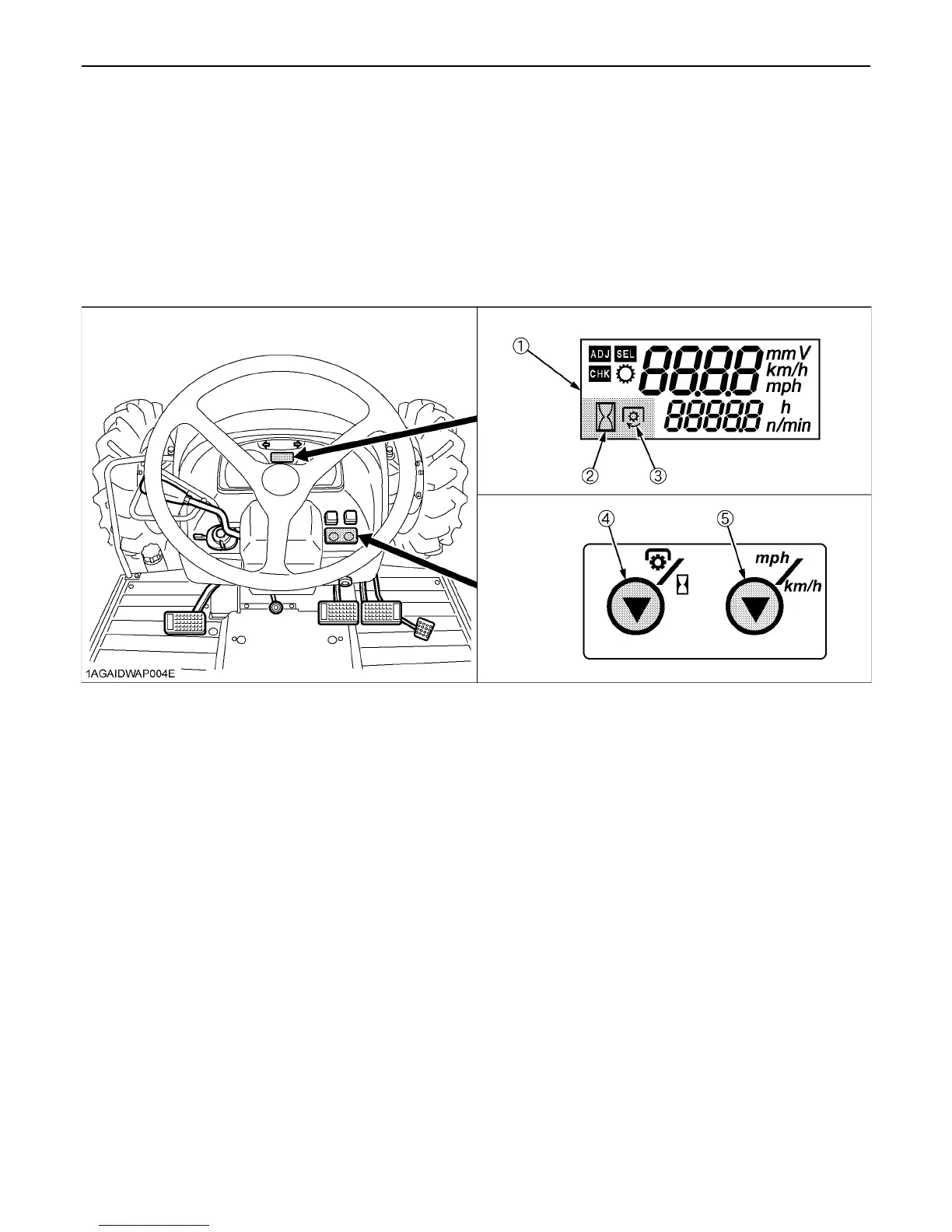
1. The LCD monitor gives two different display modes: "Traveling speed and Hour meter" and "Traveling speed and PTO
speed". Each time the PTO/Hour meter select switch is pressed, the mode is switched to the changing display.
2. To switch between "mph" and "km/h" for the traveling speed, use the Traveling speed select switch.
3. The PTO clutch control lever works for the following automatic display modes.
1) PTO clutch control lever ON: Traveling speed and PTO speed are displayed.
2) PTO clutch control lever OFF: Traveling speed and Hour meter are displayed.
(1) LCD monitor
(2) Hour Meter indication
(3) PTO Indication
(4) PTO / Hour Meter Select Switch
(5) Traveling Speed Select Switch


 To Next Page
 Loading...