ŝ46Ş
ƈ You can select the proper focus mode by switching
the focus switch.
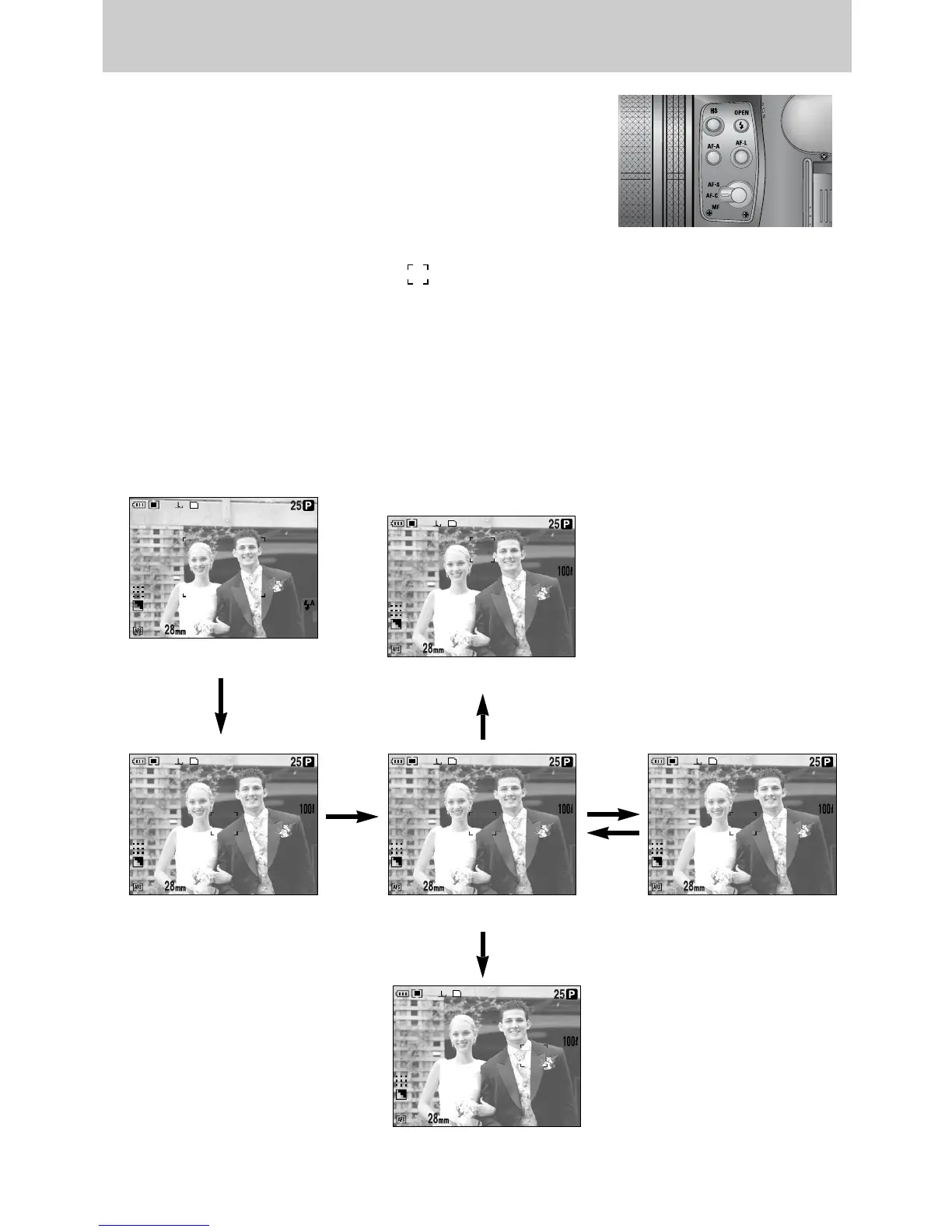
ƃ AF-A : Changing the focus frame ( )
You can change the focus frame size and position according to the subject size and position
by pressing the AF-A button. This function is available in the AF-S, AF-C mode.
- Wide AF : This is useful when taking wide range of frame.
- Fixed spot AF : The frame (White) will be fixed at the centre of the LCD.
- Modifying the Spot AF position : The frame will be yellowed and blink. The frame position
can be changed its position.
- Setting the Spot AF position : The frame turns yellow and the frame position will be set.
Focusing
[ Moving the frame to the left or right ]
[ Moving Up/ Down the frame ]
[ Wide AF ]
[ Setting Spot AF: Yellow, Blinking ]
[ Fixed spot AF: White ] [ Spot AF: Yellow ]
AF-A
button
OK
button
AF-A
button
Front jog dial (JOG1)
AF-A button
Rear jog dial (JOG2)


 To Next Page
 Loading...