Stop Method
If, for some reason, the
instrument loses power
or malfunctions, causing
an error, and stops during
a test or if the operator
presses the “Run/Stop”
key to stop the test, the
instrument will continue
to operate until fl uids are
purged from the instrument
tubing.
CAUTION
To prevent an overfl ow
and spillage once the
instrument is restarted,
a “Recovery Clean”
should be performed
to ensure that no liquid
remains in the wash
station.
Recovery Clean
Note: “Recovery Clean”
cleans the system after
an error occurs during a
sample test or the “Stop”
key is pressed.
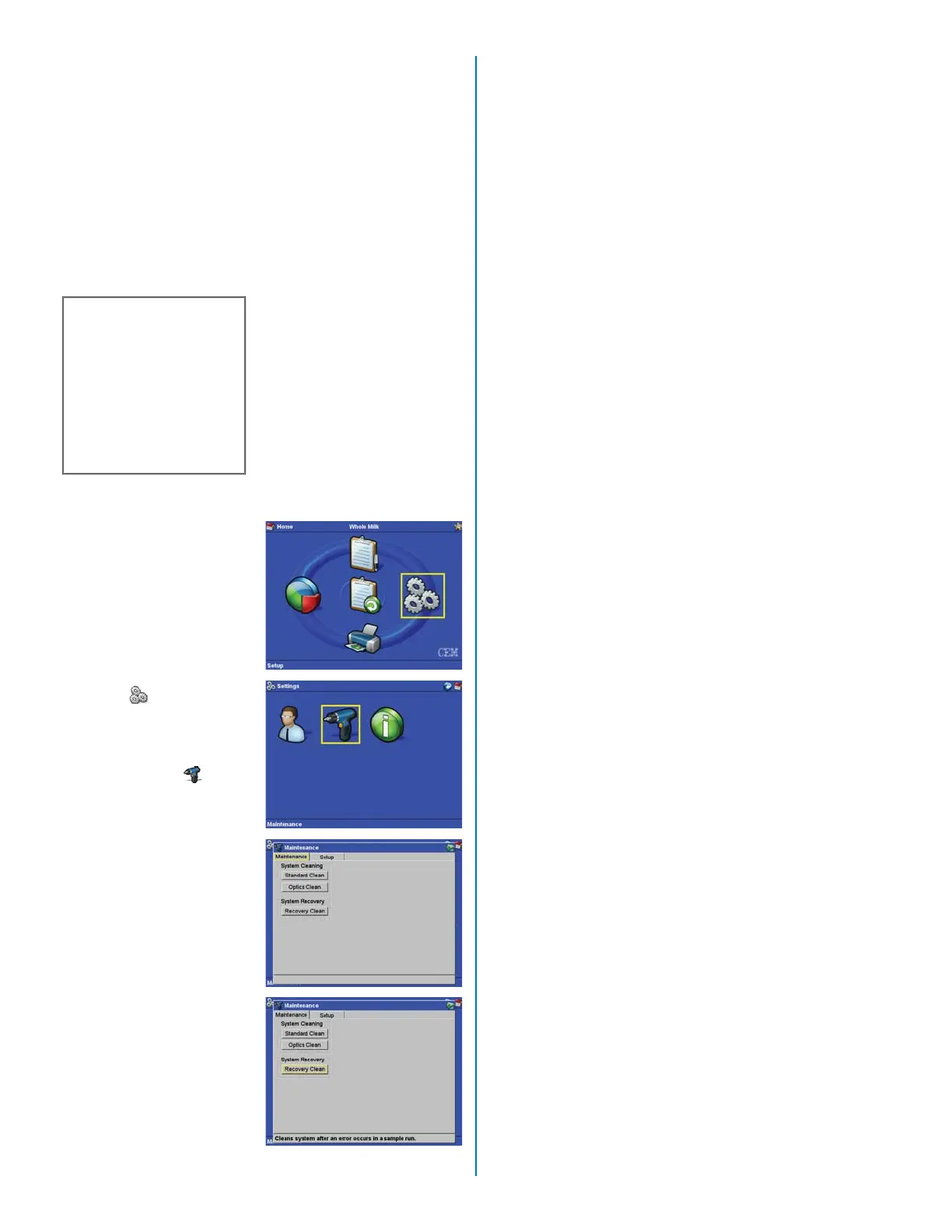
1. From the Main Screen,
using the arrow keys,
select “Setup” and
press the “Enter” key.
2. From the “Settings”
screen, select “Main-
tenance” and press the
“Enter” key.
3. Using the arrow keys,
select “Maintenance.”
4. Using the arrow keys,
select “Recovery
Clean.”
The instrument cleans the
homogenizer and purges
all fl uids from the system
components.
4. Press the “Home” key to
begin another test.
28


 To Next Page
 Loading...