1. BASIC OPERATION
1-5
1.3 How to Adjust Display Brilliance
To adjust the display brilliance, press T or S key. The setting range is 0 to 9. "0" is
off and "9" is the brightest. Hold down T or S key to change the display brilliance rap-
idly.
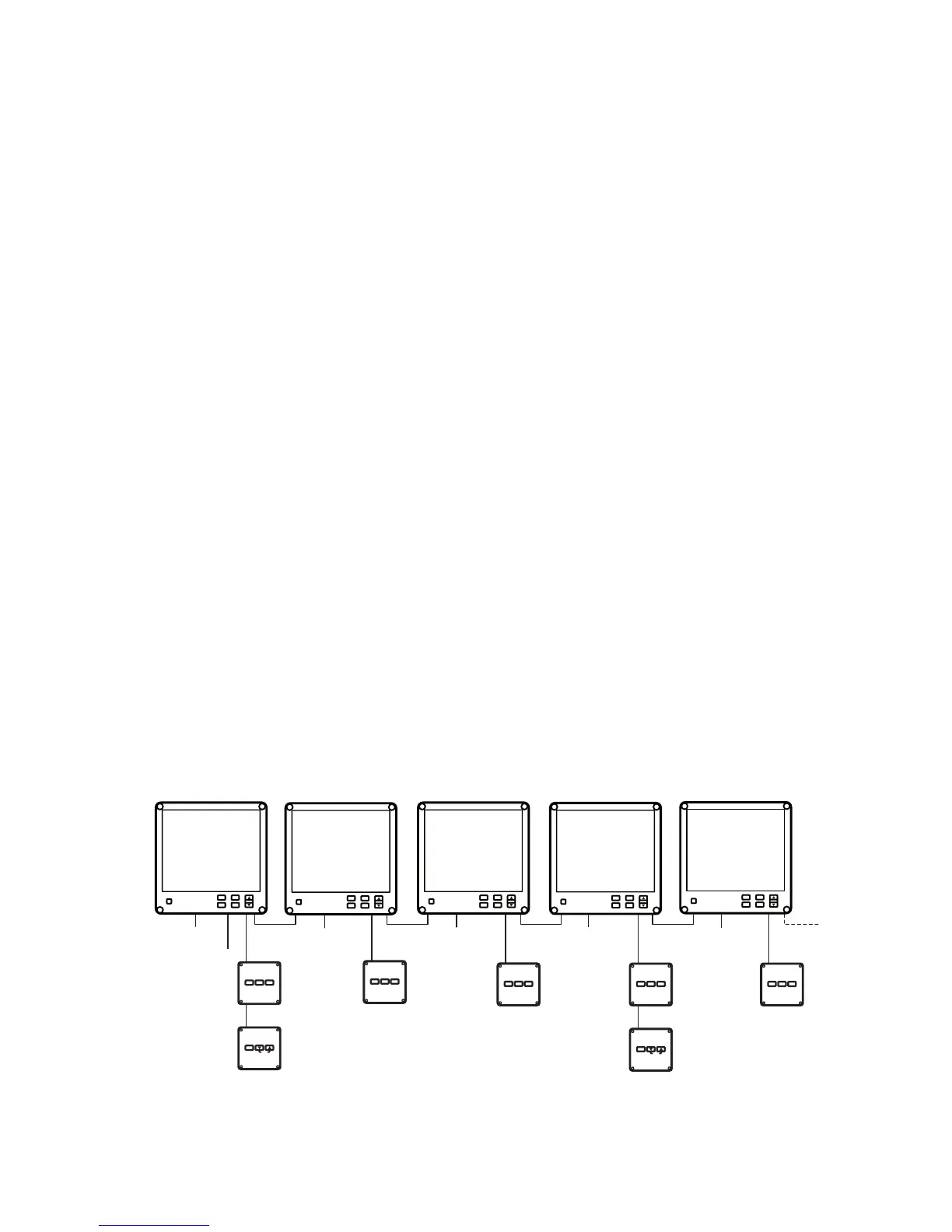
Operation with RD-50 (main)
The RD-50 (main) simultaneously controls the display brilliance of the RD-50 (main)
and the RD-50s (sub).
• Controls with T key: Decrease the display brilliance.
• Controls with S key: Increase the display brilliance.
Operation with RD-50 (sub)
Adjust the display brilliance of an RD-50 (sub) as follows to equalize brilliance with
RD-50 (main).
• Controls with T key: Decrease the display brilliance. (The variation is smaller than
that of RD-50 (main) and RD-502 connected to RD-50 (main).)
• Controls with S key: Increase the display brilliance. (The variation is smaller than
that of RD-50 (main) and RD-502 connected to RD-50 (main).)
Note: When the display brilliance is 0, 1 or 9 on a main RD-50, this operation by RD-
50 (sub) is not available.
Operation with RD-502
The RD-502 simultaneously controls the display brilliance of the RD-50 (main) and the
RD-50s (sub).
• Controls with T key: Decrease the display brilliance.
• Controls with S key: Increase the display brilliance.
FURUNO
DISP UNIT
MODE
REMOTE CONTROLLER
RD-501
FURUNO
DAY
NT
DIMMER CONTROLLER
RD-502
BRILL
RD-501
RD-502
RD-50: A (main)
12-24 VDC
NMEA 0183
sensor signal
RD-50: B (sub) RD-50: C (sub)
RD-50: D (main)
RD-50: E (sub)
12-24 VDC
12-24 VDC
12-24 VDC
12-24 VDC
FURUNO
DISP UNIT
MODE
REMOTE CONTROLLER
RD-501
RD-501
FURUNO
DISP UNIT
MODE
REMOTE CONTROLLER
RD-501
RD-501
FURUNO
DISP UNIT
MODE
REMOTE CONTROLLER
RD-501
RD-501
FURUNO
DISP UNIT
MODE
REMOTE CONTROLLER
RD-501
FURUNO
DAY
NT
DIMMER CONTROLLER
RD-502
BRILL
RD-501
RD-502
FURUNO
RD-50
PWR
DISP
DAY
NT
MENU
ESC
ENT
BRILL
FURUNO
RD-50
PWR
DISP
DAY
NT
MENU
ESC
ENT
BRILL
FURUNO
RD-50
PWR
DISP
DAY
NT
MENU
ESC
ENT
BRILL
FURUNO
RD-50
PWR
DISP
DAY
NT
MENU
ESC
ENT
BRILL
FURUNO
RD-50
PWR
DISP
DAY
NT
MENU
ESC
ENT
BRILL
The RD-502 connected to RD-50 A
commonly controls the brilliance of
RD-50 A, RD-50 B and RD-50 C.
The RD-502 connected to RD-50 D
commonly controls the brilliance of
RD-50 D and RD-50 E.


 To Next Page
 Loading...









