23
4
BASIC OPERATION
1
2
3
4
5
6
7
8
9
10
11
12
13
14
15
16
17
18
19
Depending on the
tuning step setting, it
may not be possible
to input a 1 kHz digit.
In this case, enter “0”
as 1 kHz digit, then ro-
tate [DIAL] to set the
desired frequency.
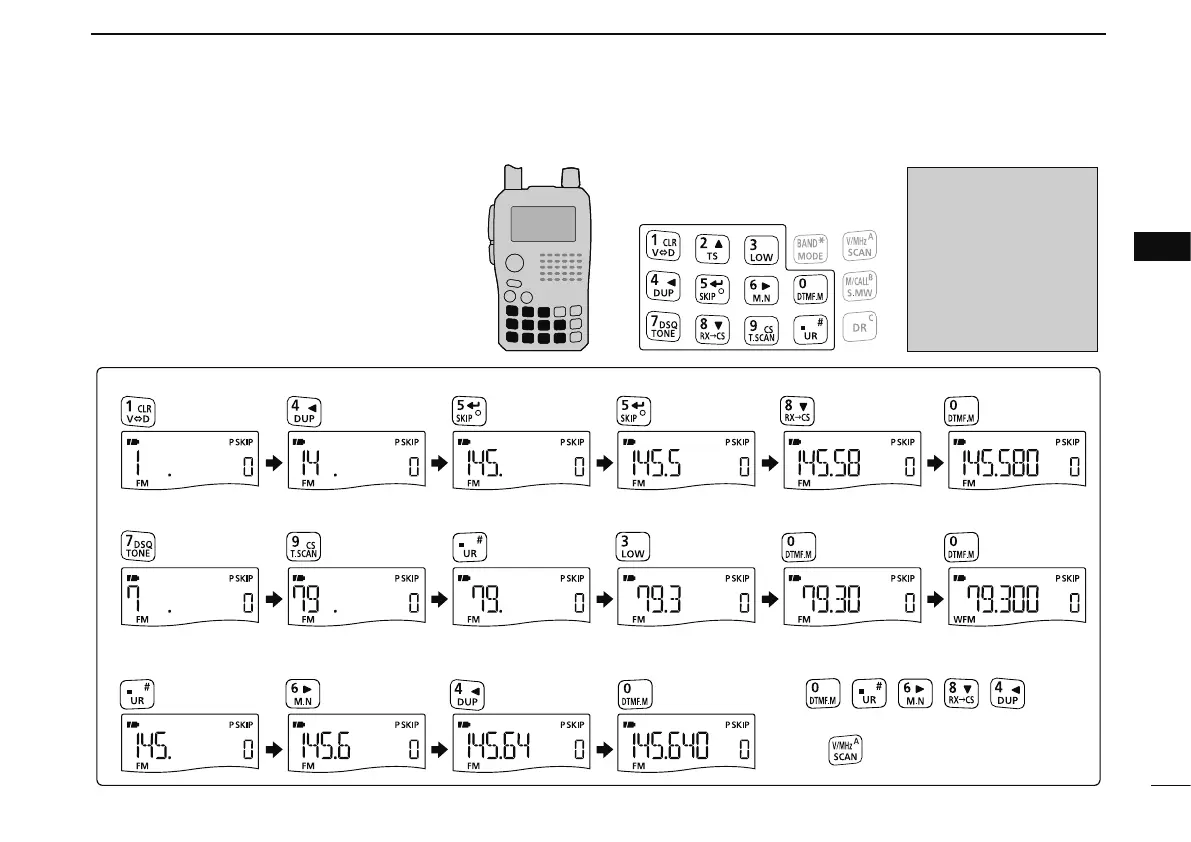
• Entering 145.580 MHz
•
Entering
79.300 MHz
• Editing to 684 kHz
• Changing 100 kHz and below
Editing 145.580 MHz to 145.640 MHz
Push to cancel numeral key input.
D Using the keypad
The frequency can be directly set via numeric
keys.
• If a frequency outside the frequency range is en-
tered, the previously displayed frequency is auto-
matically recalled after entering last digit.
q Push [V/MHz] to select the VFO mode, if
necessary.
w Enter the desired frequency via the keypad.


 To Next Page
 Loading...










