43 6 Configurations menu
fabian Therapy evolution | SW V5.1.x
Ref: 121003.EN / Date: 26Jan2021
Optional
: Resetting the device to factory settings is only possible
if activated in the “Service Mode” menu. “Nurse Call” can also
be activated or deactivated in Service mode.
I-time Display Configuration. Setting I time or frequency
(Frequency - I-time/I-time/E-time).
WARNING:
Only Reset to hospital and factory settings when the device is NOT connected to patients.
Patient data
NOTE
:
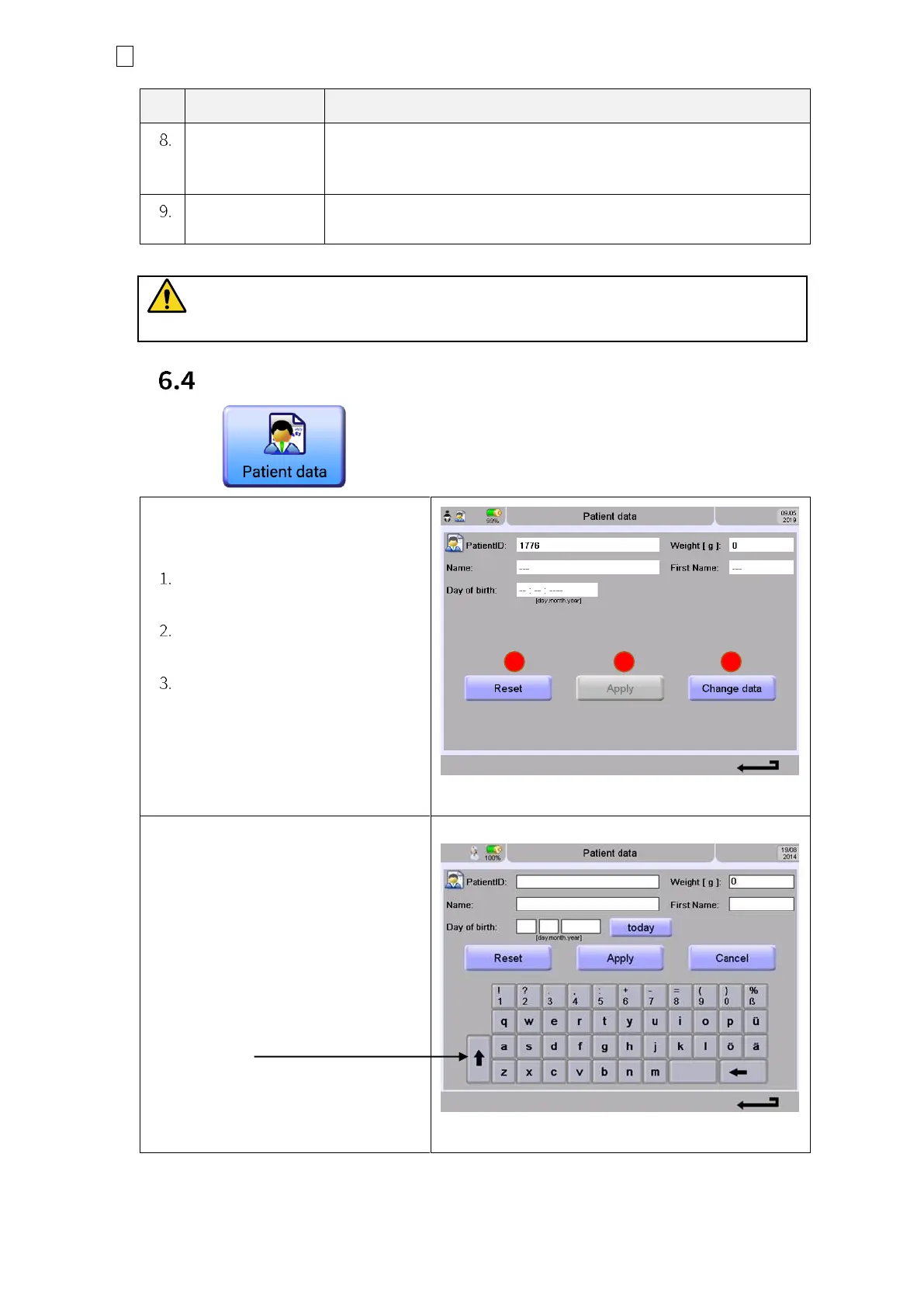
Entering new patient data will delete
all data from the previous patient.
Reset : Clearing the actual
patient data
Apply : will store patient data
from now
Change data : is used to add
new patient data. Deleting all
stored data from the previous
patient
Figure 6-11: Patient data entry
For data input, just touch the Change
data key and choose the field for
input.
Accepting data by pressing the Apply
button.
NOTE
: For Capital letters, touch the
Up-arrow key.
Figure 6-12: Data entry keyboard


 To Next Page
 Loading...


