5. CHANNEL FUNCTION SETUP
5-4
5.7 Channel Naming
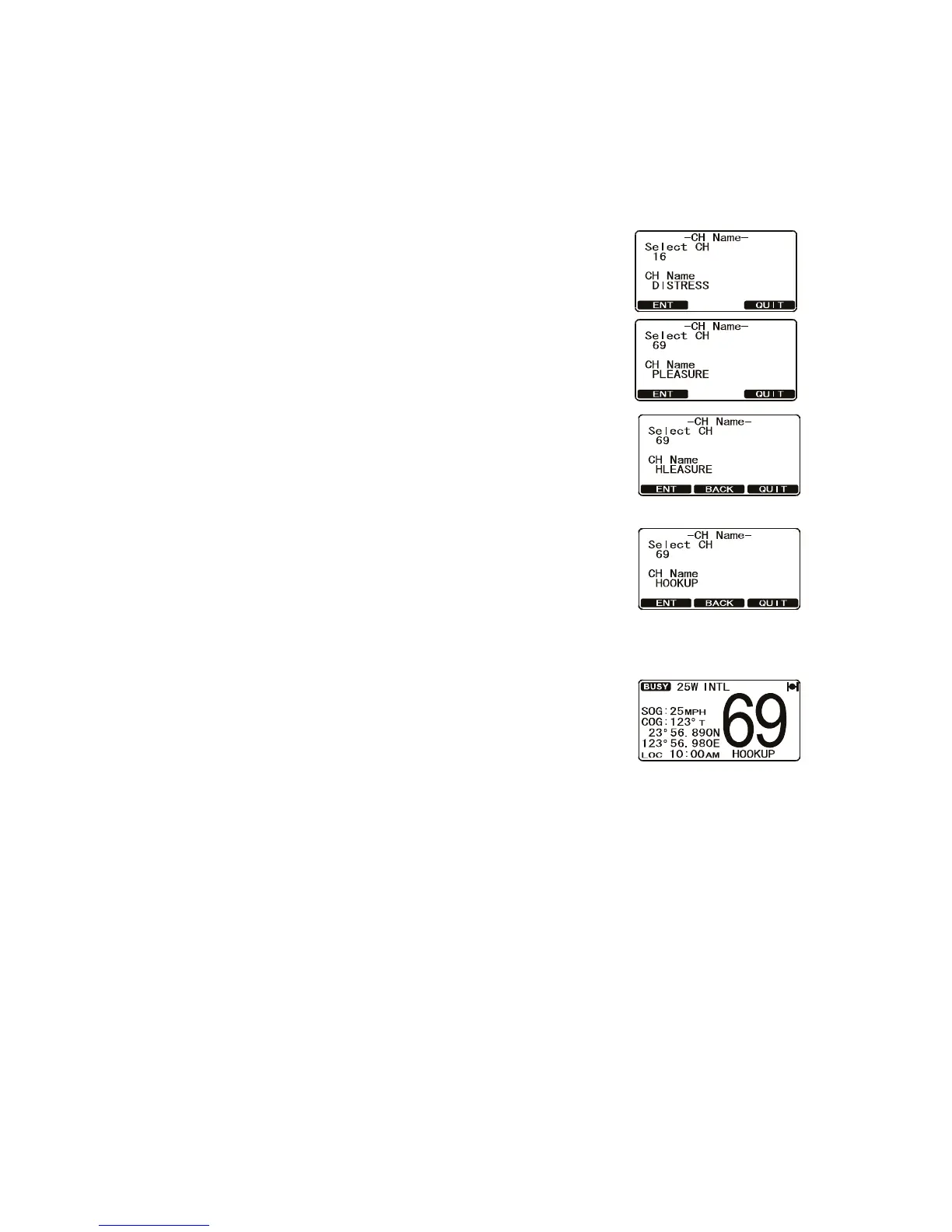
When the radio mode is in use, the display shows a name under the channel number
selected. This is name of the current channel. You can customize channel names as
follows:
1. Press and hold down the CALL/MENU key until the [Setup Menu] appears.
2. Rotate the CH knob to select [CH Function Setup] then
press the [SELECT] soft key.
3. Select [CH Name] with the CH knob then press the
[SELECT] soft key.
4. Rotate the CH knob to select a channel then press the
[ENT] soft key.
5. Press applicable key to enter the first letter of the new
channel name.
Example: Press the 4/DIM key repeatedly to toggle
among the seven available characters associated with
the key: 4 → G → H → I → g → h → i → 4...
6. Press the [ENT] soft key to store the first letter in the
name and move to the next letter to the right.
7. Repeat steps 5 and 6 to complete the name. The name
can have a maximum of 16 characters. Use the [ENT]
soft key to shift the cursor. This method can also be
used to enter a blank space in the name. If you enter a
wrong character, press the [BACK] soft key until the
wrong character is selected, then enter the correct
character.
8. Press and hold the [ENT] soft key to save the name.
9. Press the [QUIT] soft key several times to return to ra-
dio operation.


 To Next Page
 Loading...











