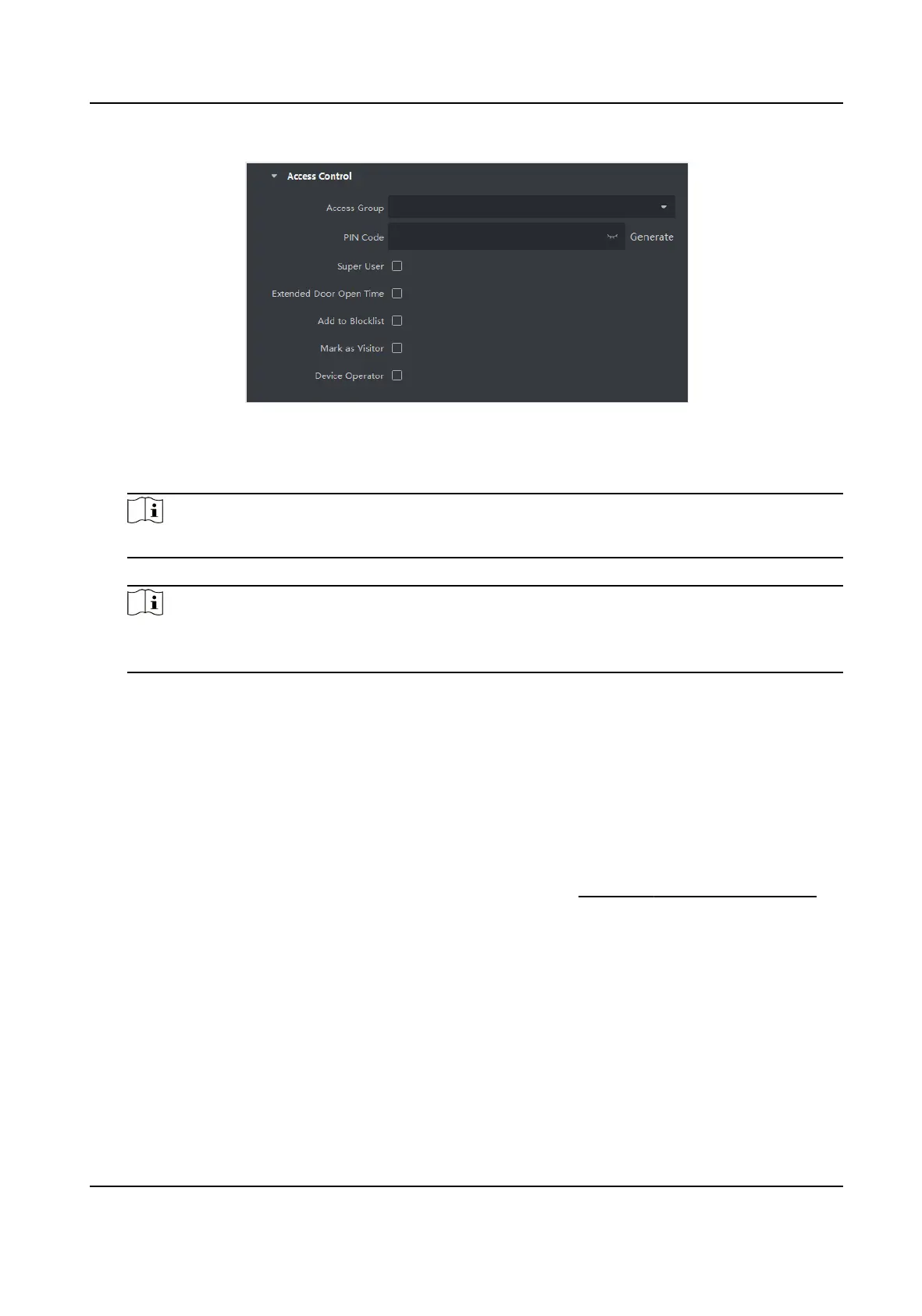
Figure 9-6 Congure Access Control Informaon
4.
Set a unique PIN code for the person which can be used for access authencaon.
-
Manually enter a PIN code containing 4 to 8 digits.
Note
Persons' PIN codes cannot be repeated.
-
Click Generate to randomly generate an unrepeated PIN code of 6 digits.
Note
If there are repeated PIN codes, a prompt will pop up on the client. The admin can generate a
new PIN code to replace the repeated PIN code and nofy related persons.
5.
Check the person's operaon permissions.
Super User
If the person is set as a super user, he/she will have
authorizaon to access all the doors/
oors and will be exempted from remaining closed restricons, all an-passback rules, and
rst person authorizaon.
Extended Door Open Time
Use this funcon for persons with reduced mobility. When accessing the door, the person will
have more me than others to pass through doors.
For details about seng the door's open duraon, refer to Congure Parameters for Door .
Add to Blocklist
Add the person to the blocklist and when the person tries to access
doors/oors, an event
will be triggered and sent to the client to nofy the security personnel.
Mark as Visitor
If the person is a visitor, you should set the her/his valid mes for visit.
DS-K1TA70 Series Face Recognion Terminal User Manual
122


 To Next Page
 Loading...