Appendix A Option Units
A-3
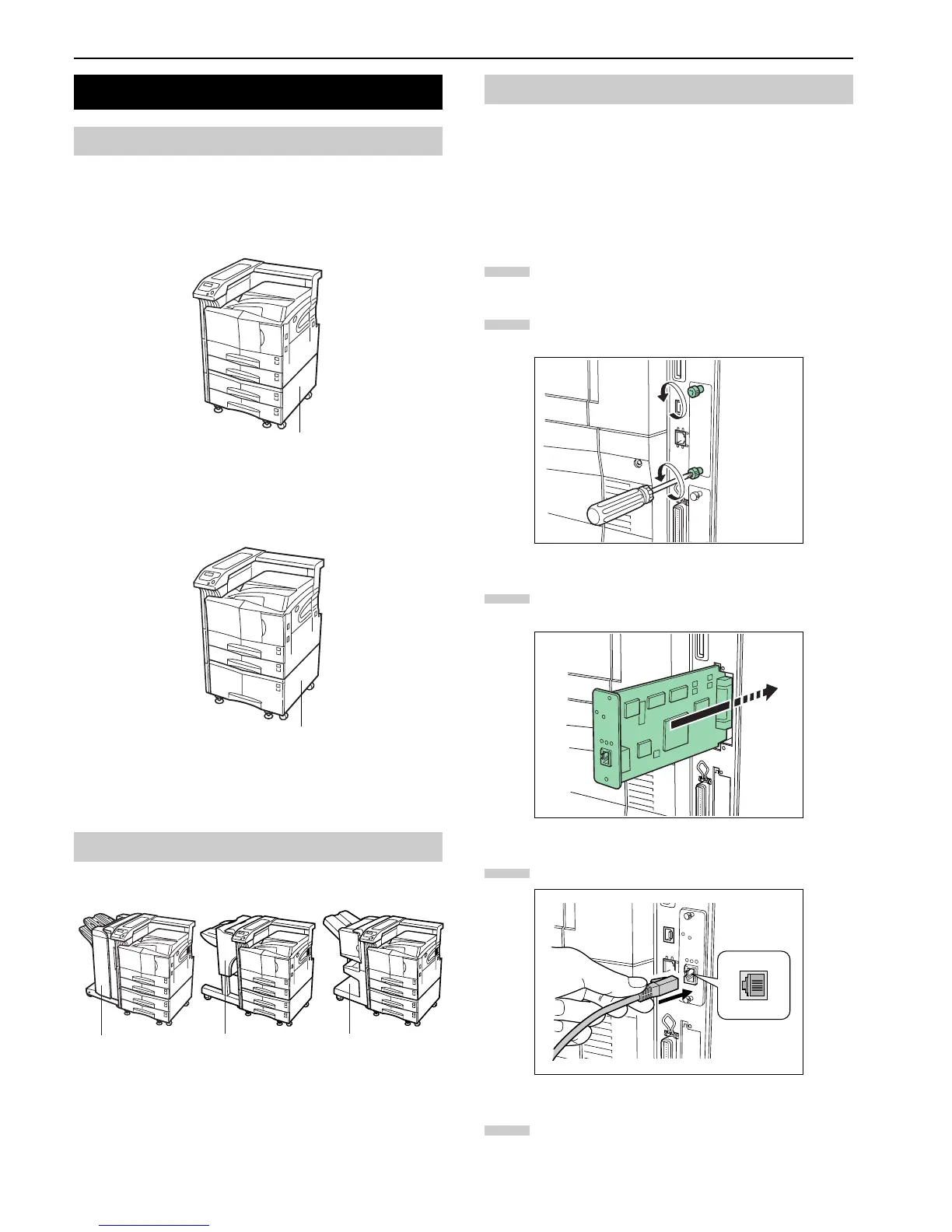
PF-70 or PF-75 Paper Feeder can be installed below the printer.
PF-70 Paper Feeder holds approximately 500 sheets of A4 to
A3 (11 × 17" in Ledger) size paper.
Figure A-2
PF-75 Paper Feeder holds approximately 3000 sheets of A4,
B5 or Letter size (8.5 × 11") paper.
Figure A-3
For details of installing the optional paper feeder in the print-
er, see the
PF-70/75 Installation Guide
.
DF-71/73/75 Document Finisher can be installed to the printer.
Figure A-4
For details of installing the optional finisher in the printer,
see the
DF-71/73/75 Installation Guide
.
The FS-9120DN/FS-9520DN have the standard Network in-
terface. This printer supports the TCP/IP, IPX/SPX, Net-
BEUI, and EtherTalk protocols, so the network printing
under various platforms such as Windows, Macintosh, UNIX,
and NetWare is available.
An option network interface card can be added by the follow-
ing procedure.
Turn off the printer and disconnect the power cord
and printer cable.
Remove the two screws from the option interface slot
cover (OPT).
Figure A-5
Insert the network interface card and secure it with
the screws removed in step 2.
Figure A-6
Connect the network cable.
Figure A-7
Set the network address from the printer operator
panel (for details about the modes, see
Changing
Network Interface Parameters on page 3-20
).
2. Installing Option Units
2.1 PF-70/75 Paper Feeders
2.2 DF-71/73/75 Document Finishers
PF-70
PF-75
DF-71
DF-75DF-73
2.3 Network Interface
1
2
3
4
5


 To Next Page
 Loading...