57
English
Drawing on screen
A simple drawing menu is displayed instead of the comparison mode menu.
Tap the pen button in the Control menu while the comparison mode is set
A simple drawing menu is displayed instead of the comparison mode menu.
Note
●
It is different from the drawing function of WhiteBoard. (Simple drawing function see page 52)
•
Pen and marker can be selected for drawing.
•
The colors available for drawing are limited (4 colors. Related with the pen button color in the Control menu).
•
If you perform an operation other than drawing, all drawn data will be erased.
●
Drawing data written using the simple drawing function will not be zoomed. However, if you have already zoomed,
the magnification will be retained.
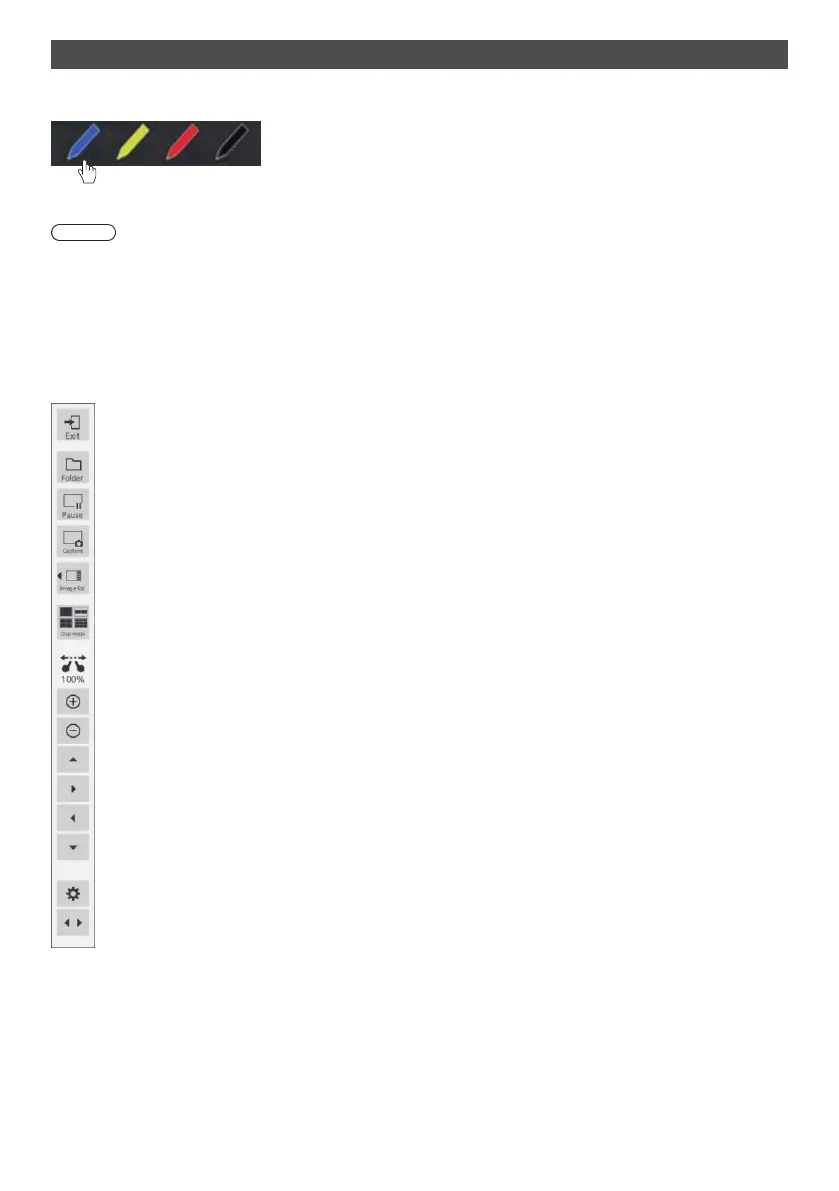
[Comparison mode] menu commands
[Exit]: Quits Comparison mode
[Folder]: Displays the data selection screen.
[Pause]: Pauses the video on the display screen.
[Capture]: Captures the displayed image. (Menus and other UI objects cannot be captured. The zoom
is applied to image-capturing.)
[Image list]: Displays a data list for comparison when the screen is set to one screen.
[Disp mode]: Switches the number of screen splits.
Thenumberofscreensplitschangeseachtimeyoutapit(1→2→4→9→1).
Zoom magnification display
Expand
Shrink
Move up
Move right
Move left
Move down
Settings: Displays the application setting screen.
Switch menu display position: Switches the menu display position (right / left).


 To Next Page
 Loading...