61
English
Using “Memory
viewer” (basic
operations)
“Memory viewer” is a function used to select still images
or movies saved in a USB memory and show it on the
display.
[Remote control operations]
Displaying the “Memory viewer”
screen
Press <INPUT> to switch the input to [MEMORY
VIEWER].
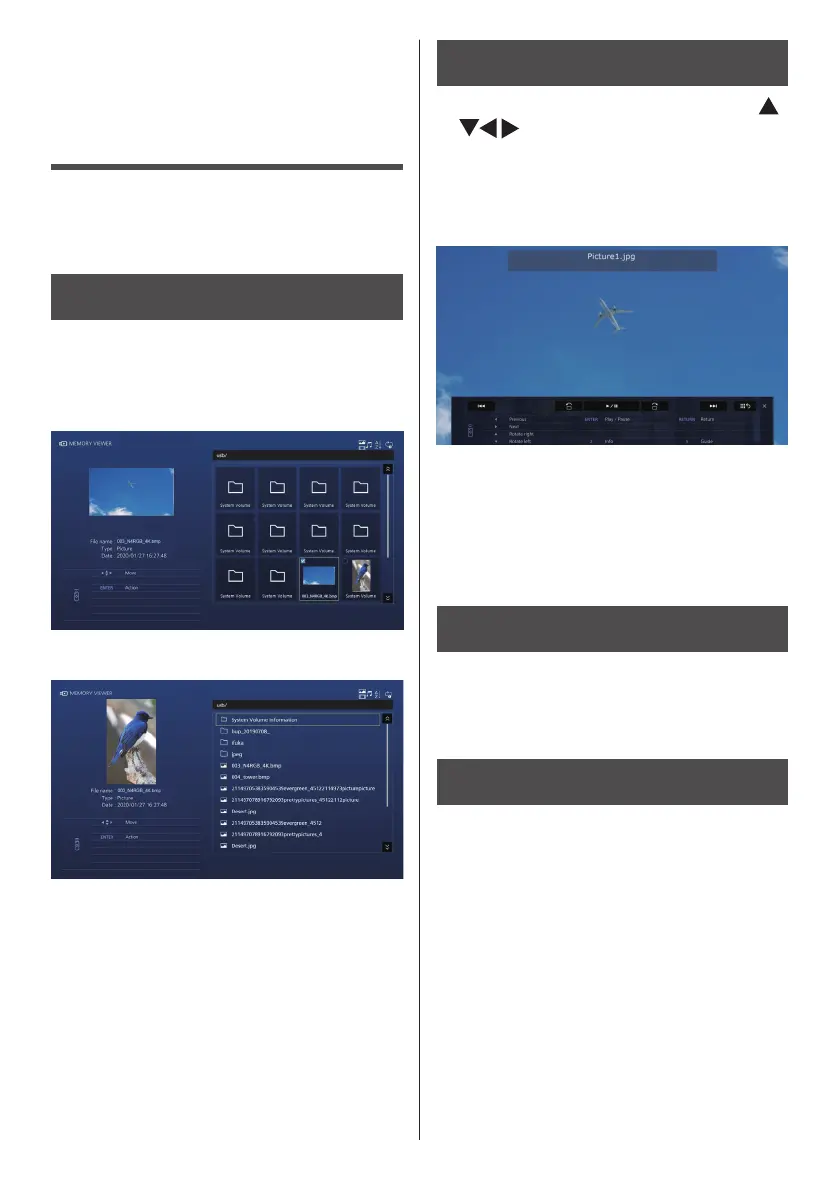
A thumbnail or file list is displayed.
■ Thumbnail view
■ File list view
Playing a still image, video, or music
file
1
On the thumbnail/file list view, use
to select the file you want to
play.
2
Press <ENTER>.
The still image or video is displayed in full screen.
(Example: Still image)
3
Press <RETURN>.
The thumbnail or file list view is displayed again.
●
For details on the “Memory viewer” function, see
page 140.
[Touch operations]
Displaying the “Memory viewer”
screen
Touch [MEMORY VIEWER] on the touch operation
input selection (Control menu - input selection).
●
The screen displayed is the same as that displayed
for remote control operations.
Playing a still image, video, or music
file
1
On the thumbnail / file list view, touch
the file you want to play to select it.
The touched file will be selected.
2
Touch the selected file again
The still image or video is displayed in full screen.
3
Press <Return>.
The thumbnail or file list view is displayed again.
●
For details on the “Memory viewer” function, see
page 140.


 To Next Page
 Loading...