51
ESP-LXME Controller
Section E - Flow Management
The ESP-LXME controller oers several tools to dynamically manage
the hydraulics of the irrigation system including:
FloManager
TM
Standard feature of the LXME controller which manages ow demands
on the water source.
FloWatch
TM
Optional add-in module which monitors the actual ow rate of the
system and reacts to ow problems.
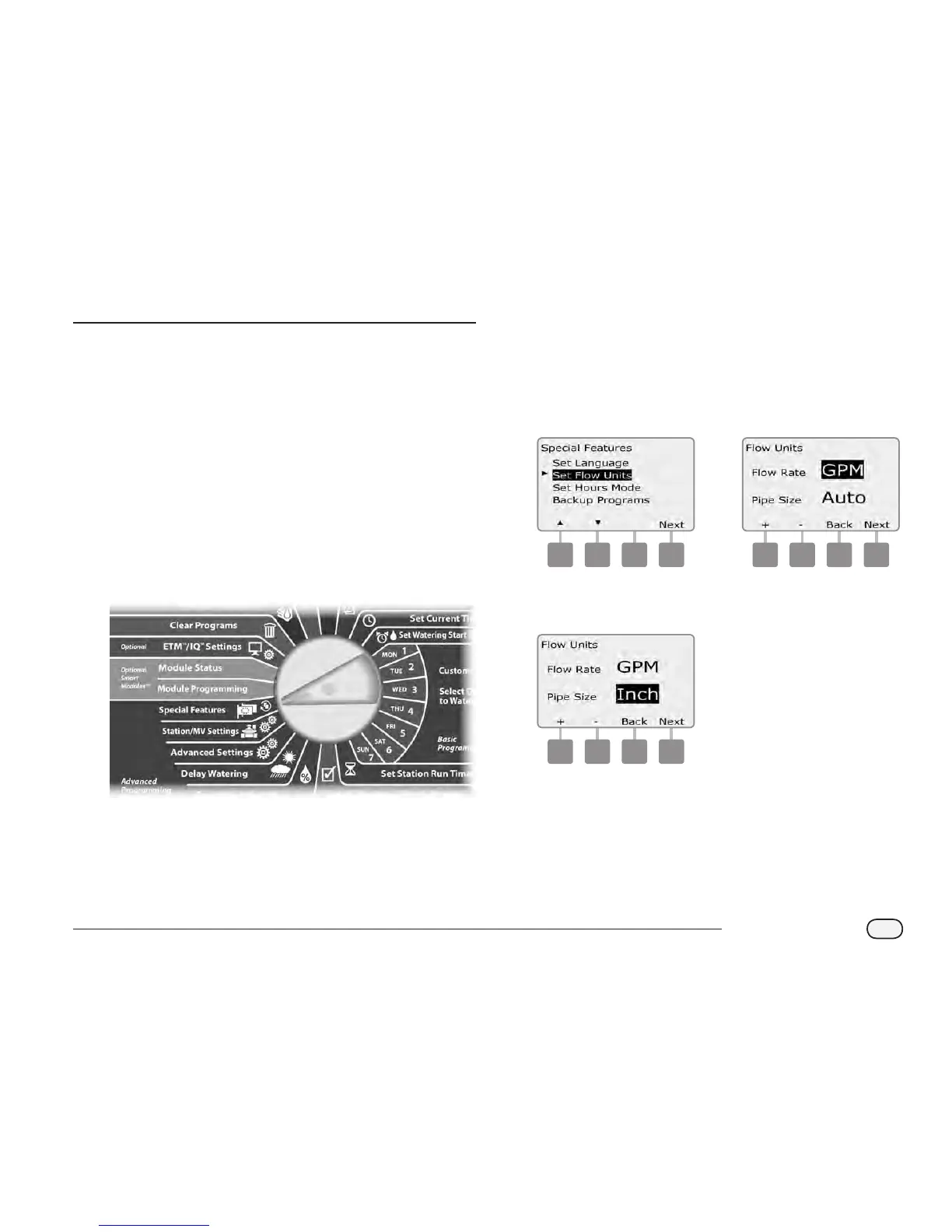
Set Flow Units
To use FloManager or FloWatch you rst need to set the measurement
units for ow management.
Turn the controller dial to Special Features.
A
The Special Features screen appears. Press the Down Arrow
button to select Set Flow Units; then press Next.
B
The Flow Units screen appears. Press the + and – buttons to select
the desired ow measurement (English or metric); then press
Next.
1 2
C
Press the + and – buttons to select the desired pipe size
measurement (English or metric).
3



 To Next Page
 Loading...











