Playback
128
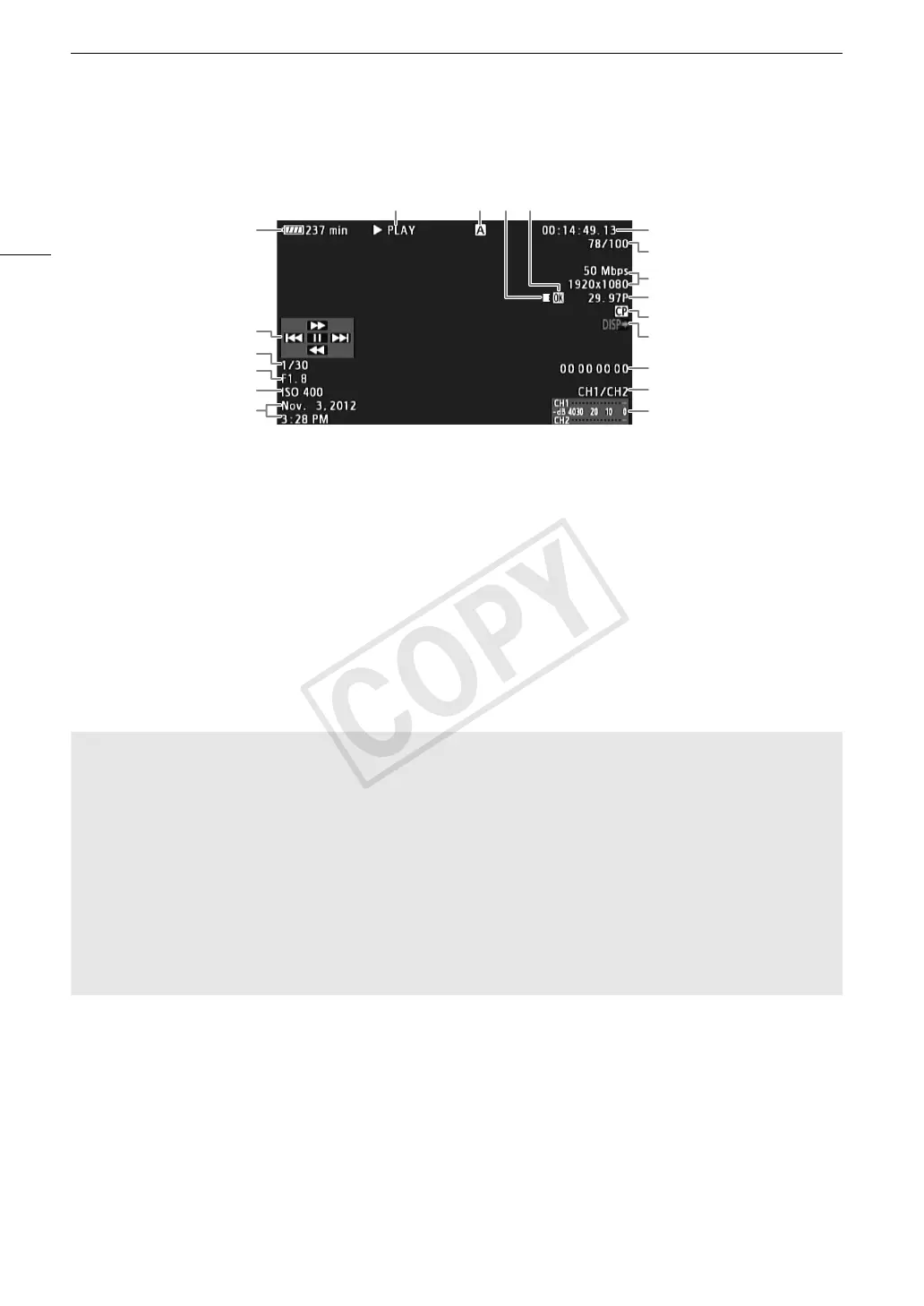
Onscreen Displays
1
Appears when [£ LCD/VF Setup] > [Metadata Display] > [Camera Data] is set to [On].
2
Appears when [£ LCD/VF Setup] > [Metadata Display] > [Date/Time] is set to [On].
3
For clips recorded using slow & fast motion mode, the shooting frame rate and playback frame rate will both be displayed.
7 8 910
14
11
12
17
18
19
1
2
4
5
6
13
15
3
16
1 Remaining battery time (A 56)
2 Joystick guide (A 129)
3 Shutter speed
1
(A 62)
4 # Aperture value
1
(A 69)
5 ISO Speed/Gain
1
(A 65)
6 Recording date and time
2
7 Playback operation
8 Selected CF card
9 Relay recording
10 $ mark/% mark (A 102, 132)
11 Time code (A 84)
12 Clip number / Total number of clips
13 Bit rate and resolution (A 59)
14 Frame rate
3
(A 59)
15 Embedded custom picture file (A 114)
16 Output displays (A 142)
17 User bit (A 87)
18 Audio output channel (A 95)
19 Audio level meter
7 Playback operation
* The playback speed (x5, x15 or x60) will also appear in the indicator.
9 Relay recording
Appears when a clip begins on one CF card and continues uninterrupted on the other. 5 indicates the first
part of the recording, 6 indicates the middle part(s) and 7 indicates the last part.
Ð PLAY Playback
Ý PAUSE Playback pause
Ô/Ó Frame reverse/Frame advance
F FWD × Fast playback*
Ø F REV Fast reverse playback*


 To Next Page
 Loading...