Photos
Erasing
a
Photo
Right
After
Recording
It
Basic
Playback
You
can erase the photo recorded last
while reviewing it within the time set for
the
[REVIEW]
option or immediately
after recording it, if
[REVIEW]
is
set
to
[(i)
OFF].
.,
1
[gJ1
(QJ
25)
Viewing
Photos
It
I
~J
(QJ
25)
+
~~~
~'U
~
While reviewing the photo immediately
after recording:
1 Push the joystick
(A)
to display
the joystick guide.
2 Press
@.
3 Select
(~~)
[YES] and press @.
62
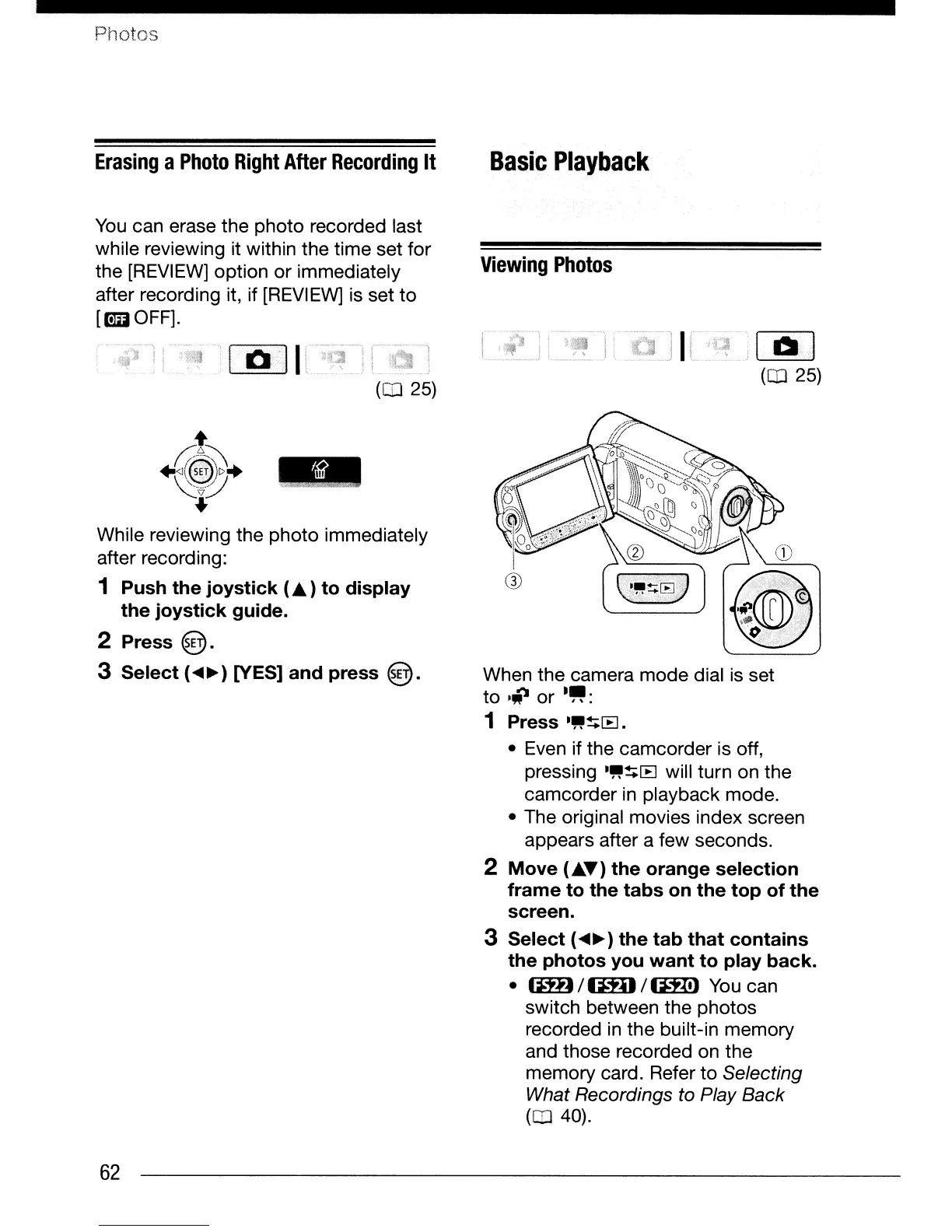
When the camera mode dial
is
set
to
liJ
or
."':
1 Press
."~[B.
• Even if the camcorder
is
off,
pressing
."~[B
will turn on the
camcorder
in
playback mode.
• The original movies index screen
appears after a few seconds.
2 Move
(A~)
the orange selection
frame to the tabs on the top of
the
screen.
3 Select
(~~
) the
tab
that contains
the photos you
want
to
play back.
•
(lH)/tmJ/1ml
You
can
switch between the photos
recorded
in
the built-in memory
and those recorded on the
memory card. Refer to Selecting
What Recordings to Play Back
(CD
40).



 To Next Page
 Loading...








