~~
I
i
I
.j;
~
I
i,
"
I
,,0"
I
Selecting
the
Video
Quality
(Recording
Mode)
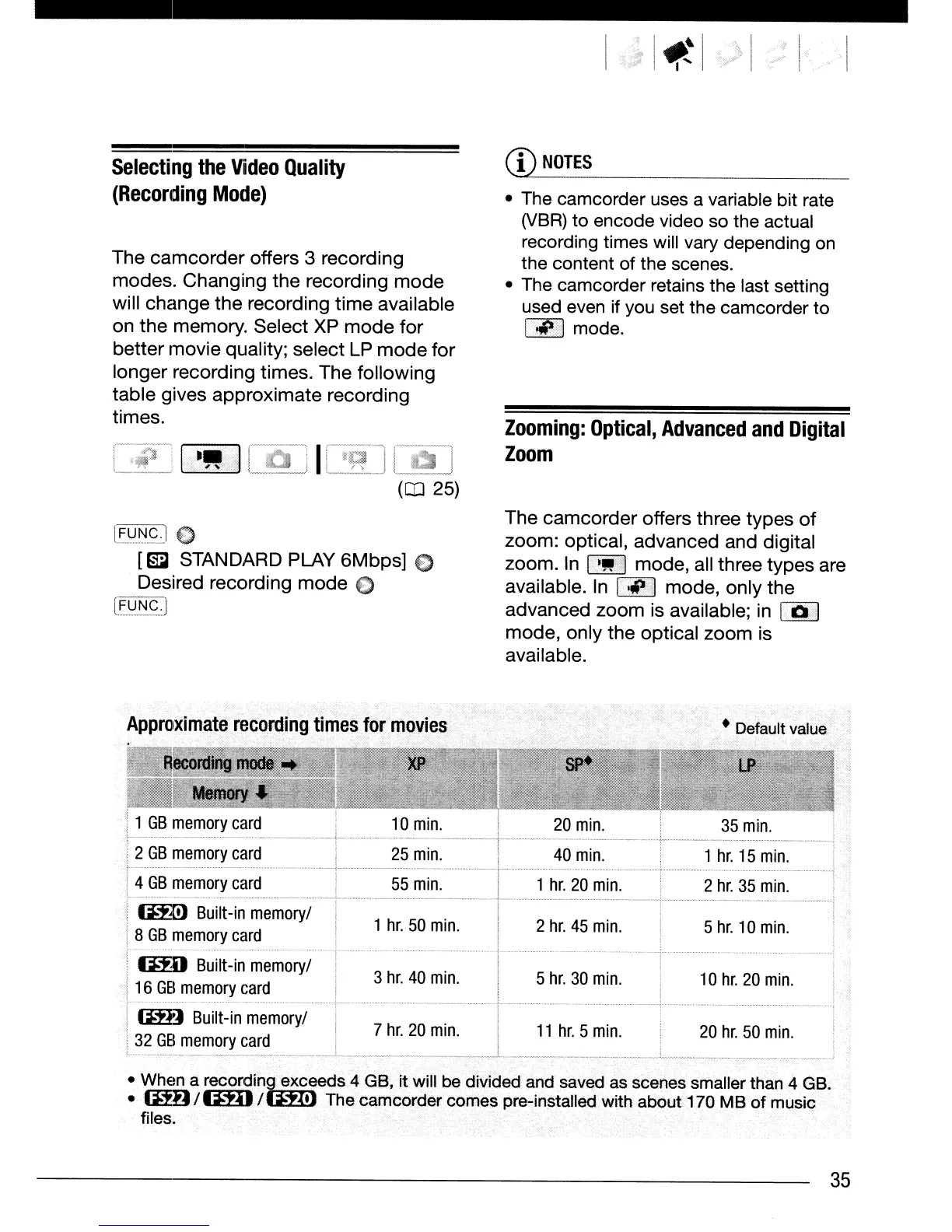
The
camcorder
offers
3
recording
modes.
Changing
the
recording
mode
will
change
the
recording
time
available
on
the
memory.
Select
XP
mode
for
better
movie
quality;
select
LP
mode
for
longer
recording
times.
The
following
table
gives
approximate
recording
times.
(aJ 25)
l~~~gJ
€)
[rm3
STANDARD PLAY
6Mbps]
C
Desired
recording
mode
€)
[~~~g.J
CD
NOTES
• The camcorder uses a variable bit rate
(VBR)
to
encode video so the actual
recording times will vary depending on
the content of the scenes.
• The camcorder retains the last setting
used even if you set the camcorder
to
I
...
.,.1
mode.
Zooming:
Optical,
Advanced
and
Digital
Zoom
The
camcorder
offers
three
types
of
zoom:
optical,
advanced
and
digital
zoom.
In I
'!lIP
I
mode,
all
three
types
are
available. In
1·'p,1
mode,
only
the
advanced
zoom
is available; in I Q
,I
mode,
only
the
optical
zoom
is
available.
Approximate
recording
times
for
movies
1
GB
memory
card
20
min.
2
GB
memory
card
25
min.
40
min.
1
hr.
15
min.
4
GB
memory
card
55
min.
1
hr.
20
min.
2
hr.
35
min.
(ml
Built-in
memory/
1
hr.
50
min.
2
hr.
45
min.
5
hr.
10
min.
8
GB
memory
card
1m)
Built-in
memory/
3
hr.
40
min.
5
hr.
30
min.
10
hr.
20
min.
16
GB
memory
card
(mJ
Built-in
memory/
7
hr.
20
min.
11
hr.
5
min.
20
hr.
50
min.
32
GB
memory
card
--,~~.
•
When
a
recordin.iffi.
eds 4 GB, it will
b.
e divided and saved
as
scenes smaller
th.an
4 GB.
•
mD/1mJ
/ t The camcorder comes pre-installed with about 170 MB of music
files.
35


 To Next Page
 Loading...









