34 www.janome.com
User Manual QUILT MAKER PRO 20
Tension Quick Start Guide
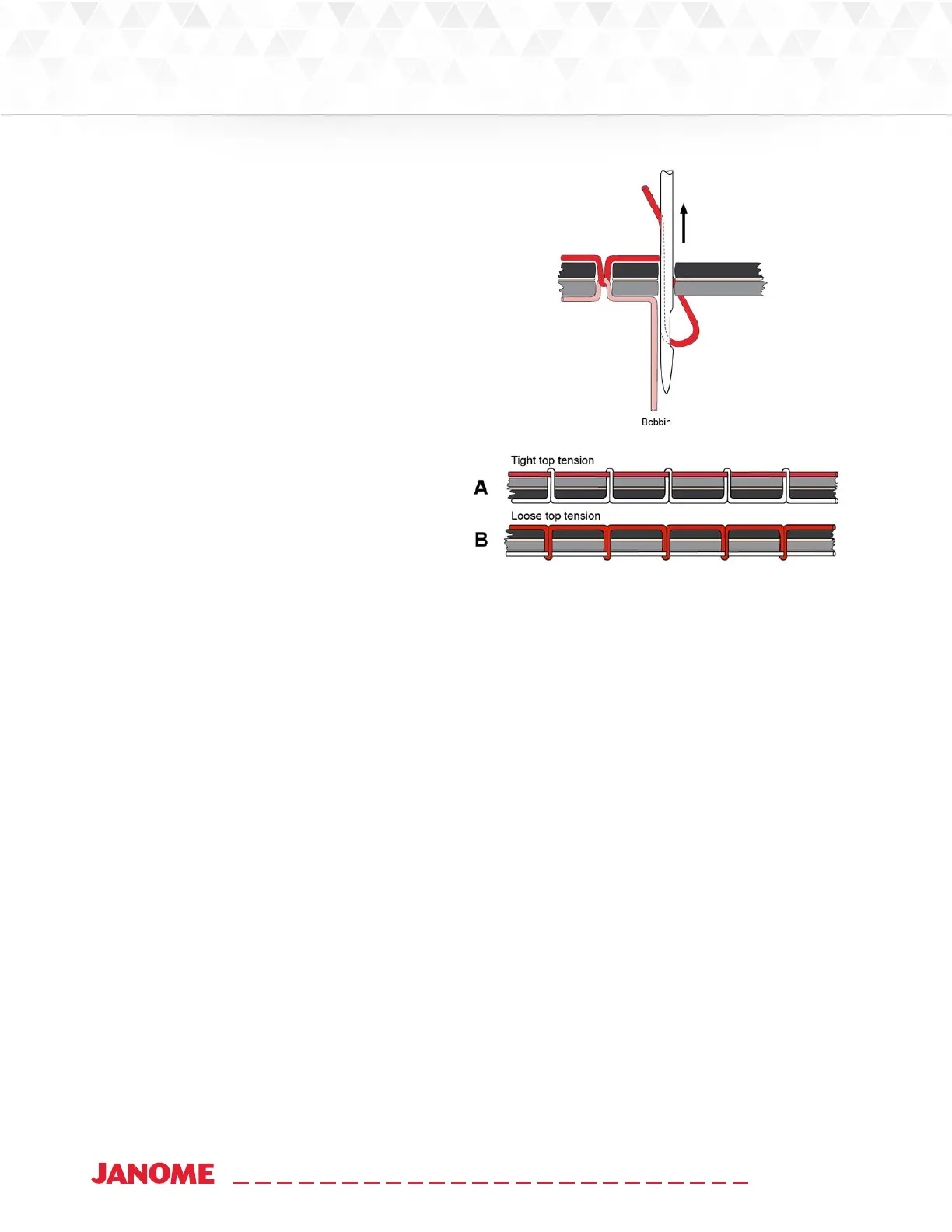
Bobbin adjustments are minute, like cks of
the clock.
1. Always adjust bobbin tension rst.
2. Stch to check top tension.
3. If thread looks like Diagram A
Problem: The top thread is too ght.
Soluon: Turn the top tension dial counter-
clockwise to loosen the top tension.
4. If thread looks like Diagram B
Problem: The top thread is too loose.
Soluon: Turn the top tension dial clockwise
to ghten the top tension.
Threading the Machine
Janome recommends that you select and use only high-quality threads for your quilts.
To thread the machine
1. Place thread cone onto spool post on the thread tray, insert the thread through the thread-mast
eyelet from back to front, connuing to the thread guide .
2. Connue to the three-hole thread guide . Wrap all three holes from back to front, being careful
not to cross threads. This is recommended for most threads. However, some very delicate threads
or metallic threads may require less tension. If you are having problems with thread breaking, try
threading only one or two holes of three-hole thread guide.


 To Next Page
 Loading...