56 www.janome.com
User Manual QUILT MAKER PRO 20
Machine Settings
To open the machine sengs, touch the Sengs icon in the Toolbar. Aer selecng it, the icon turns blue.
Choose one of the six Sengs Opons.
Aer you select an opon, the screen changes allowing you to customize that seng. At the boom of the
screen, the Sengs Opons icons will appear, allowing you to quickly and easily switch between screens.
Low-Bobbin Alarm
The amount of thread that ts on a bobbin varies according to the type and weight of thread you use. You
can create a low-bobbin capacity for up to twenty types of thread that you use in your bobbin. You’ll then
use this capacity for seng a low-bobbin alarm to alert you to when the bobbin thread is running out.
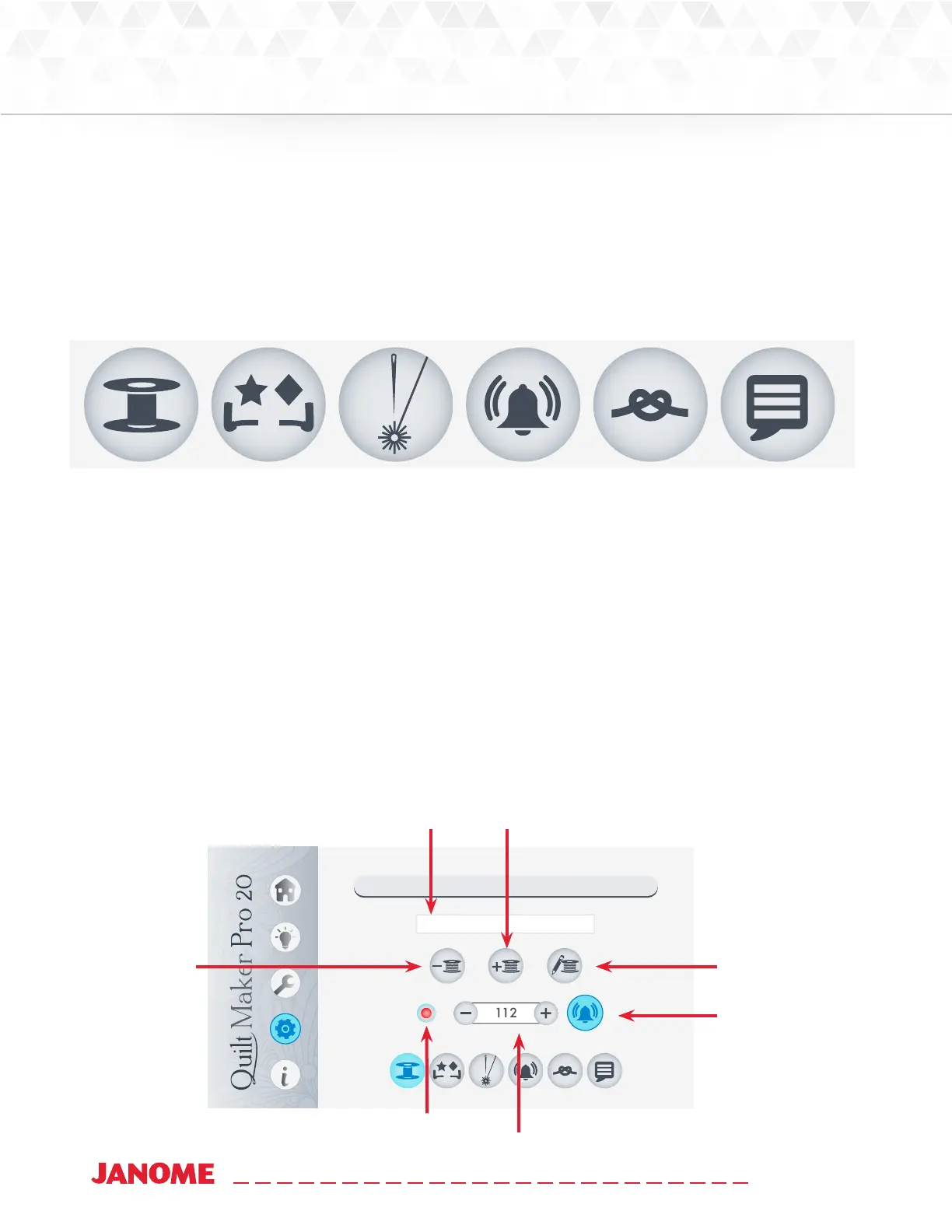
• Touch the Sengs icon in the Toolbar. Then touch the Low-bobbin Alarm buon.
Low Bobbin Alarms
40Wt
Name that de-
scribes the thread
in the bobbin.
Delete a bobbin
Add a new
bobbin
Press to toggle
on and o the
low-bobbin
alarm.
Edit bobbin
descripon
buon.
Record buon esmates
bobbin capacity
Bobbin capacity
Customize
handlebars.
Congure
alarms.
Set Language.Congure
low-bobbin
alarms.
Congure
e-os.
Turn on or o
laser lights.


 To Next Page
 Loading...