Quick Start Guide
I
How
To
Make
A Phone Call
You
can use your Bluetooth cell-phone when paired
to
this unit.
r"'~'~;~"'·-'·"'-"-·····'··~·"·'-··''''·''···'····-·~·----
-
..
_-_.
__
- _ _ _
..
_
.•...
-
"._.
__
._
_ _
.•...
" _
__
••..
_ "
..
_ _ _ .
l·
To~e
Bluetooth
function
of
DNX5180, the
o~nal
acce~so~y(KCA-B~30~iS
necessar
y
.
__
,
._
1 Register your cell-phone
to
the
unit.
Follow
as
the
procedures shown below. For
detailed
operation,
see
Registering the B/uetooth
Unit
(P.56) in
the
Instruction
Manual.
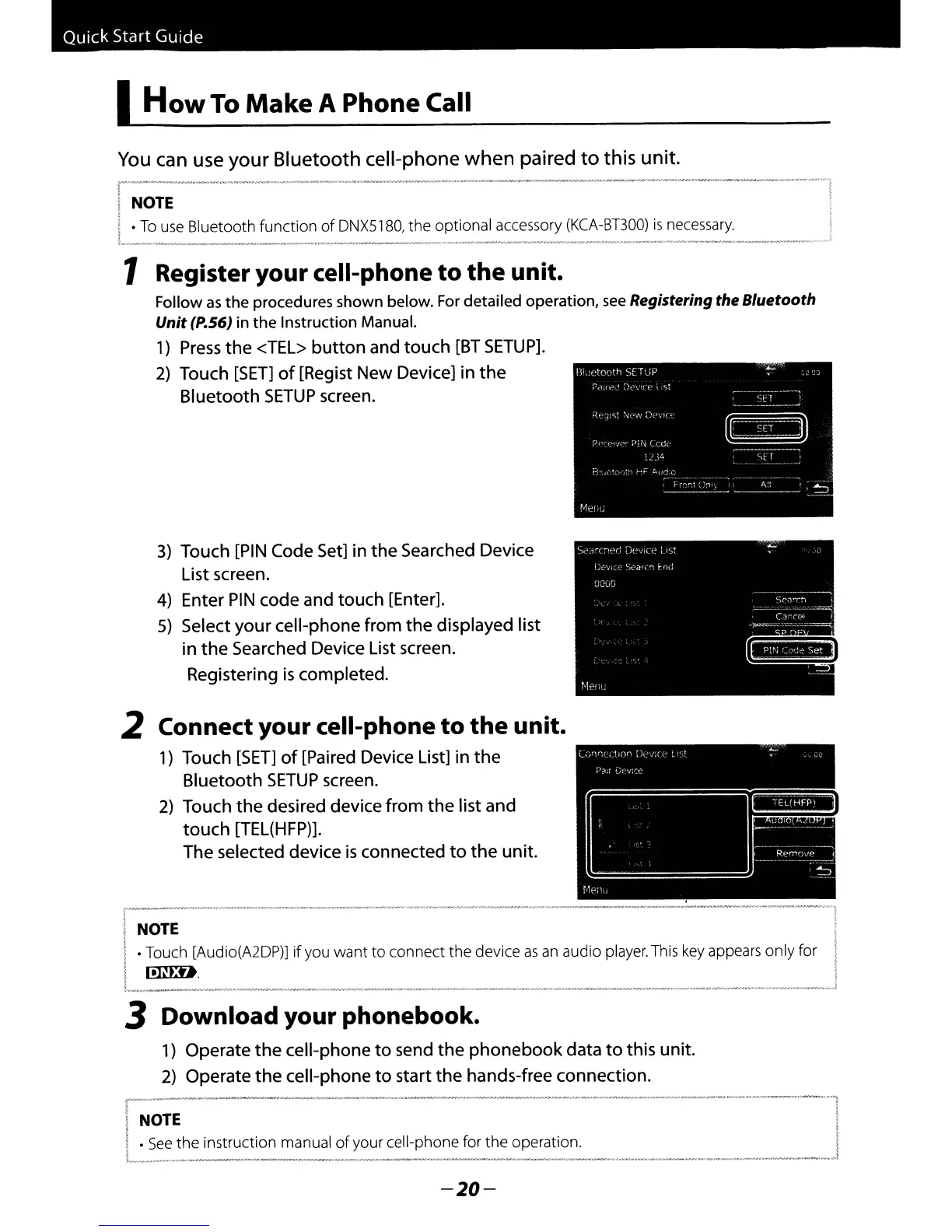
1)
Press
the
<TEL>
button
and touch
[BT
SETUP].
2)
Touch
[SET]
of
[Regist New Device] in
the
Bluetooth
SETUP
screen.
-~-----_._
...
~-----;.....------
1
.
\
t
§
~
t
1
..
__
P-....-
__
.
_.~_'
..
._.
__
..
..-_""'
....
__
...
....,
.,
...
._
...
__
.
_,
__
....
_,._._~.----i
2 Connect your cell-phone
to
the
unit.
1)
Touch
[SET]
of
[Paired Device List] in
the
Bluetooth
SETUP
screen.
2)
Touch
the
desired device from
the
list and
touch
[TEL(HFP)].
The selected device
is
connected
to
the
unit.
3)
Touch
[PIN
Code Set] in
the
Searched Device
List screen.
4)
Enter
PIN
code and touch [Enter].
5)
Select
your
cell-phone from
the
displayed list
in
the
Searched Device List screen.
Registering
is
completed.
I
I
NOTE
I.Touch [Audio(A2DP)] if you want
to
connect
the
device
as
an
audio player. This
key
appears only for
i
lmlD.
1_
••
_--_·_-
3 Download your phonebook.
1)
Operate
the
cell-phone
to
send
the
phonebook
data
to
this unit.
2)
Operate
the
cell-phone
to
start
the
hands-free connection.
r------
...
----.--.
4
...----~'
_.
__
.
__
.
-~
...
",,\
i I
INmE
I
I.
See
the
instruction manual
of
your cell-phone for
the
operation. !
l"
..
,_"
..
, ,""
~.,_
"".,"";.,-
__
."
"'
__
._
"".,
__
•
__
"',
"..-_
".,"
••
,.
"
_"
_,
_,
.."
'"'-Ol'",
..
"'
•.
__
,_,
"'.,
,.._
"'
..
,,.""
.."",,,,,,,,
_,_-",
..,......"'
••
".."
""
••
..,"""'
..
_,'.,"._"
'
__
'.,"'
..
""
_ ' _ _
,.,~J
-20-



 To Next Page