EasyManua.ls Logo

Kenwood DNX6180 - First Step

Kenwood DNX6180
177 pages
Print Icon
To Next Page IconTo Next Page
To Previous Page IconTo Previous Page
Loading...
Quick
Start
Guide
Map
Data Information
One
of
the
goals
of
Garmin
is
to
provide
customers
with
the
most complete and
accurate cartography
that
is
available
to
us
at
a reasonable cost.
We
use a combination
of
.
governmental and private data sources, which
we
identify in
product
literature and copyright
messages displayed
to
the
consumer. Virtually
all data sources contain some inaccurate
or
incomplete
data.
In
some countries, complete
and accurate
map
information
is
either
not
available
or
is
prohibitively expensive.
IFirst Step
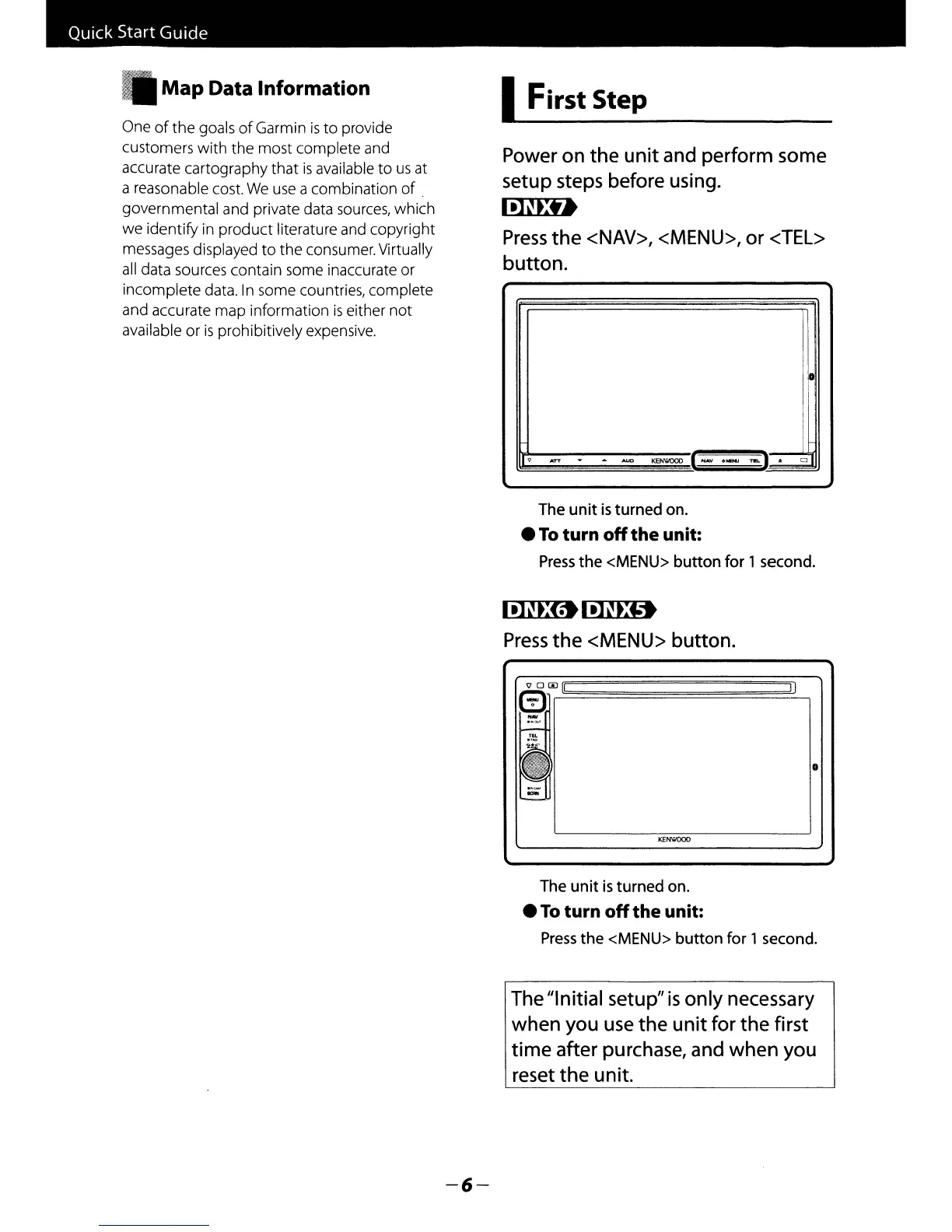
Power
on
the
unit
and perform some
setup steps before using.
IillEU
Press
the
<NAV>, <MENU>, or <TEL>
button.
v
.raT
-
...
AUO
KENWOOD
(NAY
.MENJ
~I.)..
CJ
The
unit
is
turned
on
.
To
turn
off
the unit:
Press
the
<MENU>
button
for
1 second.
~l!JHD
Press
the
<MENU>
button.
o
II
<100[1
m
-
KENWOOD
The
unit
is
turned
on
.
To
turn
off
the unit:
Press
the
<MENU>
button
for
1 second.
The "Initial setup"
is
only
necessary
when
you use
the
unit
for
the
first
time
after purchase, and
when
you
reset
the
unit.
-6-

Table of Contents

Other manuals for Kenwood DNX6180

Related product manuals