268
Creating Retouched Copies
3
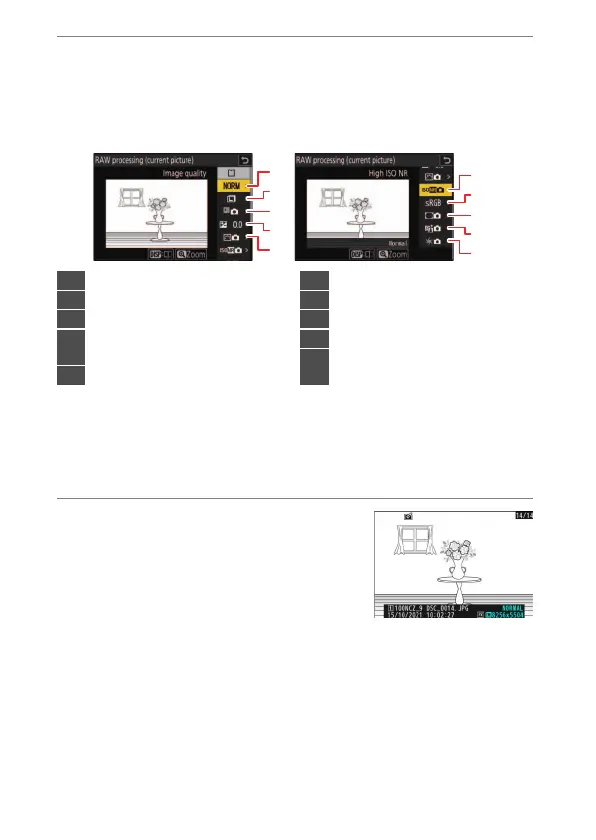
Choose settings for the JPEG copy.
•
The settings in effect when the photograph was taken appear
below a preview.
•
To use the setting in effect when the photograph was taken, if
applicable, select [Original].
•
The effects can be previewed in the edit display. To view the
unedited picture, press and hold the DISP button.
•
[Exposure compensation] can only be set to values between –2
and +2 EV.
4
Copy the photograph.
Highlight [EXE] and press
J
to create a
JPEG copy of the selected photographs.
4
3
2
1
5
9
8
7
6
10
1
Image quality (
0
105)
2
Image size (
0
108)
3
White balance (
0
158)
4
Exposure compensation
(
0
143)
5
Set Picture Control (
0
192)
6
High ISO NR (
0
515)
7
Color space (
0
511)
8
Vignette control (
0
516)
9
Active D-Lighting (
0
512)
10
Diffraction compensation
(
0
517)


 To Next Page
 Loading...











