Installing the Bobbin 37
2
—————————————————————————————————————————————————————————————
—————————————————————
1
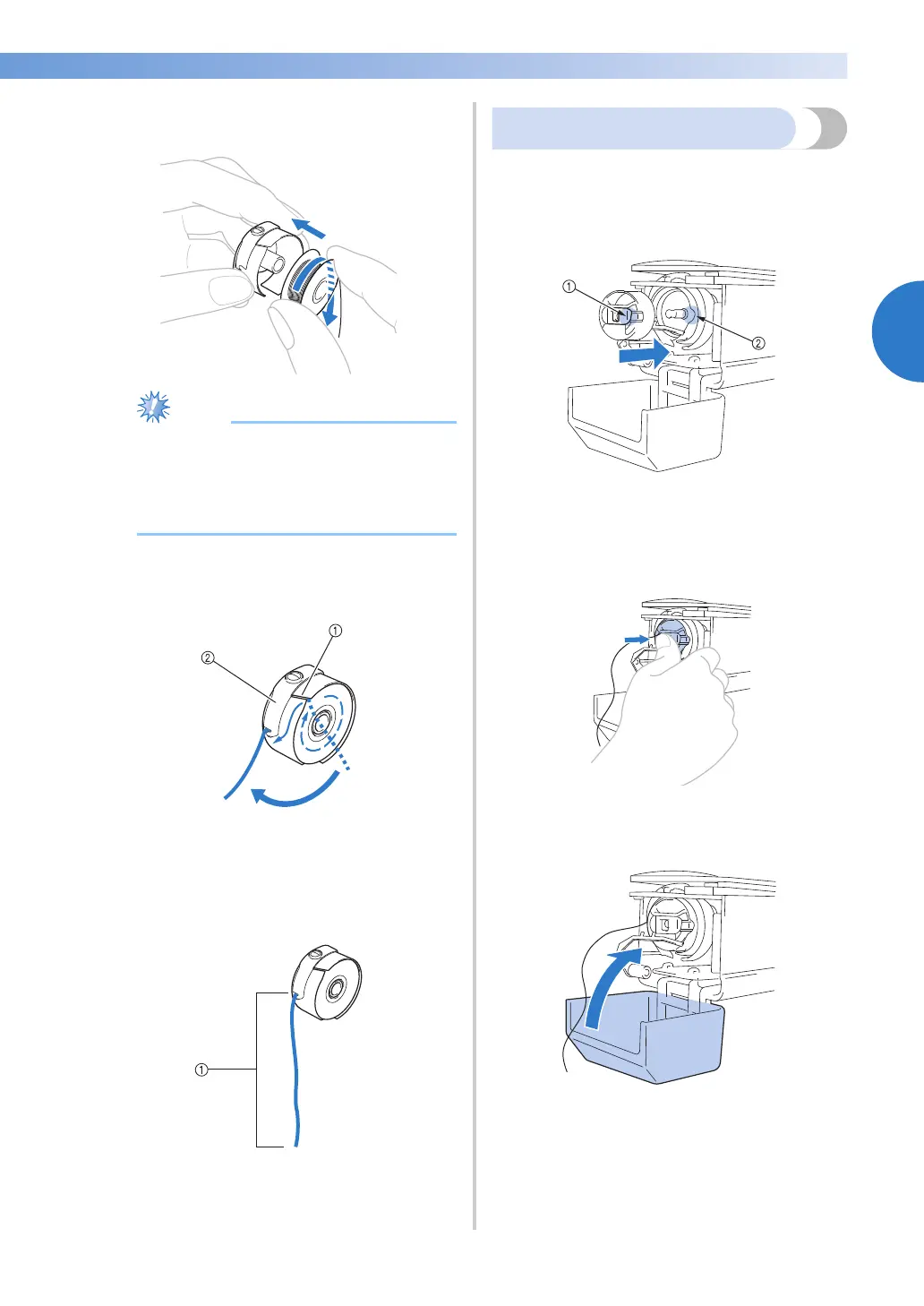
Insert the bobbin into the bobbin case.
● Check that the thread winds off the bobbin
clockwise as shown in the illustration. If
the bobbin is installed with the thread
winding off in the opposite direction, the
embroidery will not be sewn correctly.
2
Pass the thread through the thread slit and
under the tension-adjusting spring.
1 Thread slit
2 Tension-adjusting spring
3
Pull the thread about 50 mm (2 inches)
through the opening in the tension-adjusting
spring.
1 About 50 mm (2 inches).
Installing the bobbin case
1
Insert the bobbin case into the hook.
Insert the bobbin case while aligning the tab
on the bobbin case with the notch in the
hook, as shown in the illustration.
1 Tab
2 Notch
2
Fully insert the bobbin case until it snaps
into place.
3
Close the hook cover.


 To Next Page
 Loading...











