DS-7700NI-SP/9000/9600 Series HDVR/NVR User’s Manual
118
HDD Detect
The device provides the HDD detection function such as the adopting of the S.M.A.R.T. and the Bad
Sector Detection technique.
S.M.A.R.T
The S.M.A.R.T. (Self-Monitoring, Analysis and Reporting Technology) is a monitoring system for HDD
to detect and report on various indicators of reliability in the hopes of anticipation failures.
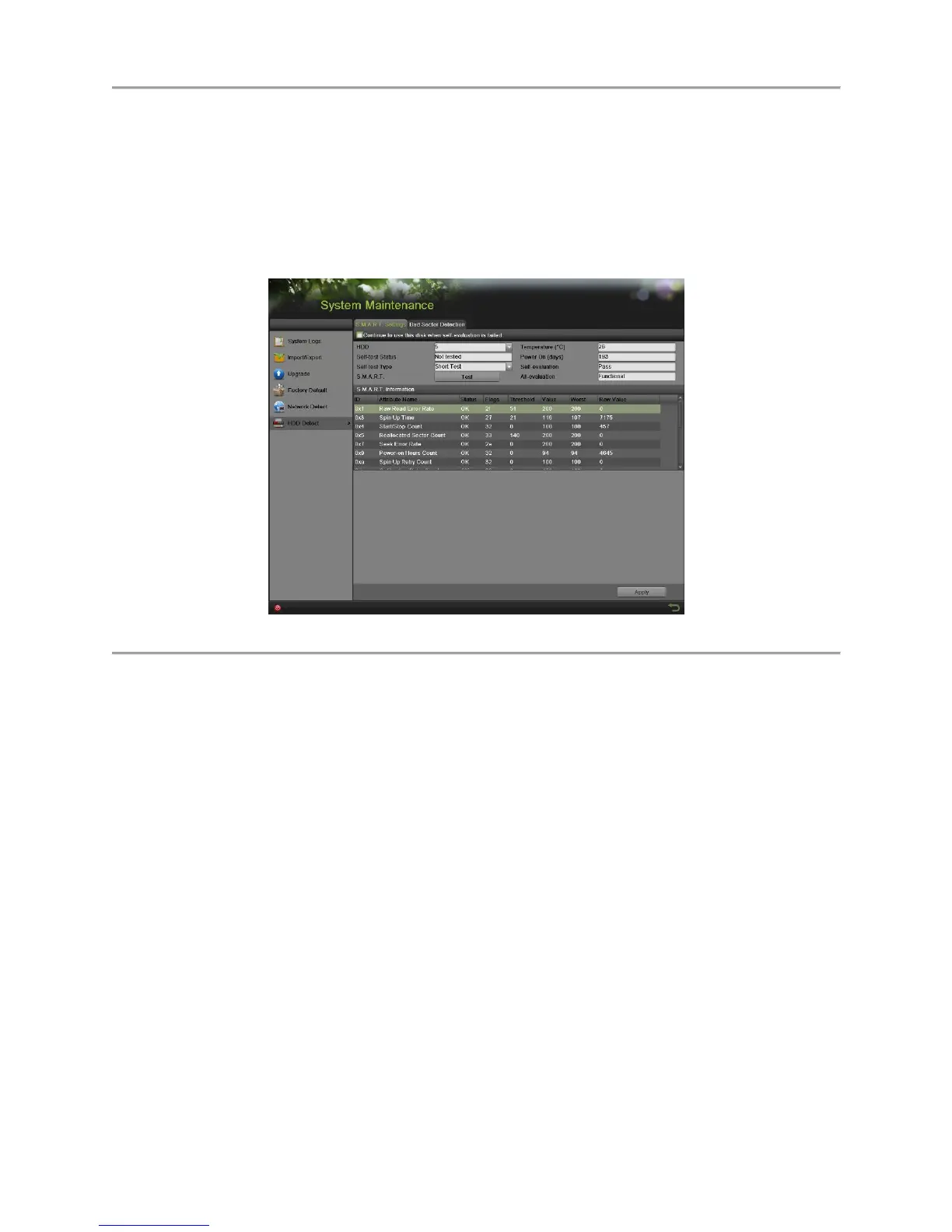
Figure 134 S.M.A.R.T. Settings Interface
To viewing S.M.A.R.T. information:
1. Enter the S.M.A.R.T. Settings menu by going to Menu > System Maintenance > HDD Detect.
2. Select the S.M.A.R.T. Settings tab, as shown in Figure 134.
3. Select a HDD to view its S.M.A.R.T. information list.
4. You can choose the Self-test Type from the dropdown list, including Short Test, Expanded Test
and Conveyance Test.
5. Click the Test button to start the S.M.A.R.T. HDD self-evaluation.
Note:
If you want to use the HDD even when the S.M.A.R.T. checking is failed, you can check the checkbox of
the Continue to use this disk when self-evaluation is failed item.
Bad Sector Detection
1. Enter the Bad Sector Detection menu by going to Menu > System Maintenance > HDD Detect.
2. Select the Bad Sector Detection tab, as shown in Figure 135.


 To Next Page
 Loading...