User Interface GPS1200 13
1.4 Icons
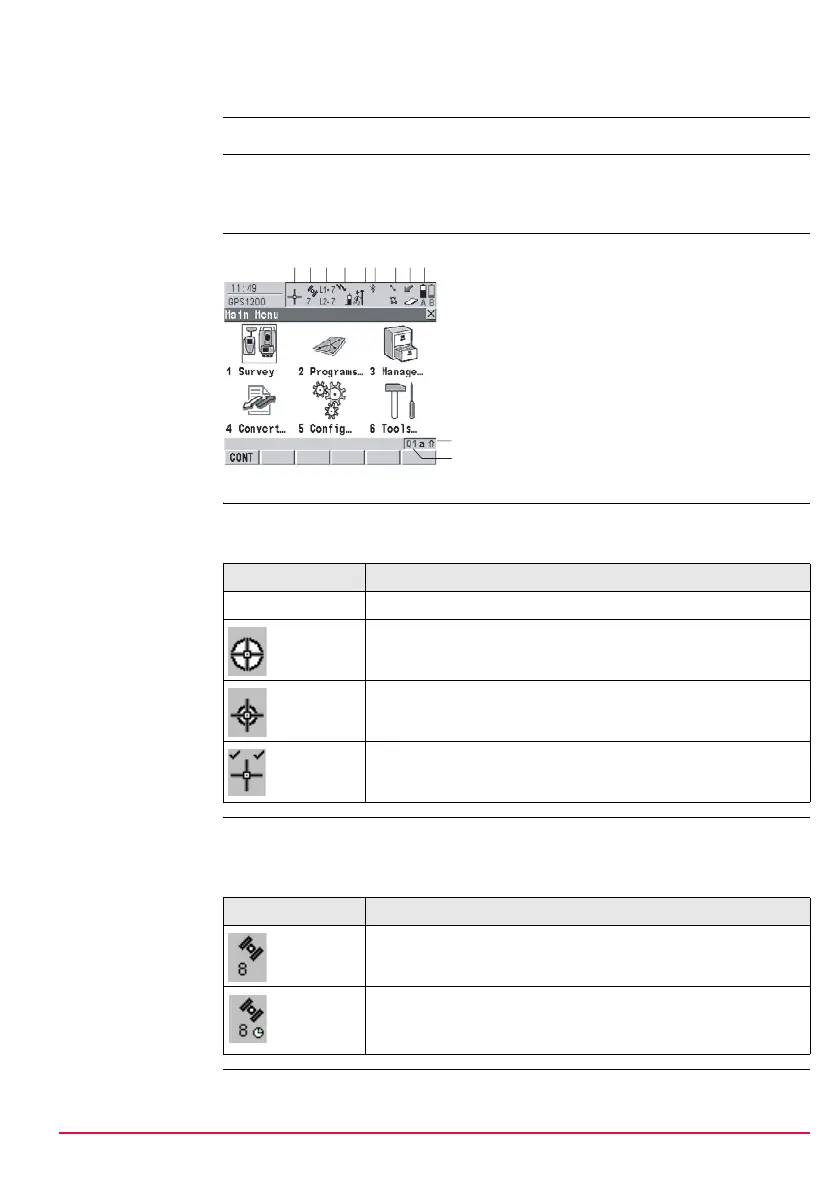
Description Icons show the current status information of the receiver.
)
The icons provide information related to basic receiver functions. The icons that
appear depend upon which GPS1200 receiver is used and the current receiver
configuration.
Position of the
icons on the screen
Position status Displays the status of the current position.
Touch screen: Tapping the icon leads to STATUS Position.
Number of visible
satellites
Displays the number of theoretically visible satellites above the configured cut off
angle according to the current almanac.
Touch screen: Tapping the icon leads to STATUS Satellites.
a) Position status
b) Number of visible satellites
c) Contributing satellites
d) Real-time device and real-time
status, Internet online status
e) Position mode
f) Bluetooth
g) Line/area
h) CompactFlash card/internal memory
i) Battery
j) SHIFT
k) Quick coding
j
a
GPS12_130
bc d ef ghi
k
Icon Description
No icon No position available
Autonomous solution available.
Code solution available.
Phase fixed solution available. The ticks indicate that an ambi-
guity check is being made.
Icon Description
The number of satellites above the <Cut Off Angle:> config-
ured in CONFIGURE Satellite Settings.
The number of satellites above the <Cut Off Angle:> config-
ured in CONFIGURE Satellite Settings. Receiver is config-
ured to accept an external oscillator input.


 To Next Page
 Loading...











