Linework GPS1200 71
SURVEY
Survey: Job Name,
Survey page
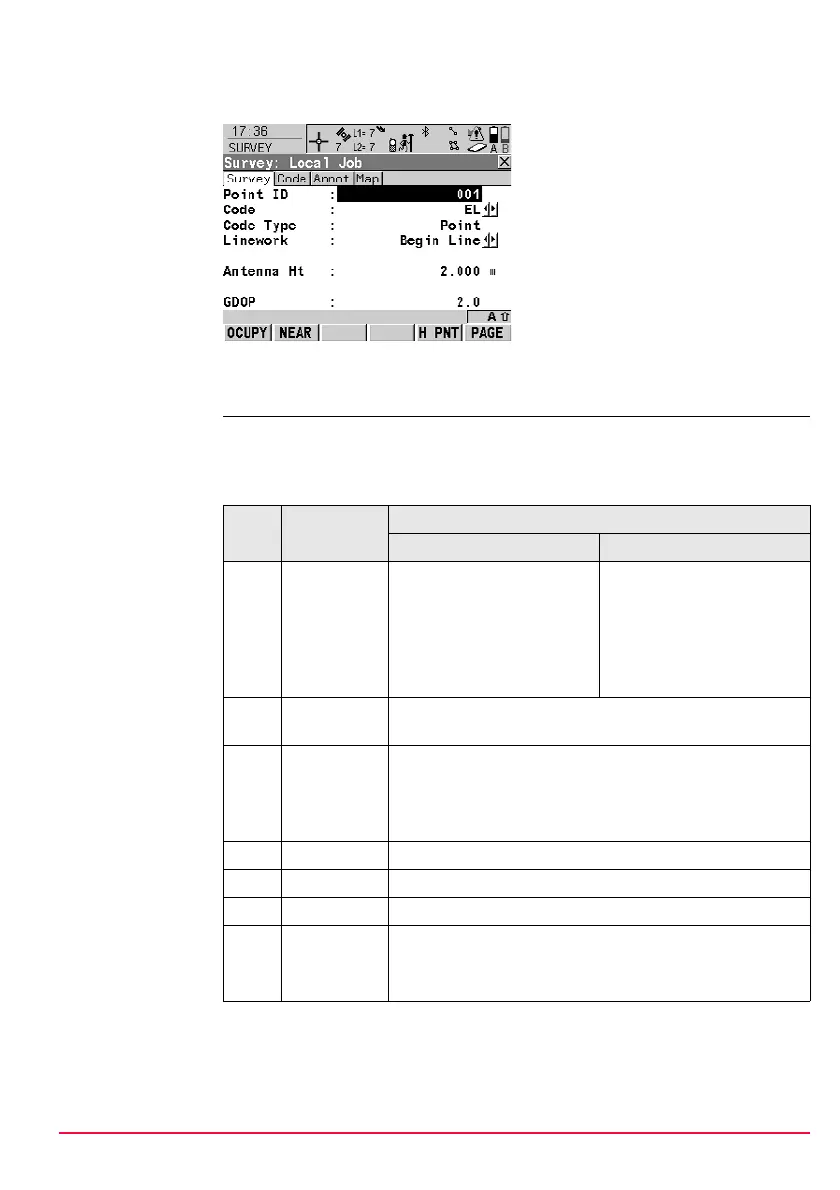
This is what a display mask configured for Linework and coding looks like. The most
important keys are explained.
Linework and
coding step-by-
step
These step-by-step instructions refer to the previous screen.
For <Show Codes: Only Pt Codes>
OCUPY (F1)
To start recording positions. (F1)
changes to STOP.
STOP (F1)
To end recording of positions when
enough data is collected. (F1)
changes to STORE.
STORE (F1)
To store the point information. (F1)
changes to OCUPY.
Step Field Description for thematical coding
With codelist Without codelist
1. <Code:> Select a code from the
choicelist. Only point codes
are available for selection.
Type in a code.
)
<None> to store a point
without code or to perform
Linework without coding.
----- to store a point without
code or to perform Linework
without coding.
2. <Code
Type:>
Point is displayed. This field is an output field. It can not be
changed.
3. <Linework:> Select an option for the Linework flag to be stored with the
point.
)
----- to store a point without Linework flag or to perform
coding without Linework.
4. - OCUPY (F1)
5. - STOP (F1)
6. - STORE (F1)
)
- • The point is stored with the selected code.
- • Depending on the selection for <Linework:>, a
line/area is opened/closed.


 To Next Page
 Loading...











